
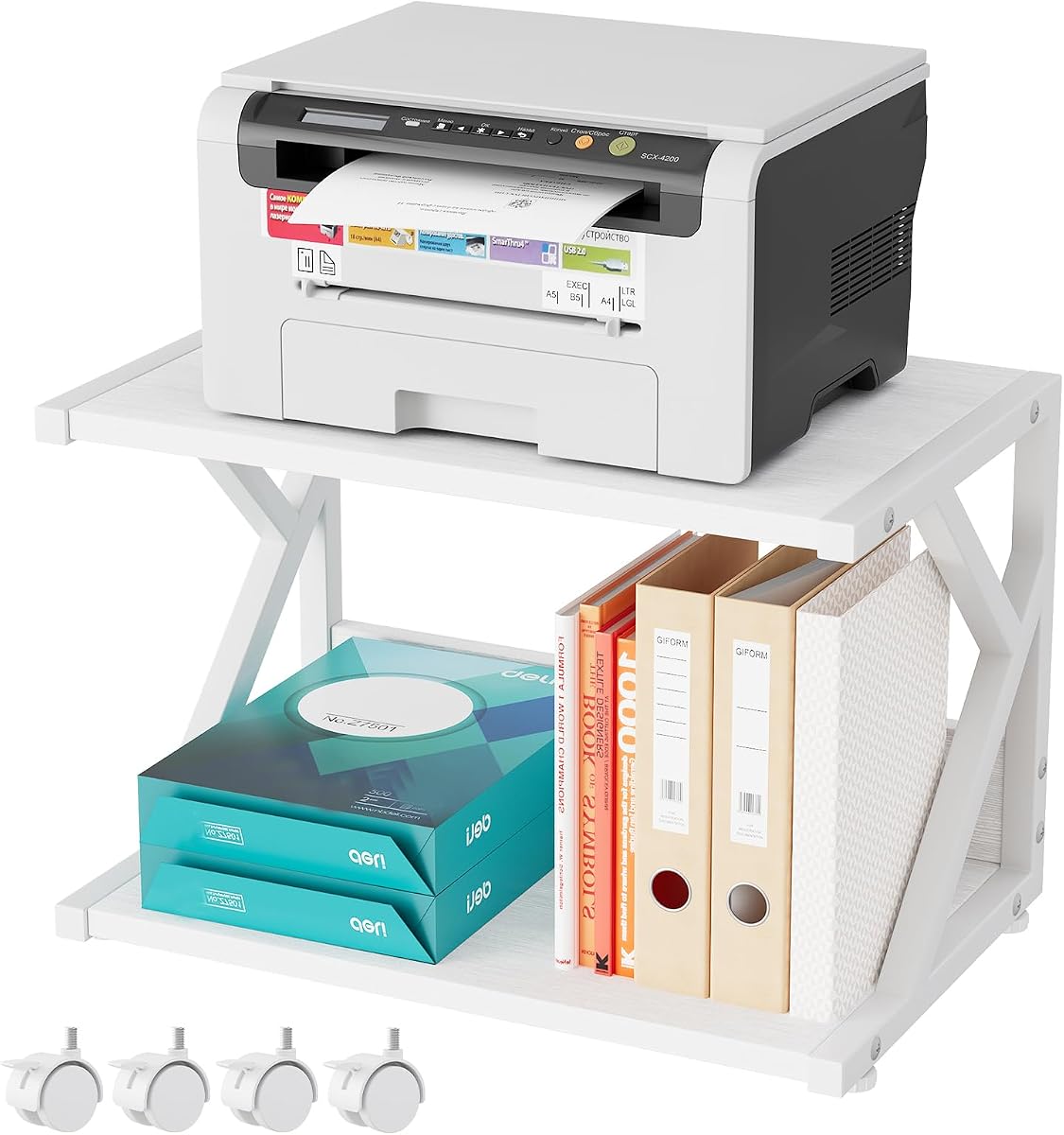
YATINEY Desktop Printer Stand
4.7Editor score
Z-Shaped Modern Design
Two Open Storage Shelves
Lightweight and Stable
Finding the right desktop printer stand can transform a cluttered workspace into an organized and efficient environment. Whether you need extra storage or a stable surface, a good stand lifts your device to eye level.
We compared ten highly rated models based on durability, size, and storage options. Each product was evaluated for its ability to hold various printer sizes while keeping your desk tidy and accessible.
Every pick below highlights key features and real-world performance. Note that availability and pricing may shift, so always verify current details before making your final purchase decision today.
4.7Editor score

4.8Editor score

4.7Editor score
As an Amazon Associate we earn from qualifying purchases.
This side-by-side comparison highlights the essential features and specifications of each model to help you choose the perfect fit for your office setup.


The YAOHUOO 2-Tier Desktop Printer Stand stands out as the top choice for most users seeking balance between size and function. With a high rating of 4.8 stars, it delivers reliable performance for home offices.
We may earn a commission when you buy through this link, at no additional cost to you.
Its standout feature is the 2-tier open design which accommodates two printers or a printer plus a scanner. The middle space is tall enough for standard items, while the fabric drawer keeps loose supplies hidden from view.
While the drawer is not lockable, it effectively minimizes clutter. The MDF tabletop is waterproof, making it easy to wipe clean after accidental spills or ink marks during normal use.
This model is ideal for those needing a sturdy yet compact solution. If you value organization without sacrificing desk space, this is the definitive recommendation for your current workspace needs.
The dual shelf setup allows you to separate active printing tasks from file storage, keeping your workflow smooth and uninterrupted during busy workdays.
Crafted with high-quality MDF and a stable metal frame, this unit supports up to 44 lbs ensuring your equipment remains safe and level at all times.
We may earn a commission when you buy through this link, at no additional cost to you.
For budget-conscious buyers, the YATINEY Desktop Printer Stand offers exceptional value. Its modern Z-shaped design fits seamlessly into various decor styles while providing reliable support for your devices.
We may earn a commission when you buy through this link, at no additional cost to you.
Each tier can bear 44 lbs, which is surprising for a stand at this price point. The open shelves make accessing files and ink cartridges effortless without digging through closed compartments.
The lack of enclosed storage means visible items require organization. However, its minimalist lines and rustic brown finish blend well with existing furniture making it a practical addition.
Choose this if you prioritize cost and style over deep storage. It delivers a stable platform for your printer while freeing up valuable desk real estate efficiently.
The unique Z-shape adds a contemporary touch to your office, proving that affordable furniture can still look professional and well-designed.
Despite its light look, each shelf holds up to 44 lbs allowing you to store heavier devices or stacks of paper without worry.
We may earn a commission when you buy through this link, at no additional cost to you.
The FITUEYES Large Desktop Printer Stands provides extensive storage for those with significant document needs. Its wide platform fits large printers comfortably while offering three compartments for organized storage.
We may earn a commission when you buy through this link, at no additional cost to you.
Stackability is a key premium feature here, allowing you to expand storage vertically if space permits. The non-slip rubber feet protect your desk surface from scratches and keep the unit in place.
While the weight makes it stable, moving it requires some effort. Assembly takes about twenty minutes, but the manual is clear and all hardware is included for a smooth setup experience.
If you need maximum capacity and the ability to expand later, this is the ideal choice. It transforms a simple stand into a robust organizational hub for your office.
The stackable feature means you can add more units on top if you have high ceilings, creating a custom tall storage tower tailored to your needs.
Rubber feet are essential for any desk stand to prevent slips and scratches ensuring your desk remains in pristine condition for years to come.
We may earn a commission when you buy through this link, at no additional cost to you.
This model is engineered for strength, supporting up to 100 lbs which is significantly higher than average. It is a top contender for users with heavy-duty laser printers or multiple devices on one shelf.
We may earn a commission when you buy through this link, at no additional cost to you.
Safety is prioritized with rounded corners to protect against accidental bumps. The anti-slip pads ensure stability even when the printer moves slightly during high-volume printing cycles.
The design is utilitarian rather than decorative, focusing purely on function. While it lacks the flair of other models, its durability ensures it will last for years of constant use.
Choose this if stability and load capacity are your primary concerns. It offers peace of mind knowing your equipment is supported by a frame built for heavy duty loads.
With a 100 lb capacity, you can stack books or supplies on the lower shelf without worrying about the structure bending or collapsing under the weight.
Rounded corners and anti-slip pads show that safety was considered during design reducing the risk of injury or accidental slips in busy areas.
We may earn a commission when you buy through this link, at no additional cost to you.
The Marbrasse Metal Printer Stand acts as more than just a stand; it is a full desk organizer. With built-in pen holders and a storage drawer, it reduces the need for extra desk accessories.
We may earn a commission when you buy through this link, at no additional cost to you.
Its metal mesh design offers a lightweight feel while maintaining strength. The drawer is perfect for storing papers or stationery keeping your desk surface clear of clutter and distractions.
Assembly takes around twelve minutes, but you might find it slightly tricky compared to solid board options. However, the functional benefits of the dedicated storage slots make it worth the effort.
Select this if you want to consolidate multiple tools into one unit. It is an efficient solution for small desks where every inch of organization matters for your workflow.
Two hanging pen holders mean your writing tools are always near hand saving time searching through drawers and keeping your workspace tidy.
This stand includes a USPTO Patent number indicating it was designed with unique features that standard generic models do not offer to users.
We may earn a commission when you buy through this link, at no additional cost to you.
The HUANUO Printer Stand stands out for its mobility and ability to fit under a desk. With locking caster wheels, you can move it easily and lock it in place when stationary.
We may earn a commission when you buy through this link, at no additional cost to you.
The storage drawer includes dividers for office supplies, keeping small items organized. The adjustable height allows you to configure the stand to fit perfectly under different table heights.
While the capacity is lower at 38.5 lbs, it suits most standard home printers. The stackable design means you can add more pieces if you have a large collection of office gear.
This is ideal for offices with limited floor space. You can push it under a desk when not in use and pull it out for printing whenever you need access.
Adjustable height lets you customize the stand for different desks, ensuring it fits neatly underneath without awkward gaps or instability.
Locking wheels offer the freedom to move the unit across room while still keeping it firmly in place once you find the right spot.
We may earn a commission when you buy through this link, at no additional cost to you.
This stand features a 3-tier design that allows you to place two printers simultaneously. The dual-rod support adds significant stability, making it safe for heavy equipment like laser printers.
We may earn a commission when you buy through this link, at no additional cost to you.
The foldable fabric drawer is unique, allowing you to hide it when not needed. This flexibility saves space and keeps the look clean while still offering storage for cartridges or papers.
The vintage color and particle board material give it a rustic charm that blends well with home decor. It is designed to hold heavy printers without wobbling during operation.
Choose this if you have multiple printing devices and need a unified solution. It balances aesthetics with practical stability, keeping your workspace looking neat while working hard.
Having two upper shelves means you can separate color and monochrome printers easily without needing extra furniture or cluttering your desk with cables.
The foldable drawer gives you the option to tuck away storage completely, which is useful if you prefer a minimal look for certain work settings.
We may earn a commission when you buy through this link, at no additional cost to you.
This model focuses on neatness with a closed non-woven drawer at the bottom. It hides files and private documents effectively, keeping your desk environment professional and organized at all times.
We may earn a commission when you buy through this link, at no additional cost to you.
The open shelves keep daily items accessible while the drawer protects sensitive papers. The industrial style fits well in modern offices, and the smooth particleboard is easy to dust off.
Assembly is straightforward, taking only about ten minutes to complete. It is a practical choice for those who want a mix of open access and closed privacy in one unit.
Select this if you need to organize files discreetly. It offers a good balance of visibility and concealment making it a smart addition for home or office use.
The closed drawer ensures that sensitive files remain out of sight which is crucial for home offices that double as guest spaces or shared areas.
Constructed with quality chipboard and a sturdy metal frame, this stand is built to resist daily wear and tear in busy office environments.
We may earn a commission when you buy through this link, at no additional cost to you.
The HOOBRO Printer Stand is unique because it includes a charging station with two USB ports. This allows you to charge phones or tablets directly while using your printer setup nearby.
We may earn a commission when you buy through this link, at no additional cost to you.
Its small size makes it perfect for corners or tight desks. The metal frame supports up to 44 lbs which is sufficient for most standard printers without taking up too much room.
Setup is quick, taking only a few minutes due to the simple structure. While the footprint is small, it is designed to maximize utility by adding power capabilities to your workspace.
Choose this if you need charging convenience. It simplifies your desk by reducing the number of power strips needed, keeping your cables managed and organized effectively.
The standard outlet and USB ports mean you can charge devices without finding a separate power strip keeping your desk free of extra cords.
Small dimensions allow this unit to fit in tight corners, maximizing your floor space while still providing a solid platform for your device.
We may earn a commission when you buy through this link, at no additional cost to you.
The aboxoo Desktop Printer Stand is made of high-quality MDF wood that is both waterproof and scratch-resistant. This ensures longevity and easy maintenance, making it a smart choice for daily use.
We may earn a commission when you buy through this link, at no additional cost to you.
You can choose between wheels and adjustable foot pads based on your preference for mobility. The 2-tier design increases storage capacity, allowing you to keep papers and ink organized near your printer.
It is versatile enough to serve as a plant stand or bookshelf in other rooms. The clean white finish adds a modern touch, though it may require more frequent dusting to stay pristine.
If you value durability and customization, this model delivers. It is a flexible solution that can grow with your needs and adapt to different rooms in your home or office.
The waterproof MDF top makes cleaning spills easy and ensures that moisture will not warp the material even in humid environments or busy kitchens.
Choosing wheels gives you mobility while fixed feet offer stability, so you can decide based on how often you move this unit around your space.
We may earn a commission when you buy through this link, at no additional cost to you.
Selecting the right printer stand requires evaluating dimensions, material quality, and storage options to ensure it meets your specific office needs.
Check the width and depth of the stand to ensure it fits your printer and leaves room for cables. Measure your desk space to ensure the unit does not crowd your other equipment.
Always verify the stand is large enough to hold your device securely without overhang that could lead to tipping during operation.
Ensure the stand supports the weight of your printer and any additional items you plan to store on top. Heavier laser printers require stands with higher load limits than small inkjet models.
Select a model rated for at least 30 to 50 pounds to guarantee stability and safety for your electronics.
Look for stands made from MDF, particleboard, or metal frames for durability. High-quality materials resist scratches and water damage better than cheap alternatives.
Prioritize sturdy materials that can withstand daily wear without wobbling or cracking over time.
Determine if you need drawers, shelves, or hooks to organize your office supplies. Some stands offer closed storage for privacy while others provide open shelves for quick access.
Choose storage configurations that match your filing and supply organization habits to maximize efficiency.
Non-slip feet or adjustable legs help keep the stand level on uneven surfaces. A stable base is essential to prevent movement when paper is pulled during printing cycles.
Always look for anti-slip pads or wide bases to ensure the unit stays put during operation.
Check if the stand requires tools for assembly and how long it typically takes. Clear instructions and numbered parts make setup easier for anyone without technical skills.
Prefer models that can be assembled quickly with minimal tools to get your workspace organized faster.
Consider the color and style of the stand to ensure it matches your existing decor. A well-designed unit can elevate the look of your office rather than looking like an afterthought.
Select a style that complements your room's theme while still offering the functionality you need.
If you need to move the stand frequently, look for models with locking wheels. Casters allow you to push the unit under a desk or into storage when not in use.
Choose a mobile option if your office layout changes often or if you need to free up floor space.
Assemble the stand on a flat surface and ensure all screws are tightened securely to prevent wobbling during use.
Clean the surface regularly with a soft cloth and mild cleaner to maintain the finish and prevent dust accumulation.
Check the stability periodically and tighten any loose hardware to ensure the stand remains safe for your equipment.
Most stands are designed for standard home printers with a width of up to 18 inches. Always check the top platform dimensions before purchasing to ensure your specific model fits securely without hanging off the edge.
Yes, most models come with clear instructions and require no special tools. Assembly typically takes between ten to twenty minutes making it a simple task for anyone setting up a new workspace.
Many stands support up to 40 to 50 pounds which is enough for most laser printers. However, always verify the weight capacity listed in the product specs to ensure it can handle your specific device safely.
Some models include drawers for extra storage while others offer open shelves. Check the product description carefully to see if the specific unit you are buying includes closed storage compartments.
A few stands offer adjustable height options via telescoping legs or adjustable pads. Most standard models have a fixed height so ensure the fixed size meets your needs before purchase.
Many stands feature MDF or metal tops that are resistant to minor spills. However, they are not fully waterproof so avoid placing wet items directly on the surface to prevent damage.
The YAOHUOO 2-Tier Stand offers the best balance of features while the YATINEY model provides great value for budget buyers.
Prioritize stability and size compatibility to ensure the stand supports your equipment securely without crowding your workspace.
Always check current prices and availability as these details can change frequently for online listings.