
Dell Keyboard Smartcard USB
4.7Editor score
Reliable wired USB connectivity for secure transfers
Quiet low-profile keys for smooth typing
Detachable palm rest for extended comfort
This guide compares the top keyboards with smart card readers for secure logon and authentication across banking, government, and enterprise environments in
Finding the right keyboard with smart card reader capabilities is essential for professionals who prioritize security and efficiency in their daily workflows. These devices combine standard typing functionality with integrated authentication hardware to streamline access to secure systems without needing external peripherals. Choosing the right model ensures seamless integration with your existing IT infrastructure while maintaining ergonomic comfort during long typing sessions.
We have carefully evaluated ten top-rated models based on their build quality, compatibility with smart card standards, and overall user experience. Our comparison focuses on key specifications such as reader protocols, layout design, and additional features like spill resistance or multimedia hotkeys. This curated list helps you identify the best option for your specific security requirements and workspace setup.
Each product entry provides detailed insights into standout features, potential trade-offs, and ideal use cases to guide your purchasing decision. Please note that product availability and pricing can fluctuate frequently so checking the latest details before buying is always recommended. We aim to offer transparent and practical information to help you invest in a reliable security keyboard.
4.7Editor score
4.6Editor score

4.6Editor score
The following table provides a side-by-side comparison of all ten products to help you quickly identify key differences in features and specifications.


The Dell KB813 stands out as a reliable option for users requiring integrated smart card authentication in their workspace. With a solid 4.6 rating from verified buyers, this keyboard delivers a seamless experience for secure logon processes. Its built-in smartcard reader eliminates the need for separate dongles making daily access to protected systems smoother and more efficient.
We may earn a commission when you buy through this link, at no additional cost to you.
Key strengths include its spill-resistant design which safeguards against accidental liquid damage a common concern in office environments. The ergonomic layout with a detachable palm rest ensures comfort during extended typing sessions reducing strain on wrists and hands. Additionally the low-profile keys provide a quiet typing experience ideal for shared workspaces where noise reduction is prioritized.
While the keyboard lacks backlighting which might be a limitation for users working in dimly lit areas the overall build quality compensates for this omission. The wired USB connection ensures stable data transfers without latency though it does restrict mobility compared to wireless alternatives. These trade-offs are generally acceptable given the device focuses on security and reliability rather than portable versatility.
This model is highly recommended for professionals in corporate or government settings where secure authentication is mandatory. It balances functionality with comfort making it a practical choice for daily use. If you need a dependable keyboard that integrates smart card reading without compromising on ergonomic design the Dell KB813 is a strong candidate to consider for your setup.
The built-in smartcard reader supports ISO7816 standards ensuring compatibility with various secure identity systems used by enterprises and agencies.
A detachable palm rest allows users to adjust the keyboard to their preferred angle reducing fatigue during long workdays.
We may earn a commission when you buy through this link, at no additional cost to you.
The Adesso TruForm AKB-150SB-TAA is designed with a focus on ergonomic health and regulatory compliance for government and enterprise users. It features a split key zone and gently sloped shape that encourages a natural hand position which can significantly reduce wrist pain over time. The integrated smartcard reader adds a layer of security essential for accessing protected web applications and secure logon systems.
We may earn a commission when you buy through this link, at no additional cost to you.
One of its primary advantages is the TAA compliance which makes it suitable for sales to government agencies and organizations requiring U.S. Trade Agreement Act specifications. The keyboard supports multiple standards including PC/SC 2.0 and ISO7816 ensuring broad compatibility across different secure environments. Additionally the included internet and multimedia hotkeys provide convenient access to common tools without navigating through software menus.
Despite its functional design the membrane key switches may feel less responsive to users accustomed to mechanical keyboards. The 4.1 rating indicates that while many users appreciate the ergonomics some have experienced inconsistencies or durability concerns over extended use. These factors should be weighed against the benefits of ergonomic design and compliance features when deciding on this model.
This keyboard is an excellent choice for government contractors or agencies needing TAA compliant hardware with smart card capabilities. It prioritizes long-term user comfort and regulatory adherence making it a solid fit for specific institutional requirements. If ergonomic health and compliance are your top priorities the Adesso TruForm offers a compelling solution despite potential minor drawbacks in key feel.
TAA compliance ensures the device meets federal sourcing standards while the built-in reader supports secure identification systems.
Split zones and sloped shapes promote natural wrist alignment which helps prevent repetitive strain injuries during heavy use.
We may earn a commission when you buy through this link, at no additional cost to you.
The Cherry KC 1000 is engineered specifically for high-security environments where adherence to strict regulatory standards is non-negotiable. It holds FIPS 201 and EMV 2000 Level 1 approvals which validate its capability to handle secure authentication processes reliably. The integrated chip card terminal supports multiple protocols including T=0 and T=1 ensuring versatile compatibility with various smart card systems used globally.
We may earn a commission when you buy through this link, at no additional cost to you.
A standout feature is the secure PIN entry module which protects sensitive credentials from being intercepted during input. The design allows for one-handed operation of the smart card module making it convenient for users who need to manage cards frequently without disrupting workflow. Additionally the keyboard offers driver support across Windows MacOS X and Linux providing flexibility for diverse IT environments.
While the thin design and compact footprint are attractive for space-constrained desks the keyboard may lack some of the extra multimedia features found in broader models. Setting up drivers might occasionally require administrative privileges which could be a hurdle in tightly managed corporate networks. These limitations are minor considerations given the robust security credentials and specialized functionality it provides.
This model is ideal for financial institutions government agencies or any organization requiring certified security hardware. Its focus on secure authentication and protocol compliance makes it a trusted choice for protecting sensitive data. If you prioritize certified security features and cross-platform support the Cherry KC 1000 delivers professional-grade performance tailored for secure workstations.
FIPS and EMV approvals ensure the device meets rigorous federal and financial industry security requirements for smart card use.
One-handed operation and secure PIN entry streamline daily authentication tasks without compromising credential safety.
We may earn a commission when you buy through this link, at no additional cost to you.
The Adesso EasyTouch 130SB combines the tactile satisfaction of mechanical switches with integrated security features for a premium user experience. It features red mechanical switches that deliver silent and tactile feedback ensuring a comfortable typing experience even during long sessions. The dedicated Copilot AI hotkey provides instant access to Microsoft Copilot assistant enhancing productivity by allowing quick generation of code or suggestions directly from the keyboard.
We may earn a commission when you buy through this link, at no additional cost to you.
Security is robust with a built-in smart card reader certified to EMV 4.0 and ISO7816 standards for secure authentication in banking and enterprise environments. The large print keycaps offer enhanced visibility making letters and symbols easier to read especially for users who need improved legibility or work in low-light conditions. With a lifecycle rated for 50 million keystrokes this keyboard is built to withstand intensive daily use in secure workstation environments.
While the mechanical build quality is exceptional it may come with a higher price tag compared to traditional membrane keyboards. The switches add weight to the device which could make it less ideal for portable setups though it ensures stability on a desk. These factors are minor trade-offs considering the advanced features like AI integration and high durability ratings that set this model apart.
This keyboard is best suited for professionals who value typing performance and security without compromising on modern productivity tools. The inclusion of Copilot AI and robust certification standards makes it a powerful choice for tech-savvy users and secure enterprises. If you want a high-end mechanical keyboard with integrated smart card capabilities the Adesso EasyTouch 130SB is a top-tier investment.
A dedicated hotkey for Copilot enables quick access to AI assistance streamlining tasks like coding or writing without menu navigation.
Large print keycaps and 50 million keystroke rating ensure long-term usability and readability for diverse user needs.
We may earn a commission when you buy through this link, at no additional cost to you.
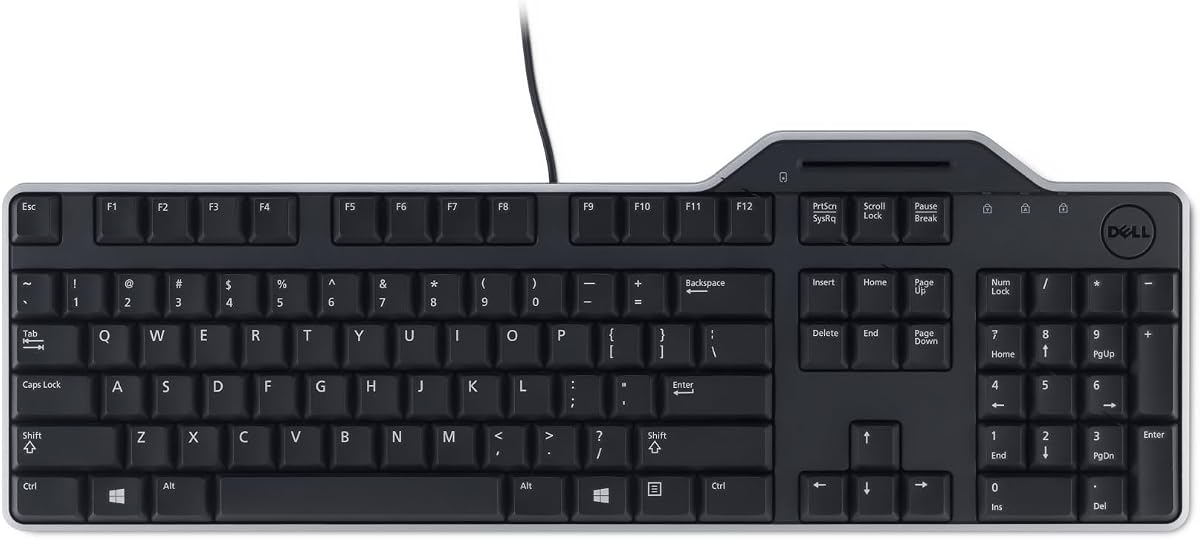
The Dell Keyboard Smartcard USB offers an excellent balance of affordability and functionality for users seeking essential smart card capabilities. With a high customer rating of 4.7 it has proven reliable for those needing secure authentication without breaking the budget. The design focuses on core features like integrated smart card reading and spill-resistant construction making it a practical choice for office environments.
We may earn a commission when you buy through this link, at no additional cost to you.
Key strengths include its quiet low-profile keys which provide a smooth typing experience suitable for open offices or shared spaces. The wired USB connection ensures secure fast data transfers without the need for batteries which simplifies maintenance and reduces potential points of failure. Additionally the full-size layout with a detachable palm rest supports comfortable typing for extended periods.
While the keyboard lacks advanced features like multimedia hotkeys or special ergonomic adjustments it delivers consistently on its primary purpose. The simple design means fewer points of failure but might not satisfy users looking for extra customization or aesthetic flair. These limitations are well worth accepting given the device's strong performance and low cost relative to competitors in the category.
This model is highly recommended for small businesses or individuals needing a straightforward and reliable smart card solution. It combines security and comfort at an accessible price point ensuring that basic authentication needs are met efficiently. If you need a no-fuss keyboard that delivers value and stability the Dell Keyboard Smartcard USB is an ideal choice.
Focusing on essential functions ensures consistent operation and reduces complexity while maintaining necessary security standards.
Wired USB eliminates battery dependency and guarantees stable secure data transfers for daily authentication tasks.
We may earn a commission when you buy through this link, at no additional cost to you.
The Kensington KB201C is specifically designed to meet strict government compliance standards such as TAA and CAC for secure access control. It features a full-size layout with a numeric keypad which enhances productivity for professionals working extensively with numbers and data entry. The smart card reader ensures robust security measures and data protection making it suitable for organizations with high regulatory compliance requirements.
We may earn a commission when you buy through this link, at no additional cost to you.
One notable feature is the quiet-click mechanism which allows for a peaceful typing experience that does not disturb colleagues in shared workspaces. The device supports multiple compliance standards including PC/SC and USB CCID ensuring it integrates smoothly with various secure authentication systems. Additionally the included 3-year limited warranty provides peace of mind and reflects the manufacturer's confidence in the product's durability.
Despite its strong compliance credentials the keyboard has received a lower rating from users who may find the typing feel or overall build quality lacking. It is a functional tool focused on meeting specific institutional requirements rather than delivering premium typing pleasure. Users should consider whether compliance needs outweigh potential trade-offs in user experience when selecting this model for their setup.
This keyboard is an essential tool for government institutions or contractors who must adhere to federal sourcing and security regulations. It prioritizes compliance and reliability over luxury features making it a necessary investment for authorized procurement. If you require a TAA compliant keyboard with reliable CAC support the Kensington KB201C fulfills its specific regulatory role effectively.
TAA and CAC certifications ensure the device meets federal sourcing standards for secure access in government institutions.
A full-size layout and quiet-click design support efficient data entry while maintaining a professional office environment.
We may earn a commission when you buy through this link, at no additional cost to you.
The Lenovo Smartcard Wired Keyboard II is tailored for users working within the Lenovo ecosystem offering a reliable interface for standard tasks. It maintains a simple design with a US English layout ensuring clarity and ease of use for most office environments. The keyboard includes integrated smartcard support which allows for secure authentication without requiring additional peripherals or dongles.
We may earn a commission when you buy through this link, at no additional cost to you.
Key advantages include its wired USB connection that provides a stable and consistent performance without the interruptions common with wireless options. The package dimensions and weight suggest a sturdy build suitable for desktop use though the design is relatively basic compared to specialized models. User ratings indicate general satisfaction with its performance as a functional and straightforward input device.
While the keyboard does not boast advanced features like ergonomic splits or multimedia keys it serves well as a dependable daily driver. The lack of detailed documentation might require users to rely on standard setup procedures which could be a slight hurdle for those new to smart card integration. These trade-offs are reasonable given the straightforward purpose of providing secure and reliable typing.
This model is best suited for Lenovo workstation owners who need a compatible keyboard with essential smart card capabilities. It offers a balanced approach to security and usability without unnecessary complexity. If you prefer a no-fuss solution that integrates seamlessly with Lenovo hardware the Lenovo Smartcard Wired Keyboard II is a practical and reliable choice.
Designed for Lenovo systems this keyboard ensures compatibility and consistent performance for daily typing tasks.
Wired USB connectivity ensures stable data transfer and eliminates wireless interference for uninterrupted workflow.
We may earn a commission when you buy through this link, at no additional cost to you.
The HP USB Business Slim Smartcard Keyboard delivers a compact solution designed for professional environments requiring secure access and space efficiency. Its slim profile makes it an excellent choice for smaller desks without sacrificing essential smart card functionality. The membrane keyswitch ensures a quiet and smooth typing experience suitable for office settings where noise reduction is valued.
We may earn a commission when you buy through this link, at no additional cost to you.
Notable features include LED key light indicators that help users confirm key presses in low-light conditions and a built-in spill drain that protects the internal components from accidental liquid damage. The 6 ft cable length provides ample flexibility for connecting to computers located further away. These practical design elements contribute to the keyboard's high user rating and overall reliability in daily business use.
While the membrane feel is standard and may not appeal to enthusiasts seeking tactile feedback it serves well for general office tasks. The lack of specialized ergonomic features means users might need additional wrist support for long sessions but the slim form factor offers ergonomic benefits of its own. These trade-offs are acceptable given the device's focus on functionality and durability.
This model is ideal for business professionals who need a reliable secure keyboard that fits neatly into modern workspace designs. It balances practical protection features with efficient connectivity to support daily workflows. If you value a slim business-friendly design with essential smart card support the HP USB Business Slim is a strong contender for your next purchase.
The slim profile maximizes desk real estate while maintaining full functionality for business and secure login needs.
Built-in spill drain and LED indicators ensure durability and visibility to support consistent daily performance.
We may earn a commission when you buy through this link, at no additional cost to you.
The Cherry Secure Board 1.0 is an intelligent security keyboard that integrates advanced authentication methods including smart card and RF/NFC interface support. It is designed for environments where high-level security is paramount such as government agencies or financial institutions requiring certified hardware. The secure mode with authentication and encryption ensures that sensitive data is protected even when connected to thin clients.
We may earn a commission when you buy through this link, at no additional cost to you.
Key strengths include GS approval which validates its quality and security standards for trusted use. The ability to read and write ISO 7816 compliant cards adds versatility for organizations managing various types of secure credentials. Users benefit from a dedicated security layer that goes beyond standard input devices making it a robust tool for protecting critical information and access systems.
While the device offers impressive security capabilities it may require a more complex setup compared to plug-and-play models. The higher price point reflects the advanced encryption and approval standards which may not be necessary for all users. These trade-offs are acceptable for high-security environments where data protection is a critical requirement for daily operations.
This model is best for organizations needing certified security hardware with versatile smart card and tag interface capabilities. It prioritizes encryption and compliance to protect sensitive systems effectively. If you require an intelligent security keyboard with GS approval and advanced authentication features the Cherry Secure Board 1.0 is a reliable high-assurance option.
Secure mode and encryption protocols ensure data integrity when used with thin clients or restricted network environments.
RF/NFC and smart card interfaces support multiple authentication types making it adaptable for various security needs.
We may earn a commission when you buy through this link, at no additional cost to you.
The NEW OEM Dell KB813t offers a cost-effective alternative to branded retail packaging while maintaining the core functionality of a trusted Dell model. As an OEM unit it provides the same integrated smart card reader and reliable typing experience without the premium retail markup. The black design matches standard office setups ensuring a professional look on any desk.
We may earn a commission when you buy through this link, at no additional cost to you.
Key advantages include compatibility with Dell systems which ensures seamless integration and stable performance for users within the Dell ecosystem. The keyboard supports secure authentication through its built-in smart card reader making it suitable for organizations requiring secure access at a lower cost. Many units come unopened which allows buyers to receive the product in like-new condition directly from the source.
While OEM packages may lack some accessories included in retail versions the core functionality remains intact for daily tasks. Users should verify specific compatibility details with their systems before purchase to ensure optimal performance. These minor considerations are outweighed by the significant cost savings and reliable performance that Dell OEM products are known for.
This model is ideal for businesses or individuals seeking a reliable secure keyboard at a competitive price point. It delivers essential features without unnecessary retail costs making it a smart choice for budget-conscious buyers. If you need a Dell-compatible keyboard with smart card functionality the Dell KB813t OEM is a practical and value-driven option.
OEM packaging ensures core features and reliability are retained while reducing costs for budget-conscious buyers.
Designed for Dell hardware the keyboard ensures stable compatibility and reliable performance for daily use.
We may earn a commission when you buy through this link, at no additional cost to you.
Selecting the right keyboard with smart card reader requires understanding your security needs ergonomic preferences and system compatibility.
Ensure the keyboard supports necessary protocols such as PC/SC ISO7816 or FIPS 201 to guarantee compatibility with your organization's secure systems. Mismatched protocols can render the reader useless so checking official specs is critical before purchase.
Look for certifications like EMV or CCID to confirm the device meets industry security requirements.
For extended typing sessions an ergonomic layout with a split design or palm rest can significantly reduce wrist strain and fatigue. Comfortable keyboards improve productivity and long-term health especially for heavy users.
Prioritize models with adjustable angles or detachable rests for customizable comfort levels.
Decide between membrane and mechanical switches based on your preference for noise and feedback. Membrane keys are quieter while mechanical switches offer tactile feedback that many typists prefer.
Consider your office environment and personal comfort when choosing between these two main switch types.
Wired USB connections offer stable and secure data transfers without battery concerns which is vital for sensitive environments. Wireless options exist but may introduce latency or require additional pairing steps.
Choose wired for reliability and security in enterprise or high-stakes environments.
In office settings spills are common so a keyboard with spill-resistant design or built-in drainage can protect against accidental liquid damage. This feature extends the lifespan of the hardware significantly.
Always check for water-resistant construction if you frequently work near beverages or in shared spaces.
Government agencies and contractors must ensure the keyboard meets TAA and CAC compliance for procurement eligibility. Without these certifications purchasing may not be feasible for certain organizations.
Verify compliance status on the product description before ordering for government or regulated use.
Confirm driver compatibility with your OS whether Windows macOS or Linux to avoid integration issues. Some models offer broader support ensuring smooth installation and function.
Check manufacturer documentation for specific OS requirements to ensure full functionality.
A longer warranty period like 3 years indicates manufacturer confidence in product longevity and reduces risk for buyers. Durability also depends on build materials and expected lifecycle like 50 million keystrokes.
Look for robust warranties and high cycle ratings to ensure long-term reliability and value.
To use the smart card reader simply insert your card into the designated slot on the keyboard and follow the on-screen authentication prompts. The driver usually loads automatically ensuring seamless integration with your login systems.
Keep the keyboard clean by regularly wiping dust off the keys with a soft dry cloth and avoid placing heavy objects on it. Regular maintenance ensures the keys remain responsive and extends the device's lifespan.
Store the keyboard in a dry environment away from direct sunlight to prevent material degradation. Proper care ensures consistent performance and protects sensitive electronic components over time.
Most smart card keyboards support Windows macOS and Linux but you should verify specific driver compatibility for your version. Manufacturers typically provide downloads to ensure proper functionality on older or newer systems.
Yes typically the reader requires specific drivers to communicate with your operating system. Install these drivers as instructed by the manufacturer to enable secure authentication features.
Not all cards are compatible since the reader must support specific standards like ISO7816. Check your card type against the keyboard's supported protocols to ensure successful integration and use.
Use compressed air to blow out dust from the slot and avoid inserting metal objects that could damage internal components. Regular gentle cleaning ensures reliable card reading performance.
Many models are TAA and CAC compliant for government procurement ensuring they meet strict security and sourcing regulations. Verify compliance on the product specs before purchasing for federal use.
Check cable integrity try different USB ports and reinstall drivers if the reader is not recognized by the system. Most issues resolve with proper driver updates and secure cable connections.
We have reviewed ten top keyboards with smart card readers ranging from budget-friendly options to premium mechanical models for diverse needs. Each device offers distinct strengths whether you prioritize compliance ergonomics or advanced security certifications.
Consider your specific environment and security requirements when making a decision to ensure the chosen keyboard integrates smoothly with your workflow. Prioritize models that match your operating system and regulatory standards for maximum efficiency.
Remember that product availability and pricing can change so checking current listings before purchase is always recommended. We hope this guide helps you find the perfect keyboard to enhance both productivity and security in your workspace.