Yamaha URX22
4.5Editor score
DSP powered monitoring
Metal housing durable
Cubase AI included
Compare the top 10 audio interfaces with built in dsp to find the best DSP for recording, mixing, and live streaming workflows in 2026.
Finding the right audio interface with built in dsp can transform your home studio into a professional production environment. These devices handle signal processing internally, reducing latency and CPU load significantly.
We analyzed ten top models based on audio quality, dsp power, connectivity options, and software ecosystems. Our goal is to help you select the perfect tool for your specific recording needs.
Each pick showcases unique strengths for vocalists, musicians, and streamers. Remember that prices and availability change frequently so check current listings before making your final decision.
4.5Editor score
4.7Editor score

4.0Editor score
This side by side comparison highlights the core specifications and strengths of each interface to help you quickly identify the right fit for your workflow and budget constraints.


The Focusrite Scarlett Solo 4th Gen is a popular choice for beginners seeking studio quality sound. It offers a massive dynamic range and classic Air mode to enhance your recordings immediately.
We may earn a commission when you buy through this link, at no additional cost to you.
Its converters match those found in flagship interfaces, ensuring clean audio capture. The included software suite like Pro Tools Intro and Ableton Live Lite provides a complete production environment out of the box.
While it lacks extensive onboard DSP for complex routing, it remains highly efficient for basic tracking. The Air mode adds rich harmonics to vocals and guitars without taxing your computer.
This interface is ideal for solo songwriters and podcasters starting out. It delivers professional sound quality at an accessible price point with everything you need to begin recording now.
The converters used here are the same as Focusrite flagship interfaces found in major studios ensuring pristine audio fidelity for your recordings.
Air mode lifts vocals and guitars to the front of the mix adding musical presence and rich harmonic drive to your tracked audio.
We may earn a commission when you buy through this link, at no additional cost to you.
Elgato Wave XLR MK.2 is designed specifically for streamers and podcasters needing quick audio adjustments. It features touch controls and LED rings for instant visual feedback on your audio levels.
We may earn a commission when you buy through this link, at no additional cost to you.
The Wave FX Processor unifies DSP effects and VST plugins in one signal chain allowing you to enhance your voice with compressor EQ and voice enhancer easily.
While the software integration is powerful it relies heavily on the Wave Link app for full routing control. This adds complexity compared to standalone mixer interfaces for live use.
Choose this interface if you stream live on Twitch or YouTube regularly. The touch control and integrated effects make it easy to manage audio performance during broadcasts effortlessly.
Experience ultra-low-latency monitoring to hear exactly what your audience hears with 24bit and 48kHz audio resolution for real-time clarity.
Enhance your voice with built-in effects and unify DSP with VST plugins in one signal chain for a seamless processing workflow.
We may earn a commission when you buy through this link, at no additional cost to you.
The Universal Audio Apollo Twin X QUAD offers the highest DSP power in this comparison. It lets you record through authentic emulations of Neve API and Avalon preamps using Unison technology.
We may earn a commission when you buy through this link, at no additional cost to you.
You can access over 200 UAD plugins including Capitol Chambers and EL8 Distressor directly on the hardware. This keeps your CPU free for processing complex mixes and virtual instruments.
The main trade-off is the high cost and requirement for Thunderbolt 3 ports on your computer. It is a significant investment best suited for serious producers needing top-tier analog emulation.
Select this interface if you want to record with finished sounds and rely heavily on UAD plugins. It provides professional audio conversion and unparalleled DSP power for studio work.
Hear next generation audio conversion with the widest dynamic range and lowest distortion of any Apollo while using Unison preamps for analog tones.
Access the full library of 200+ UAD DSP and Native plug-ins including award-winning titles like Capitol Chambers and Sound City Studios.
We may earn a commission when you buy through this link, at no additional cost to you.
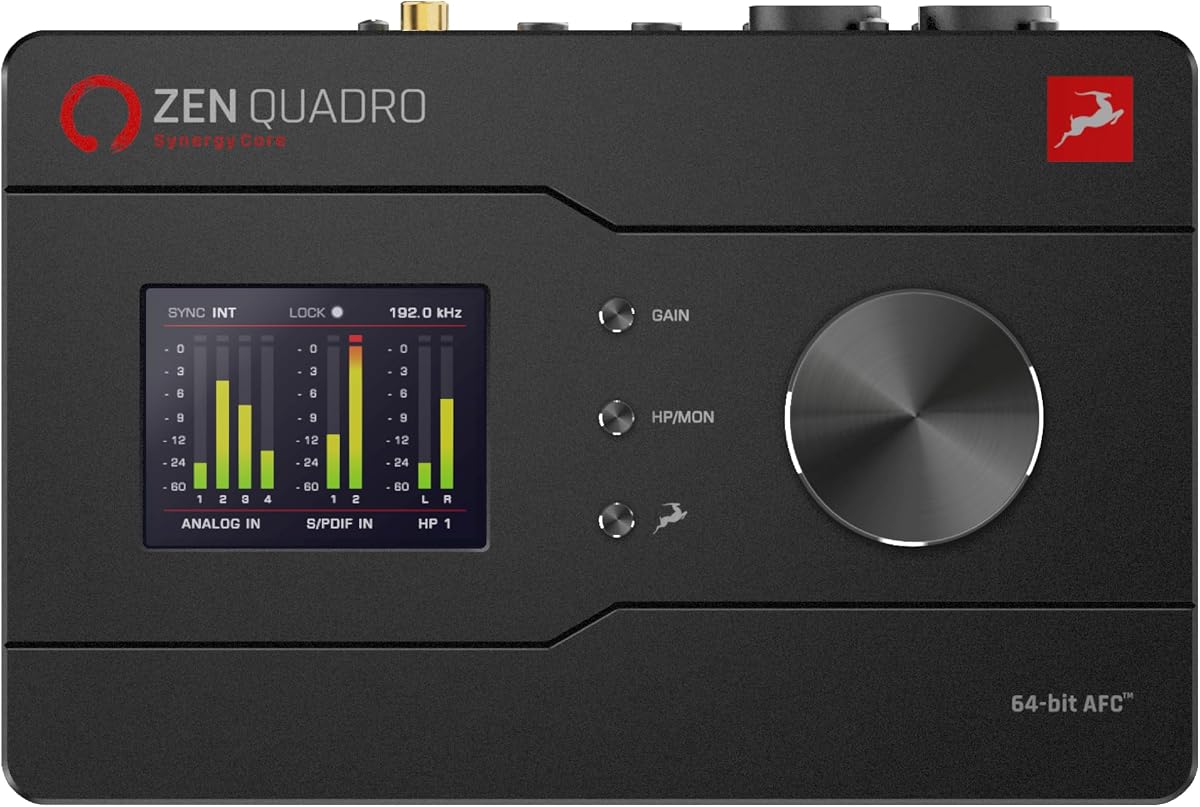
The Antelope Audio Zen Quadro provides an impressive balance of portability and DSP power. It features four discrete preamps and 64-bit AFC clocking trusted by Grammy-winning engineers for high fidelity.
We may earn a commission when you buy through this link, at no additional cost to you.
Its Synergy Core FX system runs on dedicated DSP and FPGA hardware allowing you to track through 37 included effects without host CPU load. This ensures near-zero-latency recording for live workflows.
You can connect via dual USB-C to route audio between computers or devices. The standalone preset saving allows quick changes between studio and stage setups easily.
Choose this interface if you need expandable studio capabilities without sacrificing sound quality. It handles vocals instruments and streaming with professional DSP effects and robust connectivity.
Track through 37 included effects with 90+ available running on dedicated DSP and FPGA hardware for near-zero-latency recording without host CPU load.
Hear the same conversion technology used in flagship studio interfaces with 64-bit AFC clocking trusted by Grammy-winning engineers worldwide.
We may earn a commission when you buy through this link, at no additional cost to you.
The Universal Audio Apollo Twin X DUO offers similar features to the QUAD model with two processing cores. It allows real-time recording through authentic analog preamp emulations like Neve and API.
We may earn a commission when you buy through this link, at no additional cost to you.
You still get access to the full library of 200+ UAD plugins. The bass management feature lets you add a subwoofer to your monitor setup for detailed low-end monitoring.
The DUO version is slightly more affordable but still expensive compared to non-DSP options. It requires Thunderbolt 3 and specific drivers which may limit compatibility with older systems.
This interface is a solid choice if you prefer UAD plugins but need slightly less power. It delivers professional conversion and analog tone for serious home studio production needs.
Use Auto-Gain to set your levels across multiple inputs in seconds and never miss the take when recording quickly.
Hear all the low-end detail in your mixes using bass management to add a subwoofer to your monitor setup for better monitoring.
We may earn a commission when you buy through this link, at no additional cost to you.
The Solid State Logic 2 MKII Plus brings legendary SSL console quality to your desktop. It uses 32-bit and 192 kHz converters for exceptional dynamic range and audio clarity.
We may earn a commission when you buy through this link, at no additional cost to you.
The Legacy 4K Analog Enhancement channel adds warmth and character to your recordings. This feature mimics the classic SSL sound without needing extensive post-processing plugins.
While it lacks advanced DSP routing this unit focuses on pure conversion quality. It is bus-powered for portability but may need a mixer for complex live setups.
Pick this interface if you want professional SSL tone in a compact form. It suits producers prioritizing analog character and zero latency monitoring over heavy DSP features.
The Legacy 4K Analog Enhancement feature adds warmth and character to your recordings mimicking classic SSL console sound.
Experience zero-latency monitoring for immediate feedback while recording ensuring you hear your audio instantly without delay.
We may earn a commission when you buy through this link, at no additional cost to you.
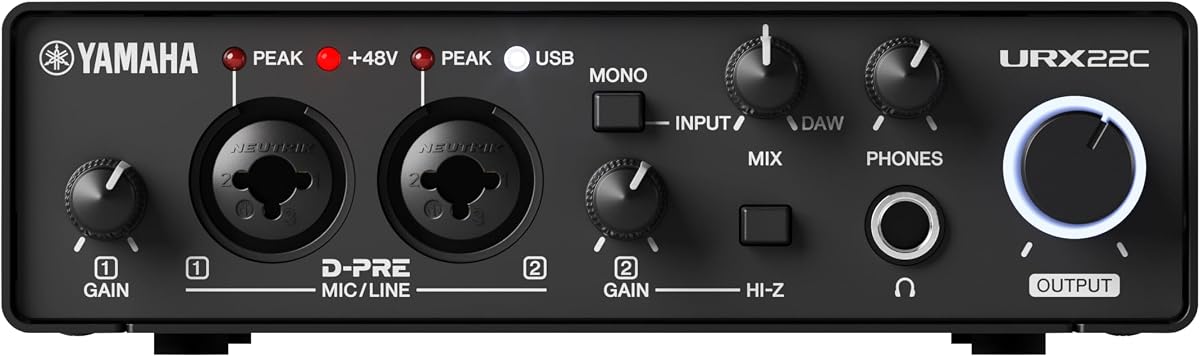
The Yamaha URX22C offers excellent value for those needing DSP without a high price. It includes latency-free DSP-powered monitoring with REV-X reverb and Channel Strip effects.
We may earn a commission when you buy through this link, at no additional cost to you.
Its Class-A D-PRE mic preamps ensure clean gain and low noise for vocals and instruments. The rugged full-metal housing makes it durable for travel and daily use.
While the software suite is helpful it requires installation for full DSP control. The two combo inputs limit simultaneous recordings compared to larger interfaces.
This interface is perfect for budget-conscious musicians and podcasters. It provides essential DSP tools and solid audio quality for creating professional content efficiently.
2 analog XLR/TRS combo inputs with Class-A D-PRE mic preamps supporting +48 V phantom power for high quality sound capture.
Use REV-X reverb and Channel Strip for latency-free DSP-powered monitoring to hear effects in real time without lag.
We may earn a commission when you buy through this link, at no additional cost to you.
The MOTU UltraLite-mk5 is a powerful interface with 18 analog inputs and 22 outputs. It allows you to create unique mixes for each output pair via CueMix DSP.
We may earn a commission when you buy through this link, at no additional cost to you.
Its OLED display provides high-resolution metering for all analog I/O. You can apply reverb EQ and dynamics processing directly on board to reduce CPU usage.
Although it uses USB 2.0 it supports high-speed transfer for large channels. It is bulkier than compact interfaces but offers unmatched routing flexibility.
Choose this if you record bands or need multiple headphone mixes. The robust DSP mixing and high input count make it ideal for live and studio work.
Mix live inputs to any analog output pair and create separate unique mixes for each output pair using CueMix DSP.
Apply reverb 4-channel parametric EQ and dynamics processing to inputs and bus mixes directly on the interface.
We may earn a commission when you buy through this link, at no additional cost to you.
The Yamaha URX22 B features a 4.3 inch touchscreen for easy parameter control. It supports Dual USB-C ports for connecting multiple devices simultaneously.
We may earn a commission when you buy through this link, at no additional cost to you.
Its built-in DSP processor ensures professional sound and latency-free monitoring. The preamps offer a 78 dB gain range for versatile mic compatibility.
The touchscreen interface simplifies mixing but may be sensitive in some setups. It is a new model with promising features for modern workflow needs.
This interface is ideal for users wanting intuitive visual control. The DSP power and multi-stream driver make it great for streaming and recording combined.
Control levels and settings with a 4.3 inch touchscreen and 5 control knobs for easy navigation and adjustment.
Use Multi-Stream Audio Driver and dual MAIN/SUB USB ports to connect multiple devices and route audio flexibly.
We may earn a commission when you buy through this link, at no additional cost to you.
The Antelope Audio Zenith 2 offers a colorful display and extensive DSP for streaming. It features Studio Wizard for precise adjustment of compression EQ and De-essing.
We may earn a commission when you buy through this link, at no additional cost to you.
Its Smart Vocal Chain transforms your voice instantly and Loopback simplifies system audio capture. Two independent headphone mixes are rare in this class.
It includes over 75 premium effects and Bitwig Studio Essentials. The 123 dB conversion ensures pristine sound quality even for demanding microphones.
Choose this for podcasting and streaming with professional DSP effects. The intuitive display and included software make it a complete solution for content creators.
Take full command with the Studio Wizard screen allowing precise adjustment of Compression EQ De-essing and Air using premium effects.
Features two headphone outputs with fully independent mixes perfect for recording sessions or collaboration where users need separate monitoring.
We may earn a commission when you buy through this link, at no additional cost to you.
Selecting the right interface requires understanding your specific needs and budget constraints. Here are key factors to consider before buying.
The number of DSP cores or FPGA capacity determines how many plugins you can run simultaneously. Higher power allows more complex chains without affecting performance.
Always check the plugin limit to ensure it fits your workflow needs.
Interfaces offer USB-C Thunderbolt or ADAT expansion for scalability. Ensure your computer supports the interface type for optimal speed.
Prioritize USB-C or Thunderbolt for fast data transfer and future-proofing.
Count your inputs needed for mics and instruments versus outputs for speakers and headphones. More channels allow more flexibility for bands.
Match the interface I/O to your current setup requirements exactly.
Many interfaces come with specific software like UAD or Synergy Core. These offer high-quality effects but may be locked to that brand.
Choose a brand whose software aligns with your DAW preferences.
Onboard DSP ensures near-zero latency for monitoring. This is critical for recording with effects to avoid hearing delay.
Verify that DSP is truly onboard and not CPU-based for best results.
Look for metal housing and solid knobs if you move your gear often. Plastic units may not withstand travel or frequent use.
Select a build quality that matches your environment stability.
DSP interfaces range from budget to premium prices. Consider the long-term value of included plugins versus buying them separately.
Balance upfront cost against the included software bundle value.
Bus-powered units work via USB while others need external power. Bus-powered options are better for portable or minimalist setups.
Ensure your USB port supplies enough power for the interface.
Connect your interface to your computer using a high-quality USB or Thunderbolt cable. Install the latest drivers to ensure stable performance and latency-free monitoring.
Set your DSP effects in the included software or onboard display. Adjust gain stages carefully to avoid clipping while maximizing audio quality.
Store your interface in a dry environment to protect electronics from moisture. Keep connectors clean and avoid excessive force when plugging in cables.
Built in DSP means the interface has its own digital signal processor to handle effects and routing. This reduces the load on your computer's CPU for lower latency.
Most require a computer for control software but some allow standalone preset saving. A computer is usually needed for full plugin control and DAW integration.
They allow real-time monitoring with effects without taxing your streaming CPU. You can route multiple inputs and manage levels directly on the hardware.
No UAD plugins are specifically designed for Universal Audio hardware. Other interfaces like Antelope use their own proprietary Synergy Core FX systems instead.
Antelope Audio Zen Quadro and Universal Audio Apollo offer great amp sims. These allow you to record with finished guitar tones directly.
Some models work with iOS via USB-C or adapters. Always check manufacturer compatibility lists to ensure your mobile device is supported.
We highlighted ten interfaces ranging from budget-friendly to premium solutions for your production needs. Each option brings unique strengths for vocalists streamers and musicians.
Prioritize DSP power if you rely heavily on effects during tracking. For general use choose a model with strong connectivity and durable build quality.
Prices and availability change frequently so verify current listings before buying. We hope this guide helps you find the perfect audio interface for your studio.