
StarTech 3.5in SATA Trayless Mobile Rack
4.4Editor score
Holds one 3.5 inch SATA drive
Trayless design for quick access
Internal rubber shock absorbers
A Hot Swap SATA Mobile Rack allows you to easily insert and remove hard drives without opening your computer case. This feature is essential for technicians, server admins, and power users who need quick data access or frequent drive swaps for backups.
We compared ten top-rated models based on build materials, drive compatibility, cooling features, and insertion durability. Each product offers unique benefits such as trayless designs, multiple bay options, or advanced LED indicators to help you choose the right solution.
Each pick highlights specific strengths like aluminum construction, fan cooling, or support for both SATA and SAS drives. Note that prices and availability change frequently, so always verify current details on the product page before purchasing your next mobile rack.
4.4Editor score

4.1Editor score

5.0Editor score
As an Amazon Associate we earn from qualifying purchases.
The following table provides a side-by-side comparison of all ten models included in this guide. You can quickly review key specifications like drive size support, bay count, and special features to narrow down your options before reading the detailed reviews.




The StarTech 3.5in SATA Trayless Mobile Rack is an affordable and reliable solution for users who need to swap a single 3.5 inch SATA drive frequently. With a 4.4 star rating, it is praised for its straightforward design and robust build quality that ensures longevity over time.
We may earn a commission when you buy through this link, at no additional cost to you.
This mobile rack features a trayless design that allows you to install or remove hard drives without needing to mount them into separate trays. It includes internal rubber shock absorbers to protect the drive during insertion and removal, and a lockable bay for added security.
While it lacks active cooling or multiple bays, the solid aluminum construction helps dissipate heat passively. The 50,000+ insertion rating means you can swap drives hundreds of times without worrying about wear on the connectors or the rack itself.
If you need a simple, cost-effective way to add hot-swap capability to a 5.25 inch bay for a single drive, this StarTech model is an excellent starting point. It is ideal for backups or media access where complex features are not necessary.
The trayless design means you can slide the drive in and out quickly without tools, saving valuable time during maintenance or data transfer tasks.
With rubber shock absorbers and a high insertion rating, this rack is built to withstand frequent swaps without damaging your valuable storage drives.
We may earn a commission when you buy through this link, at no additional cost to you.
The ICY DOCK Dual 2 Bay 2.5” SSD & HDD Dock is designed for users who need to manage multiple 2.5 inch drives in a single 3.5 inch bay. It holds a 4.3 star rating and is popular for its door-less design that makes hot-swapping incredibly convenient without extra steps.
We may earn a commission when you buy through this link, at no additional cost to you.
It supports both SATA 3.0 and SAS 3.0 standards, giving you flexibility to use modern SSDs or older HDDs. Active Power Technology ensures that only bays with installed drives receive power, which helps reduce heat and energy consumption when slots are empty.
The individual drive eject buttons and built-in activity lights make it easy to identify which drive is active or needs attention. However, users should note this unit is designed exclusively for 2.5 inch form factors and does not include power cables in the box.
This dock is an excellent choice for IT professionals or home labs that need a compact, efficient way to swap SSDs or small HDDs. Its combination of door-less access and Active Power Technology makes it a standout in the mid-range category.
Compatibility with both SATA and SAS interfaces means you can use a wide range of drives without needing different adapters or racks.
Active Power Technology powers up individual LEDs only when a drive is installed, keeping the system cooler and more efficient.
We may earn a commission when you buy through this link, at no additional cost to you.
The StarTech.com 2 Drive 2.5in Trayless Hot Swap Mobile Rack Backplane turns a single 3.5 inch bay into a hot-swappable interface for up to two 2.5 inch drives. With a 4.1 star rating, it is valued for its compatibility and ease of use by technicians who work with various drive types.
We may earn a commission when you buy through this link, at no additional cost to you.
Its open-top design and vented slot divider help prevent drive failure by maximizing passive heat dissipation. The unit includes screw kits and both SATA data and power cables, so you have everything needed for immediate installation without extra trips to the store.
While it is priced higher than single-bay units, the ability to manage two drives from one bay is a significant productivity booster. The aluminum construction and high insertion rating ensure that frequent swaps do not wear down the connectors or the backplane over time.
This model is ideal for users who need to swap 2.5 inch SSDs or HDDs frequently without opening the case. If you value having the included cables and robust thermal design, this StarTech backplane is a solid premium choice.
Included screws and cables mean you can install the backplane and connect drives immediately without needing to source additional parts.
The open-top design and vented dividers are critical for keeping drives cool during long transfers, helping extend their operational lifespan.
We may earn a commission when you buy through this link, at no additional cost to you.
The Kingwin Tray-Less Hot Swap Mobile Rack Cage is designed for users who prioritize data security alongside hot-swap convenience. It receives a strong 4.5 star rating and is built to fit most standard PC and server cases, making it a flexible choice for many setups.
We may earn a commission when you buy through this link, at no additional cost to you.
Its key lock feature keeps your data safe from unauthorized access, which is particularly valuable in shared or public environments. The cage supports both SATA and SAS interfaces and delivers up to 6Gbps performance, ensuring your drives run at peak speed.
The tray-less design allows for quick installation of bare drives without tools, and LED indicators help you monitor power and activity at a glance. While losing the key could be inconvenient, the security trade-off is worth it for sensitive data storage scenarios.
If you need a secure way to house 2.5 inch drives in a standard bay, this Kingwin model offers a great balance of safety and performance. It is a reliable choice for enterprise applications or personal systems where data protection is paramount.
The key lock mechanism adds a physical layer of security to prevent unauthorized access to your sensitive data stored on the drives.
Non-scratch SATA connectors and support for high-speed interfaces ensure your data transfers are fast and reliable without connector wear.
We may earn a commission when you buy through this link, at no additional cost to you.
The ICY DOCK MB326SP-1B 6-Bay Mobile Rack Enclosure is a powerhouse for users who need maximum drive density in a standard 5.25 inch bay. It achieves a perfect 5.0 star rating and is designed to hold up to six 2.5 inch drives with efficient cooling and mounting options.
We may earn a commission when you buy through this link, at no additional cost to you.
Its dual 40mm fan cooling system ensures that all six drives remain cool even under heavy load. Active Power Technology powers individual bays only when a drive is installed, which improves efficiency and reduces heat generation when some bays are empty.
The ExpressTray tool-less system makes installing SSDs incredibly fast while maintaining the stability of traditional tray-based designs. However, this unit requires three contiguous optical drive bays and is priced higher, making it more suitable for professional or high-demand storage setups.
If you are building a home lab or small server that requires multiple drives, this model offers exceptional value through its capacity and thermal management. The combination of tool-less mounting and smart cooling makes it a top-tier choice for demanding users.
Dual fans and three-speed control keep your drives at optimal temperatures, preventing thermal throttling and extending their lifespan.
Active Power Technology ensures power is only delivered to bays with drives, saving energy and reducing heat when bays are empty.
We may earn a commission when you buy through this link, at no additional cost to you.
The ICY DOCK ExpressCage MB324SP-1B 4 Bay is a flexible solution for users needing four drive slots in a 5.25 inch bay. It holds a 4.6 star rating and is known for its ExpressTray tool-less mounting system and ability to accommodate a wide range of drive heights.
We may earn a commission when you buy through this link, at no additional cost to you.
Its locking latch design ensures secure connections for both data and power cables, preventing accidental disconnections during hot swaps. The three-speed fan control allows you to balance noise and cooling based on your environment and thermal needs.
While it requires two 5.25 inch bays, the ability to host four drives efficiently makes it a great choice for expanding storage without moving to a full tower. The individual blue LEDs give you clear status updates for each drive at a quick glance.
If you need a reliable mid-range option with robust thermal control, this ExpressCage model is highly recommended. Its balance of capacity, security features, and cooling makes it a strong contender for home servers and workstations.
The locking latch design keeps your SATA and power connections secure, reducing the risk of data loss from loose cables.
Support for drive heights from 5mm to 12.5mm means you can use almost any 2.5 inch drive without worrying about fit issues.
We may earn a commission when you buy through this link, at no additional cost to you.
The ORICO 5.25 Trayless Hot Swap Mobile Rack is a straightforward and affordable option for users who need to access a single 3.5 inch SATA drive easily. With a 4.1 star rating, it is appreciated for its tool-free mounting and durable stainless steel construction that aids in heat dissipation.
We may earn a commission when you buy through this link, at no additional cost to you.
Its on/off button on the front panel lets you switch between connection and sleep mode without opening your PC case. The design supports SATA III data transfer rates, ensuring your drive runs at full speed for fast data transfers and backups.
While it lacks advanced features like fans or multiple bays, the simplicity makes it a great entry-level choice for casual users. The stainless steel body helps protect against corrosion and wear, ensuring reliable performance over many years of occasional use.
If you just need a quick way to add hot-swap capability for a single drive, this ORICO adapter is a practical choice. Its price point and ease of use make it a solid option for budget-conscious buyers.
Stainless steel construction helps move heat away from the drive efficiently, keeping it cooler during long usage sessions.
The front on/off button gives you easy access to power the drive without needing to restart your computer.
We may earn a commission when you buy through this link, at no additional cost to you.
The Rosewill Internal Hard Drive Enclosure is a unique solution that converts three 5.25 inch bays into four 3.5 inch drive slots. It holds a 4.3 star rating and is ideal for users with older cases that have multiple optical drive bays but no built-in hot-swap options.
We may earn a commission when you buy through this link, at no additional cost to you.
Its single rear 120mm exhaust fan provides effective cooling to prevent overheating, especially when all slots are filled with drives. The rugged steel and ABS construction ensures reliable use over time, while hot-swap support lets you change drives without shutting down your system.
Note that this cage requires three contiguous bays and may not fit all case designs. However, if your case supports it, this model offers significant storage expansion at a reasonable price compared to custom rackmount solutions.
If you have the space and need to maximize drive capacity in an existing case, this Rosewill enclosure is a practical choice. Its cooling and SAS compatibility make it a versatile option for both home and small business users.
Converting three optical bays into four drive slots significantly increases your storage options without needing to buy a new PC case.
The large 120mm exhaust fan ensures consistent airflow across all drives, maintaining safe operating temperatures even with a full load.
We may earn a commission when you buy through this link, at no additional cost to you.
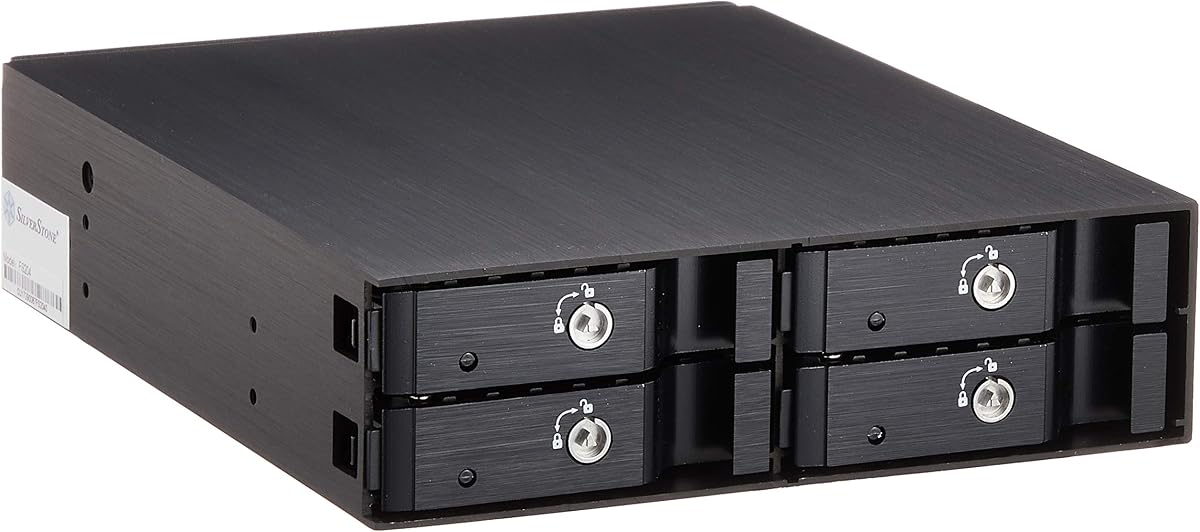
The Silverstone SST-FS204B is a premium mobile rack backplane that holds four 2.5 inch drives in a single 5.25 inch bay. With a 4.2 star rating, it stands out for its all-aluminum body and beautiful hairline brushed finish that looks professional in any workstation.
We may earn a commission when you buy through this link, at no additional cost to you.
Its individual metal key lock for each drive adds a layer of physical security that is rare in mobile racks. The built-in cooling fan and independent drive status LEDs ensure your drives stay cool and you can easily monitor their status at a glance.
While it is priced higher than many competitors, the combination of premium materials, security features, and efficient cooling justifies the cost. If you value aesthetics and durability alongside functionality, this Silverstone model delivers a high-end experience.
If you are building a professional or home office PC and want a sleek and secure solution, this is an excellent choice. Its design and build quality make it one of the best-looking and most functional racks available.
The all-aluminum body with hairline finish adds a professional touch to your PC interior, matching high-end build aesthetics.
Individual metal key locks ensure that no unauthorized person can remove or access specific drives without your permission.
We may earn a commission when you buy through this link, at no additional cost to you.
The LYNICESHOP 5-Bay Mobile Rack Backplane is a space-saving solution that uses three optical drive bays to expand into five hot-swap drive positions. It has a perfect 5.0 star rating and is praised for its aluminum alloy construction and excellent heat dissipation capabilities.
We may earn a commission when you buy through this link, at no additional cost to you.
Its design supports both SATA and SAS interfaces, giving you flexibility to mix and match drives based on your needs. Dual power supplies ensure that the operation is safer and more stable, reducing the risk of power failures during intensive usage.
The cooling fan included in the unit provides excellent heat dissipation, extending the service life of both the cage and your drives. While it requires three contiguous bays, the resulting five-drive capacity is impressive for the space it consumes in a case.
If you need a high-capacity solution that maximizes space, this model offers great value. Its durable construction and dual power design make it a reliable choice for users who prioritize stability and performance in their storage setups.
Using three optical bays to create five drive slots means you get more storage without needing a larger chassis or more cases.
Dual power supplies provide redundancy and stability, ensuring your drives receive consistent power without interruptions.
We may earn a commission when you buy through this link, at no additional cost to you.
Choosing the right Hot Swap SATA Mobile Rack depends on your specific storage needs, drive sizes, and available drive bays in your case. The following factors will help you narrow down the options to find a model that fits your setup.
Check whether you need support for 3.5 inch or 2.5 inch drives. Some racks support both, while others are designed exclusively for one size. Ensure the rack matches your existing drive collection to avoid purchasing incompatible products.
Always verify the supported drive sizes before buying to ensure the rack fits your hardware.
Decide how many drives you need to access simultaneously. Single-bay options are simple and affordable, while multi-bay models like 2, 4, 5, or 6 bays offer more flexibility. Consider your current and future storage needs.
Select a bay count that meets your capacity requirements without wasting space or budget.
Trayless designs allow you to insert bare drives without screws, saving time during swaps. Tray-based designs offer more stability but require mounting. Choose based on how frequently you plan to swap drives.
Trayless is better for frequent swapping while tray designs offer better stability for rarely moved drives.
Look for racks that support SATA I II and III speeds to ensure future compatibility. Some advanced models also support SAS interfaces for higher performance. Check the connector durability and insertion rating for long-term use.
Ensure the rack supports the interface standards required by your drives for optimal performance.
Hot swap racks generate heat when multiple drives are active. Choose models with aluminum construction for passive cooling or those with built-in fans. Active cooling is essential for multi-bay systems under heavy load.
Prioritize models with adequate cooling to prevent overheating and extend drive lifespan.
If your PC is in a shared environment, consider racks with key locks to prevent unauthorized drive removal. Security features can be critical for protecting sensitive data stored on hot-swappable drives.
Include locks if physical security is important for your data protection strategy.
Verify how many 5.25 inch or 3.5 inch bays your case has. Multi-bay racks often require multiple contiguous bays. Ensure your case can accommodate the physical size of the rack you are considering.
Measure your available drive bays before purchasing to ensure a physical fit.
Look for reputable brands that offer warranties on their products. A solid warranty indicates confidence in the product's build quality and durability. It also provides peace of mind if the rack fails.
Choose brands with good support and warranty terms to protect your investment.
First, install the mobile rack into your case's available 5.25 inch bay. Secure it with screws according to the instructions. Connect the SATA data and power cables from your motherboard and power supply to the rack.
To insert a drive, power on your PC and align the drive connector with the backplane. Push it in firmly until you hear a click or see the activity LED light up. To remove a drive, press the eject button and wait for the light to stop blinking before sliding it out.
Regularly check that all cables are securely connected and that the cooling fans are running properly. Keep the interior of your PC clean to ensure optimal airflow. If you notice unusual noise or heat, inspect the rack and connections for loose parts.
Yes, most modern Hot Swap SATA Mobile Racks support hot swapping as long as your operating system and motherboard support the feature. Ensure you use the eject buttons or safe removal process before physically removing the drive.
No, most racks do not require additional drivers. They work as plug-and-play devices using standard SATA interfaces. Your OS should automatically detect the drives once connected.
Some models support both interfaces, while others are SATA-only. Check the product specifications carefully. SAS drives usually work in SATA ports but may not achieve full speed.
Trayless designs let you slide bare drives in without mounting them, saving time. Tray designs require you to mount drives in trays first, which can be more stable but slower to swap.
Check your case manual to see how many 5.25 inch bays are available. Multi-bay racks often require multiple contiguous slots. Measure the space before buying.
Yes, these racks are fully compatible with solid state drives. In fact, they are excellent for managing SSDs for backups or external storage access.
This guide compared ten top models ranging from affordable single-bay units to premium multi-bay solutions. The StarTech models offer great value for basic needs while ICY DOCK and Silverstone provide advanced features for power users.
Prioritize features like drive compatibility and cooling based on your specific usage. If you need security, look for key locks. If you need capacity, choose a multi-bay model with fans to handle the heat.
Remember that prices and availability change frequently. Always check the latest details and read current reviews on the product page before making your final purchase decision.