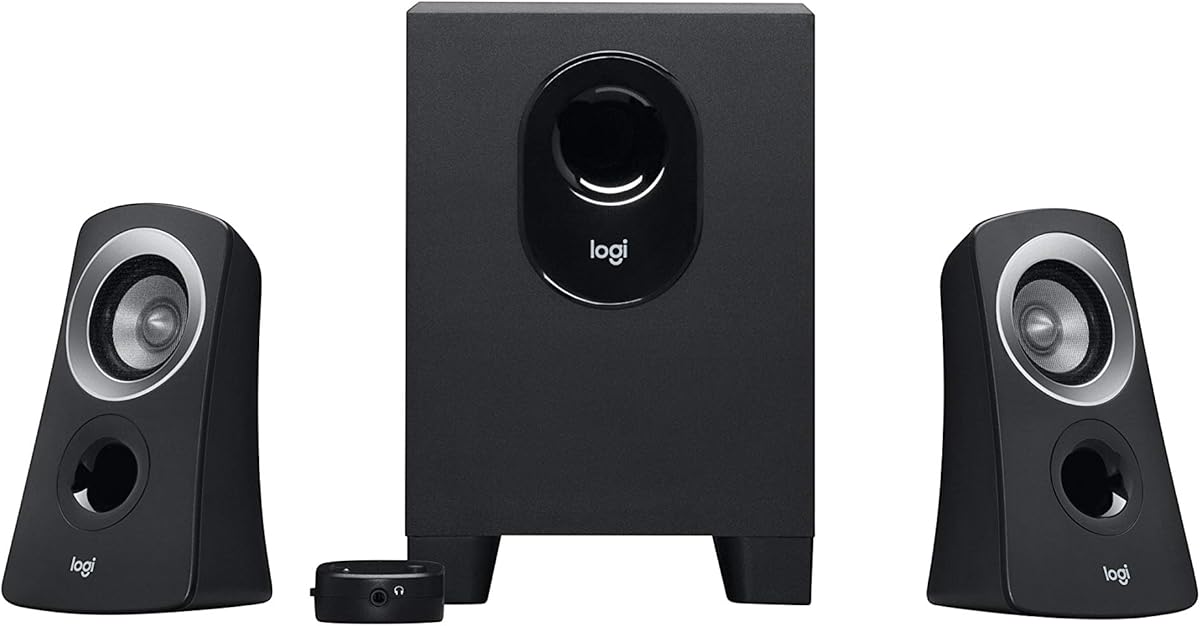
Logitech Z313 2.1 Multimedia Speaker System
4.4Editor score
Compact Design
25W RMS Output
Simple Control Pod
This guide compares the top 2.1 Channel Desktop Speakers for immersive sound. Explore features, performance, and expert insights to choose the right audio
Finding the right audio solution for your workspace can transform your daily computing experience. A high-quality 2.1 Channel Desktop Speakers system delivers clear mids, crisp highs, and deep bass that stereo pairs often miss. Whether you are gaming, editing videos, or simply enjoying music, the right speakers make a noticeable difference in immersion and clarity.
We evaluated ten leading models based on sound quality, power output, connectivity options, and build design. Our analysis focuses on real-world performance metrics like driver size, amplifier power, and user ratings to ensure you get a system that performs reliably. We also considered ease of setup and desk footprint to match various workspace needs.
Each pick in this list highlights specific strengths such as THX certification, wireless connectivity, or budget-friendly pricing. You will see detailed breakdowns of pros and cons to help you weigh trade-offs like size versus power. Please note that availability and terms may change, so verify details before purchasing to ensure the best fit for your needs.
4.4Editor score

4.5Editor score

4.6Editor score
This side-by-side comparison highlights the key specifications and features of all ten selected models. We focus on power output, connectivity types, driver sizes, and unique selling points to help you quickly identify which system matches your specific audio requirements and desk space constraints.


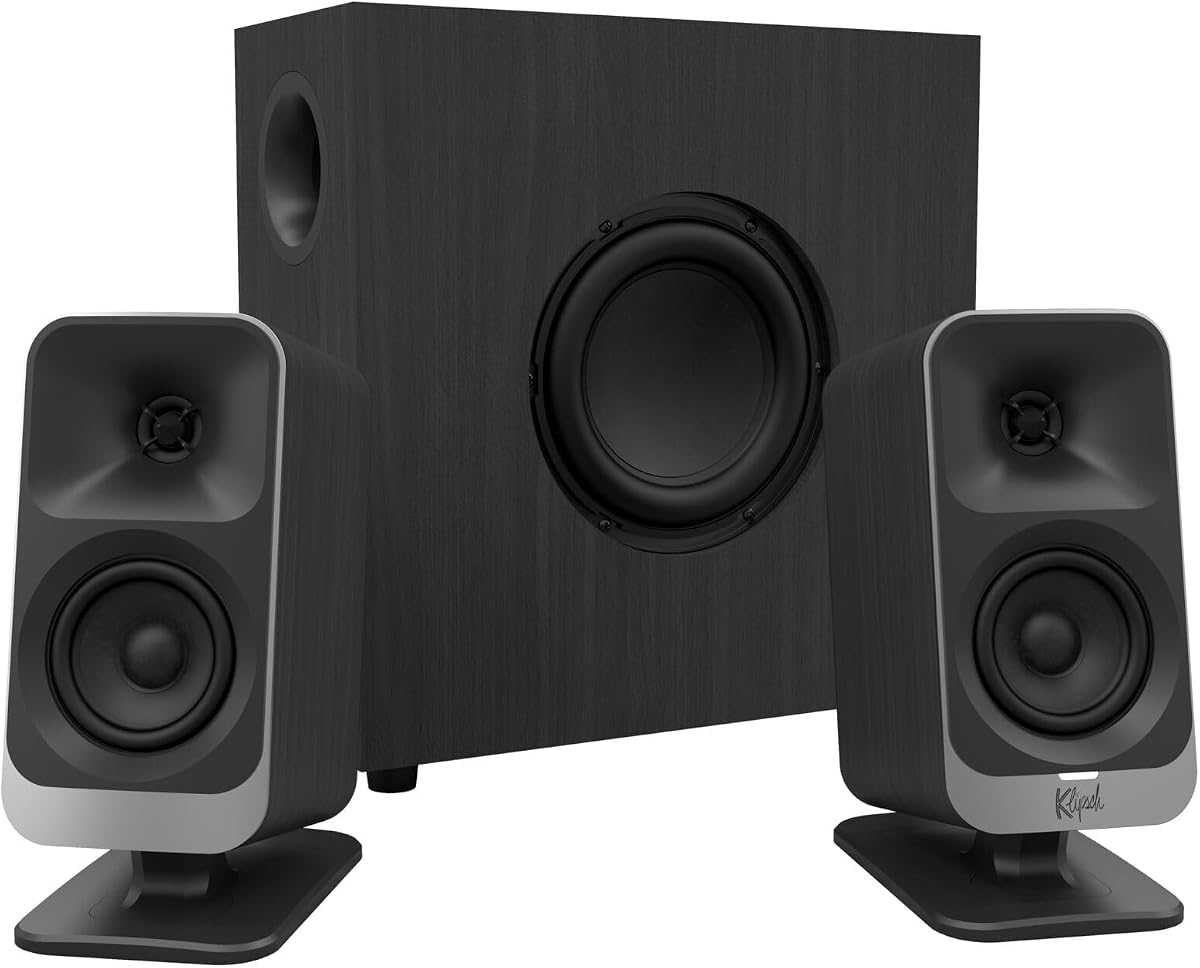
The Klipsch ProMedia 2.1 THX stands out as a top-tier choice for desktop audio enthusiasts. With a strong rating and THX certification, it delivers immersive sound that rivals home theater setups. This system is ideal for those seeking high fidelity without needing a dedicated amplifier.
We may earn a commission when you buy through this link, at no additional cost to you.
Its MicroTractrix horn technology ensures efficient sound dispersion, directing audio straight to your ears for enhanced clarity. The 6.5 inch side-firing subwoofer provides deep bass that you can feel, making movies and games more engaging. The satellites handle mids and highs with precision, avoiding distortion even at higher volumes.
While the system is powerful, it requires a reasonable amount of desk and floor space due to its size. There are no wireless connectivity options, so you will need to rely on physical cables for connection. However, the trade-off is justified by the superior audio performance and reliability.
Buyers looking for premium sound quality should prioritize this model for their setup. It excels in gaming, music listening, and movie watching. The control pod makes adjustments easy, ensuring you can tailor the volume to your environment. This is a long-term investment for audio quality.
THX certification guarantees that the sound meets strict industry standards for fidelity and immersion.
The unique horn design maximizes power efficiency, delivering more sound per watt of input power.
We may earn a commission when you buy through this link, at no additional cost to you.
The Logitech Z313 offers exceptional value for budget-conscious shoppers needing better audio than laptop speakers. It features a compact subwoofer that fits easily under desks while providing distinct bass separation. The system is praised for its simplicity and effective volume management via the control pod.
We may earn a commission when you buy through this link, at no additional cost to you.
Its 25 watt RMS output is sufficient for small to medium rooms without overwhelming the space. The satellites are designed to direct sound toward the listener, improving clarity during calls or media consumption. While it lacks premium features, it performs reliably for daily use.
Listeners may find the volume levels limiting in very noisy environments or large rooms. The build feels functional rather than premium, which is expected at this price point. Still, the audio improvement over integrated speakers is significant and noticeable.
This model is perfect for students or home office workers who need clear sound without breaking the bank. It supports basic connectivity needs well. If your primary goal is functional audio on a budget, this system delivers consistent performance.
The compact subwoofer design allows for flexible placement without cluttering your desk area.
The dedicated control pod lets you adjust volume quickly without navigating software settings.
We may earn a commission when you buy through this link, at no additional cost to you.
The Logitech Z623 is a powerhouse designed for users who want room-filling sound from their desktop. With THX certification and high wattage, it delivers a cinematic experience that rivals dedicated home audio setups. Its reputation is built on consistent performance and robust build quality.
We may earn a commission when you buy through this link, at no additional cost to you.
The 400 watt peak power ensures that audio remains clear even at high volumes. The satellites and subwoofer are tuned to work together, providing rich mids and deep bass. Multiple inputs allow you to connect various devices like consoles and TVs easily.
Due to its size, it requires significant desk and floor space. It also needs a dedicated power outlet, which limits placement options compared to USB-powered models. However, the audio quality justifies the space requirements for enthusiasts.
If you want the best sound quality available for your computer setup, this system is a top recommendation. It is ideal for gaming, movies, and music. The versatility in connectivity makes it a future-proof choice for any multimedia center.
The THX certification ensures the audio meets professional standards for immersion and clarity.
Multiple input options allow you to connect computers, consoles, and media players simultaneously.
We may earn a commission when you buy through this link, at no additional cost to you.
The Creative Pebble X Plus brings a fresh design to desktop audio with USB-C connectivity and Bluetooth support. It targets users who want a clean cable setup and modern aesthetics. The addition of RGB lighting allows for customization to match your desk theme.
We may earn a commission when you buy through this link, at no additional cost to you.
It delivers 30 watts of RMS power, providing balanced sound suitable for casual listening. The drivers are elevated to aim sound directly at the listener. The subwoofer adds necessary low-end presence without being overly aggressive.
The RGB lighting might not appeal to professional environments due to potential distractions. Bass is present but may not satisfy audiophiles seeking deep resonance. Connectivity is versatile though, supporting both wired and wireless sources easily.
This system is best for users prioritizing aesthetics and wireless convenience. It works well for gaming and media consumption. If you appreciate modern design and RGB customization, this offers a compelling package for the price.
Supporting both USB-C and Bluetooth ensures compatibility with a wide range of modern devices.
RGB options allow you to personalize your workspace lighting to match your mood or setup.
We may earn a commission when you buy through this link, at no additional cost to you.
The Bluedee speakers deliver 80 watts of peak power for impactful sound in a desktop setting. They feature Bluetooth 5.4 for stable wireless connections. DSP tuning helps reduce distortion and smooth out the audio profile for clearer vocals.
We may earn a commission when you buy through this link, at no additional cost to you.
The dedicated subwoofer keeps bass separate from satellites to prevent muddy sound. RGB lighting adds a modern touch to the setup. The single control knob simplifies volume and lighting adjustments significantly.
Some users might find the bass heavy if tuned too high. The overall build is decent but not premium. Connectivity options are versatile including USB and auxiliary inputs for flexible use.
If you want strong audio without paying premium brand prices, these are a strong candidate. They are suitable for gaming and music. The Bluetooth version ensures minimal latency for wireless audio streaming.
Built-in DSP reduces distortion and ensures a balanced sound profile across all frequencies.
Bluetooth 5.4 offers improved range and stability for wireless audio connections.
We may earn a commission when you buy through this link, at no additional cost to you.
The Cyber Acoustics CA-3090 is designed for basic audio needs at an entry-level price. It provides a dedicated subwoofer to enhance low-end response beyond standard stereo pairs. Volume controls are straightforward and accessible for everyday adjustments.
We may earn a commission when you buy through this link, at no additional cost to you.
With 18 watts of peak power, it is best suited for smaller rooms. The four inch subwoofer adds some depth to the sound profile. Build quality is functional but lacks premium materials.
Sound clarity may not match higher-end models during complex audio passages. It is a practical choice for those with strict budget constraints. Expect basic performance without advanced features like digital tuning.
Buyers seeking a simple upgrade from internal speakers should consider this model. It is adequate for office work or casual listening. For gaming or critical listening, investing more might yield better results.
This system provides a straightforward solution for improving basic computer audio output.
Dedicated knobs for volume and bass make adjusting sound levels simple without software.
We may earn a commission when you buy through this link, at no additional cost to you.
The Creative Pebble Plus is a compact solution for those lacking wall outlets near their desk. It runs entirely on USB power, making setup extremely easy. The drivers are angled at 45 degrees to optimize sound projection toward the user.
We may earn a commission when you buy through this link, at no additional cost to you.
A down-firing subwoofer adds bass that would otherwise be missing in compact speakers. High Gain Mode can boost volume when using a stronger USB adapter. The footprint is minimal, fitting almost anywhere on a desk.
Power is limited by USB constraints, so it is not ideal for large rooms. Sound is clear but not as deep as AC-powered systems. It is a great portable option for laptops.
For laptop users or small desk setups, this model offers convenience and clarity. It supports basic gaming and media needs. If portability and desk space are priorities, this system is a smart choice.
Powered by USB to eliminate the need for extra wall sockets near your desk.
Drivers angled at 45 degrees direct sound effectively towards the listener for better imaging.
We may earn a commission when you buy through this link, at no additional cost to you.
The Cyber Acoustics CA-3610 balances power and affordability effectively. Its 62 watts of peak power ensure adequate volume for most desktop tasks. Titanium drivers contribute to crisp highs and warm tones.
We may earn a commission when you buy through this link, at no additional cost to you.
The five inch subwoofer delivers strong bass suitable for action movies. A headphone jack on the satellite allows for private listening without disconnecting cables. This versatility is a strong feature for shared spaces.
The design is simple and functional without RGB or wireless options. Bass can be deep but requires tuning to avoid overpowering mids. Overall performance is reliable for its class and price range.
This system is recommended for users wanting balanced sound without advanced tech. It is suitable for gaming and general media. The headphone jack adds practical utility for quiet work times.
A built-in headphone jack allows private audio without unplugging your connected devices.
The subwoofer provides strong low-end response while maintaining clarity in upper frequencies.
We may earn a commission when you buy through this link, at no additional cost to you.
The Logitech Z407 stands out for its wireless control dial that simplifies volume management. It delivers immersive sound with strong bass and clear highs. Connectivity options include Bluetooth and wired inputs for flexibility.
We may earn a commission when you buy through this link, at no additional cost to you.
The dial allows control from across the room which is convenient for larger desks. Subwoofer output is tuned for depth without distortion. The satellites can be positioned vertically or horizontally to fit aesthetics.
The control dial requires batteries which adds maintenance. Bluetooth connection might add minor latency compared to wired. However, the convenience of wireless control often outweighs these minor issues for many users.
This model is ideal for those who value ease of use and wireless control. It suits gaming and home office setups well. If wireless convenience is a priority, this system offers a solid experience.
Adjust volume and playback settings remotely without reaching for your computer.
Satellites can be oriented vertically or horizontally to match your desk layout preferences.
We may earn a commission when you buy through this link, at no additional cost to you.
The Klipsch ProMedia Lumina is a modern successor to a classic design with premium RGB effects. It features Bluetooth 5.3 and USB-C for modern connectivity. The control app allows customization of sound and lighting settings.
We may earn a commission when you buy through this link, at no additional cost to you.
Audio quality remains true to the Klipsch brand with clear sound and impactful bass. The low profile subwoofer minimizes floor space usage. Lighting effects can be reactive to music or static.
The app dependency might be a hurdle for non-tech users seeking simple plug and play. Price is higher than standard models due to lighting and connectivity features. Still, the aesthetic integration is unmatched.
Gamers and streamers will appreciate the RGB integration and brand reputation. It fits well into a modern gaming setup. If you value style and modern connectivity features, this is a compelling option.
Use the desktop app to adjust EQ and lighting modes for a personalized audio experience.
Built-in RGB lighting syncs with your setup to create a cohesive visual environment.
We may earn a commission when you buy through this link, at no additional cost to you.
Choosing the right speaker system involves weighing audio quality, power, connectivity, and space requirements. This guide outlines key factors to consider to ensure you find a system that matches your specific needs and environment.
Power output determines how loud your speakers can play without distortion. Look for RMS power rather than peak power for a realistic measure of performance. Higher wattage is useful for larger rooms but consider your desk size and noise sensitivity.
Prioritize systems with sufficient RMS wattage for your room size to ensure clear audio at all volumes.
Driver size influences the quality of midrange and high frequencies. Larger drivers generally provide better detail but require more space. Subwoofer size impacts bass depth; larger subs usually deliver more low-end punch.
Select drivers and subs that balance sound quality with the physical constraints of your workspace.
Modern speakers offer various inputs including 3.5mm AUX, RCA, USB, and Bluetooth. USB and Bluetooth are convenient for laptops while RCA may be needed for older devices. Ensure the inputs match your primary devices.
Choose connectivity that matches your devices to avoid needing extra adapters or cables.
Build quality affects durability and aesthetic appeal. Materials like wood or metal often sound better than plastic. Design considerations include desk footprint and cable management options for a tidy setup.
Invest in sturdy build quality to ensure longevity and a professional look on your desk.
Controls like volume knobs, bass adjustments, or remote dials enhance usability. Some models include software control for EQ and lighting. Evaluate if physical or digital controls suit your workflow better.
Ensure the control interface is intuitive and accessible for daily adjustments.
Certifications like THX indicate tested audio performance standards. DSP tuning helps reduce distortion and optimize sound profiles. These features often justify a higher price point through better audio fidelity.
Look for THX or DSP features if high fidelity and accuracy are priorities for your listening.
Prices vary from affordable entry-level models to premium systems. Determine your budget based on how often you will use the speakers. Investing more often yields better power and durability for heavy users.
Balance cost against the features you truly need to maximize value for your specific use case.
To set up your system, connect the satellites to the subwoofer using the provided cables. Plug the subwoofer into the audio source via 3.5mm, RCA, or USB. Ensure the subwoofer is connected to a power outlet if not USB-powered.
Position the satellites at ear level for optimal sound clarity and keep the subwoofer on the floor for better bass response. Avoid placing speakers too close to walls to prevent excessive bass resonance in your listening area.
Regularly dust the drivers with a soft cloth to prevent debris buildup. Do not use harsh chemicals on the grills. If you notice distortion at high volumes, reduce the volume slightly to protect the drivers over time.
A 2.1 system includes two satellite speakers for left and right audio channels and one subwoofer for low frequencies. This setup provides stereo sound with enhanced bass compared to standard stereo pairs.
Most desktop speakers have built-in amplifiers so you do not need an external one. Simply connect them to your computer or audio source and plug them into a power outlet or USB port.
Yes, many modern desktop speakers support Bluetooth connectivity for wireless streaming. Ensure your PC has Bluetooth capability or use a Bluetooth adapter if you want to connect without cables.
Distortion often occurs when the volume is too high for the speakers to handle. Lower the volume and check connections. Ensure cables are not damaged and the source volume is not at maximum.
Connect the subwoofer to the satellites and then to your audio source using the appropriate cables. Place the subwoofer on the floor near a wall for bass response and adjust the bass knob to taste.
THX certification ensures that the audio equipment meets specific quality standards for sound reproduction. It indicates the system delivers immersive and accurate sound suitable for multimedia entertainment.
The Klipsch ProMedia 2.1 THX leads this list with certified sound quality and robust power. For budget buyers, the Logitech Z313 offers impressive value and simplicity. The Logitech Z623 remains the premium choice for powerful multimedia experiences.
Prioritize power output and connectivity options that match your specific usage patterns. Consider how much desk space you have before choosing a system with large satellites or subwoofers.
Always check current availability and warranty details before making your final purchase. This guide aims to help you select a system that enhances your audio enjoyment for years to come.