
Redragon K618 PRO
4.1Editor score
Tri-mode connectivity
Macro zone included
Slim low profile design
This guide compares the top ten low profile mechanical keyboards for speed and comfort, evaluating switch types, connectivity options, and build quality to
Low profile mechanical keyboards offer a unique blend of speed and comfort for users who value ergonomics. These slim designs reduce wrist strain while maintaining the tactile feedback enthusiasts love. Whether you game or type, finding the right balance is key to productivity.
We evaluated ten leading models based on build quality, connectivity options, and switch performance. Each product was analyzed for its unique features, from wireless capabilities to customizability. Our goal is to help you find the perfect match for your setup and needs.
Each pick highlights specific strengths and ideal use cases for different users. We focus on real-world performance and design details that matter most. Please note that prices and availability can change, so check current listings before purchasing.
4.1Editor score

4.7Editor score

4.6Editor score
This table provides a side-by-side comparison of all ten selected keyboards. It highlights key specifications like layout, switch type, and connectivity to help you quickly identify the best fit for your specific workflow and preferences.




The Keychron K1 Ultra 8K stands out as the top performer in our lineup with an impressive 4.7 rating. It combines high-speed gaming capabilities with professional productivity features in a slim low-profile chassis.
We may earn a commission when you buy through this link, at no additional cost to you.
Its 8K polling rate ensures minimal latency during competitive gaming, while the ZMK firmware offers deep customization for power users. The hot-swappable sockets let you change switches without soldering.
While the price is higher than budget models, the build quality and features justify the investment. The lack of a dedicated knob on some units may be a minor inconvenience for media control.
This board is perfect for enthusiasts who demand speed and flexibility. If you want a versatile keyboard that excels at both work and play, this is the strongest choice available.
The 8K polling rate wired ensures lightning-fast response times for competitive play.
ZMK firmware and hot-swap support allow endless tweaks to your typing experience.
We may earn a commission when you buy through this link, at no additional cost to you.
The Redragon K618 PRO offers exceptional value with a strong 4.1 rating and rich features. It is designed for gamers and typists seeking speed without breaking the bank.
We may earn a commission when you buy through this link, at no additional cost to you.
It includes a dedicated macro zone and tri-mode connectivity, allowing you to switch between devices effortlessly. The low-profile design reduces travel time for faster actuation.
The build quality is decent for the price, though it lacks the heft of metal keyboards. Some users may find the software setup slightly less intuitive than competitors.
This is the ideal choice for budget-conscious buyers. If you need a compact, fast keyboard with wireless options for a low cost, the K618 PRO delivers well.
You get premium features like macros and multi-device support at a low price.
The ultra-thin profile ensures comfortable typing for extended sessions.
We may earn a commission when you buy through this link, at no additional cost to you.
The Keychron K3 Max SE earns a 4.6 rating for its premium materials and advanced features. It is a refined version of the popular K3 series with enhanced ergonomics.
We may earn a commission when you buy through this link, at no additional cost to you.
It uses QMK firmware for deep customization and comes with hot-swap sockets for easy switch changes. The acoustic foam layers provide a smooth, muted typing sound.
The price is higher than entry models, reflecting the superior materials and build. The 75% layout saves space but may take adjustment if you rely on a numpad.
This model is perfect for professionals who want a premium feel. If you value sound dampening and customizability, the K3 Max SE is a top-tier investment.
QMK support allows you to map every key exactly how you prefer.
Built-in acoustic foam ensures a quiet and premium typing experience.
We may earn a commission when you buy through this link, at no additional cost to you.
The Keychron K3 V2 is a solid wireless option with a 4.3 rating, perfect for multi-device setups. It bridges the gap between productivity and compact design effectively.
We may earn a commission when you buy through this link, at no additional cost to you.
It connects via Bluetooth 5.1 to three devices and supports QMK for customization. The Mac layout ensures compatibility with macOS shortcuts without extra keycaps.
While the battery life is good, it lacks the ultra-fast polling of wired models. The plastic bottom frame keeps it light but may feel less sturdy than aluminum options.
Ideal for laptop users and mobile workers. If you need a portable, reliable wireless keyboard that handles Mac and Windows, this is a strong choice.
Stable Bluetooth connection allows seamless switching between up to three devices.
Includes specific Mac layout and keys for seamless integration.
We may earn a commission when you buy through this link, at no additional cost to you.
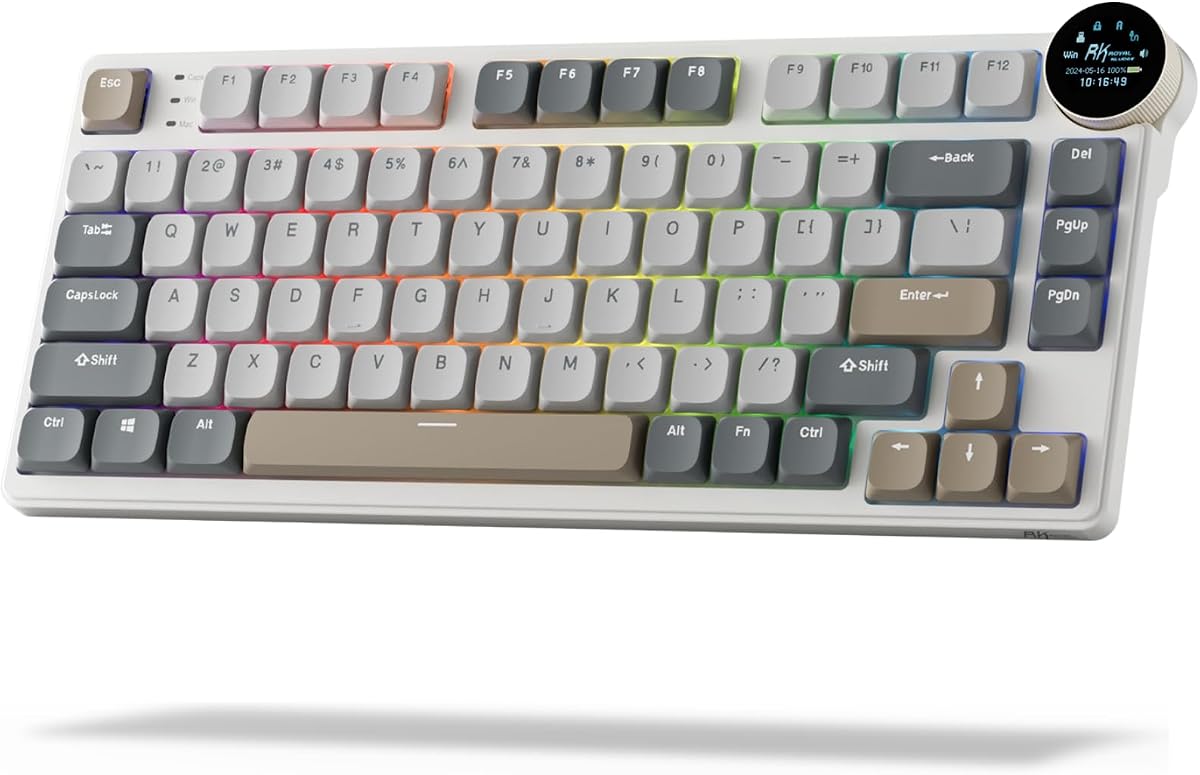
The RK ROYAL KLUDGE N80 brings innovation with a smart display screen and a 4.1 rating. It is designed for users who want visual feedback and modern aesthetics.
We may earn a commission when you buy through this link, at no additional cost to you.
Its smart screen shows battery status and connection modes, while tri-mode connectivity ensures flexibility. The sound-absorbing layers minimize hollow sounds during typing.
The display adds a unique touch but can be distracting for some users. The mid-range price reflects the extra tech compared to standard mechanical boards.
Great for tech enthusiasts who love gadgets. If you want a keyboard that looks unique and offers visual data, the N80 is a great pick.
The onboard screen provides instant status updates on connections and battery life.
Top-mounted switches provide a firm keystroke and stability.
We may earn a commission when you buy through this link, at no additional cost to you.
The Flow Lite 84 is celebrated for comfort, earning a 4.3 rating with its gasket mount. It is designed to reduce wrist strain during long typing sessions.
We may earn a commission when you buy through this link, at no additional cost to you.
Its Specter switches have lower operating force, reducing fatigue. The PBT keycaps offer a textured, durable feel, while the gasket mount adds softness.
The ABS body is less premium than aluminum but keeps the unit light. The price is higher than budget options, reflecting the comfort-focused design.
Perfect for those prioritizing ergonomics. If you need a keyboard that feels soft and reduces strain, the Flow Lite 84 is highly recommended.
Gasket mount design cushions keystrokes for a comfortable typing feel.
PBT double-shot keycaps ensure longevity and a textured grip.
We may earn a commission when you buy through this link, at no additional cost to you.
The Keychron K17 Max offers a 4.4 rating with a rare 96% layout in low profile. It is ideal for users needing numeric input without sacrificing ergonomics.
We may earn a commission when you buy through this link, at no additional cost to you.
It supports QMK for customization and features a slim aluminum frame. The low-profile Brown switches provide tactile feedback with reduced travel distance.
While the numpad adds utility, it requires more desk space. The slim design helps, but it is not ideal for very compact travel setups.
Best for accountants or data entry professionals. If you need a compact numpad with low profile benefits, this is your best option.
The 96% layout packs a full numpad into a space-saving design.
Ultra-slim aluminum frame ensures a premium feel and durability.
We may earn a commission when you buy through this link, at no additional cost to you.
The Flow Lite 100 earns a 4.4 rating for its exceptional battery life and full layout. It is built for heavy typists who need a full board with comfort.
We may earn a commission when you buy through this link, at no additional cost to you.
With a 3000mAh battery, it lasts up to 100 hours. The gasket mount and Specter switches ensure a soft typing experience even on a full deck.
Its size makes it less portable than smaller boards. The price reflects the large battery and premium build features like PBT keycaps.
Ideal for desk setups where space allows. If you want a full-sized low profile keyboard with great battery life, this is the top choice.
A 3000mAh battery delivers up to 100 hours of usage per charge.
Gasket mount design maintains a premium feel across all keys.
We may earn a commission when you buy through this link, at no additional cost to you.
The Cherry MX 10.0N holds a 4.3 rating for its reliability and build quality. It is a robust option for those who prefer a classic brand.
We may earn a commission when you buy through this link, at no additional cost to you.
Its aluminum housing ensures durability and stability. The Cherry MX Low Profile Speed switches offer rapid actuation and a clean, linear feel.
It lacks deep customization features like QMK found in other boards. The RGB is customizable but limited compared to open-source alternatives.
Best for users valuing stability. If you want a no-nonsense, durable keyboard from a trusted brand, this is a great pick.
Full aluminum housing provides a sturdy and premium typing platform.
Cherry MX Low Profile Speed switches deliver fast and consistent actuation.
We may earn a commission when you buy through this link, at no additional cost to you.
The Razer Ornata V3 is a 4.5-rated keyboard designed for gamers seeking low-profile convenience. It uses Mecha-Membrane switches for a hybrid feel.
We may earn a commission when you buy through this link, at no additional cost to you.
It offers snappy feedback similar to mechanical switches but with the durability of a membrane. The wrist rest ensures comfort during long gaming sessions.
True mechanical users may miss the distinct actuation of switches. The media keys are convenient but software control is limited to Razer Synapse.
Great for gamers wanting hybrid feel. If you prefer a soft touch with low-profile benefits, the V3 is an excellent choice.
Mecha-Membrane switches provide a satisfying clicky feel without full mechanical height.
Included magnetic wrist rest supports your hands during long gaming sessions.
We may earn a commission when you buy through this link, at no additional cost to you.
Choosing the right low profile mechanical keyboard requires understanding key factors that affect your typing experience and workflow. This guide breaks down the essential elements to consider before making a purchase.
Low profile switches come in linear, tactile, and clicky varieties. Linear switches offer smooth travel, while tactile provide a bump. Profile determines height and actuation force.
Choose linear for gaming and tactile for typing based on your preference for feedback.
Keyboards range from 60% to full size. Low profile options often save space with 60%, 75%, or 80% layouts. Ensure it fits your desk and includes necessary keys.
Prioritize compact layouts if desk space is limited, but keep a numpad for data work.
Look for tri-mode connectivity including Bluetooth, 2.4GHz wireless, and USB-C. Wired modes reduce latency, while wireless offers flexibility. Check compatibility with your devices.
Select multi-device support if you switch between phone and computer frequently.
Materials like aluminum provide durability and stability. Plastic frames are lighter but may flex. Check for features like gasket mounting for softness and sound dampening.
Invest in metal frames for long-term use and better stability during heavy typing.
Advanced users may prefer QMK or ZMK firmware for deep key remapping. Basic boards offer simpler software. Consider if you need macros or complex shortcuts.
Open-source firmware is best for those who want to fully customize every function.
Wireless models require batteries. Look for 3000mAh or higher for long life between charges. Some boards allow wired charging while in use.
Check battery specs if you plan to use wireless mode exclusively without a cable.
Low profile keyboards naturally reduce wrist strain. Look for adjustable kickstands and included wrist rests. Ensure the angle is comfortable for your hands.
Prioritize ergonomics if you type for hours to prevent fatigue and strain.
Prices vary from budget models under $50 to premium options over $100. Higher price usually means better materials and features. Decide what fits your budget.
Balance cost against needed features to get the best value for your setup.
When setting up your keyboard, ensure it is clean and dry. Connect via USB or Bluetooth depending on your mode. Pair devices carefully to avoid interference issues.
Use the provided software to remap keys or set macros. Adjust RGB lighting if your model supports it. Test switches to ensure all keys register correctly.
Clean your keyboard regularly with a soft cloth and compressed air. Avoid liquids directly on the switches. Store in a cool, dry place to maintain battery health.
A low profile mechanical keyboard uses shorter switches with reduced travel distance. It offers faster actuation and lower key height for ergonomic comfort while maintaining mechanical tactile feedback.
They can be better due to reduced finger travel and ergonomic positioning. However, it depends on personal preference and whether you prefer longer mechanical travel.
Yes, many models offer fast response times and high polling rates suitable for gaming. The shorter travel can even improve speed for some competitive games.
Most low profile switches are rated for similar lifespans as standard switches. They are designed to withstand millions of keystrokes without significant wear.
Pair via Bluetooth or the provided 2.4GHz dongle. Switch modes using dedicated keys. Ensure the device is within range to maintain a stable connection.
Many models offer dual layouts and function key switches. Always check product specs for OS compatibility before purchasing to ensure all keys work correctly.
The Keychron K1 Ultra 8K, Redragon K618 PRO, and Keychron K3 Max SE stand out as top choices for different needs and budgets. Each offers unique strengths.
Prioritize features like connectivity, build material, and switch feel. Choose a keyboard that matches your daily workflow and comfort preferences for best results.
Remember to check current prices and availability as they change often. Investing in the right board will enhance your typing experience significantly.