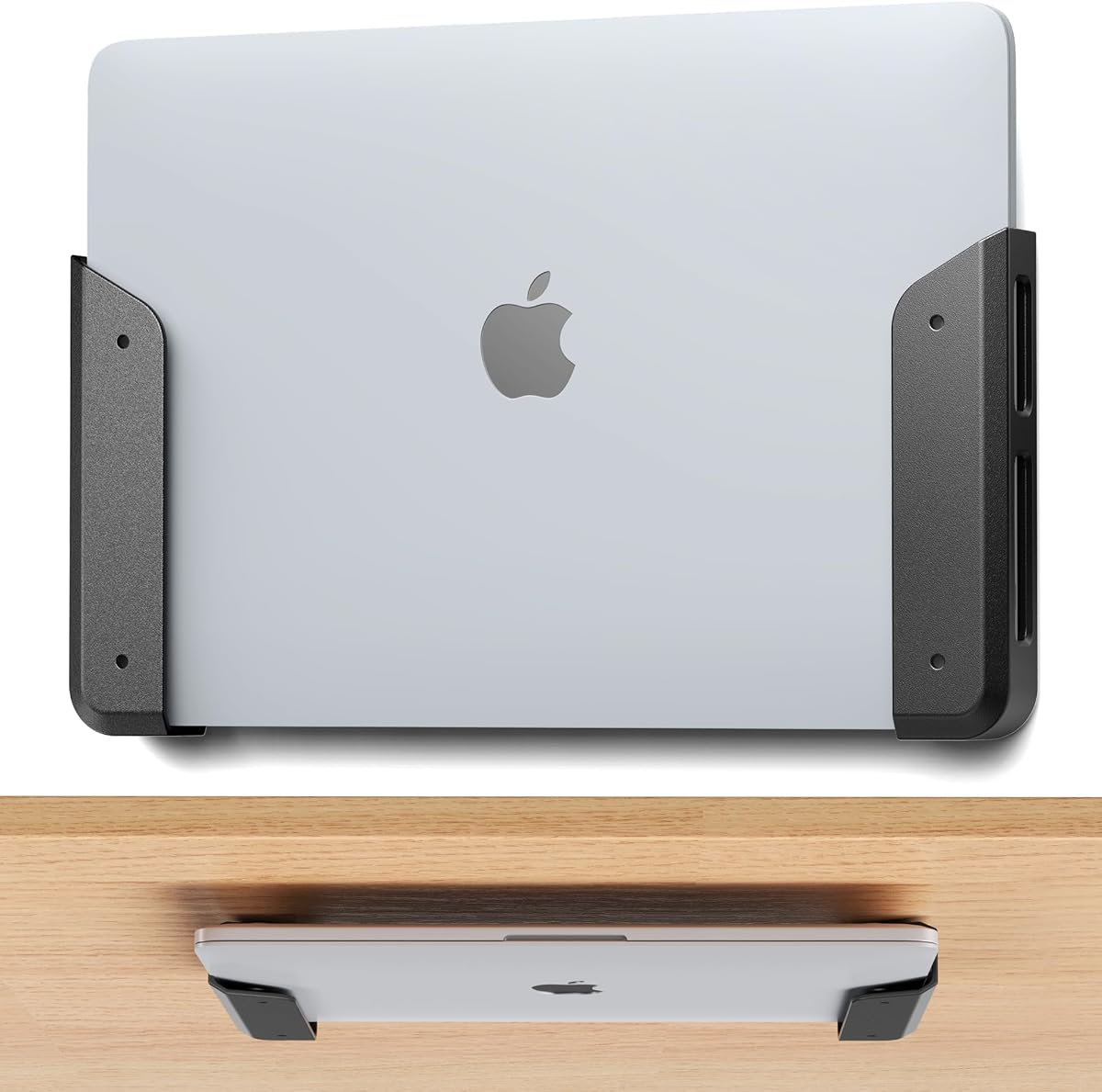
ELETIUO Wall & Under Desk Mount
4.2Editor score
Dual Adhesive and Screw Options
Anti-Scratch Protective Pads
Universal Device Compatibility
Finding the right laptop wall mount can transform your workspace by freeing up valuable desk surface. A good mount offers stability, adjustability, and protects your device from overheating while keeping it accessible.
We evaluated ten highly rated models based on their build materials, range of motion, weight capacity, and ease of installation. Our analysis focuses on real-world usability for home offices, clinics, and compact living spaces.
Each pick below highlights specific strengths and ideal use cases to help you match a mount to your needs. Keep in mind that availability and terms may shift, so verify details before purchasing.
4.2Editor score

4.6Editor score

4.5Editor score
As an Amazon Associate we earn from qualifying purchases.
The following table provides a side-by-side look at the key specifications and capabilities of each model to help you quickly identify which fits your specific setup requirements.


This mount stands out as a top choice for its dual functionality and robust build quality. With a solid rating from users, it delivers reliable support for laptops and monitors alike while offering significant ergonomic flexibility.
We may earn a commission when you buy through this link, at no additional cost to you.
Its articulating arms allow for extensive tilt, swivel, and rotation, enabling you to position your screen exactly where you need it. The integrated cable management helps maintain a tidy workspace, which is crucial for professional environments.
The ventilation slots in the tray are a thoughtful addition that prevents overheating during long sessions. While installation requires specific wall types for safety, the included hardware and clear instructions simplify the process.
Ideal for home offices or clinics, this mount combines stability with adaptability. It is an excellent investment for anyone looking to reclaim desk space without compromising on device accessibility.
The 2-in-1 design allows you to switch between laptop and monitor modes effortlessly, adapting to different tasks throughout the day.
The vented tray design promotes airflow, ensuring your device remains cool even during intensive computing tasks.
We may earn a commission when you buy through this link, at no additional cost to you.
For those seeking a cost-effective solution, this mount offers great value with its universal compatibility. It accommodates a wide range of devices including laptops, tablets, and even gaming consoles.
We may earn a commission when you buy through this link, at no additional cost to you.
The dual mounting options provide flexibility depending on your needs. Adhesive strips allow for quick installation without tools, while screws ensure a more permanent and secure setup for heavier items.
Anti-scratch pads are strategically placed to protect your device from damage during insertion and removal. The design also ensures you do not have to remove your device to charge it.
This mount is perfect for temporary setups or lighter devices where a full arm is not necessary. It effectively declutters your space at a fraction of the cost of more complex systems.
The adhesive option allows you to mount your device instantly without needing screws or anchors, ideal for renters.
Adjustable spacing ensures a snug fit for everything from slim notebooks to thicker tablets and keyboards.
We may earn a commission when you buy through this link, at no additional cost to you.
This premium model offers an extended reach that surpasses standard mounts, making it ideal for spaces where distance is a factor. The gas spring mechanism ensures smooth, effortless adjustments without sagging.
We may earn a commission when you buy through this link, at no additional cost to you.
The detachable tray allows you to convert the arm into a standard monitor mount easily, providing versatility for different setups. This dual-purpose design adds significant value to the overall package.
While the price is higher, the quality of materials and the long reach justify the investment. It is particularly well-suited for professionals who need to position their screen across a large desk area.
If you prioritize flexibility and ergonomic comfort, this mount delivers top-tier performance. Its stability and smooth motion make it a standout choice for demanding work environments.
With an extension up to nearly 28 inches, you can pull your screen forward or push it back as needed effortlessly.
The 3-section gas spring arm maintains tension over time, ensuring your device stays in place without drifting.
We may earn a commission when you buy through this link, at no additional cost to you.
This model combines strength and versatility with a weight capacity that accommodates most modern devices. The locking mechanism adds an extra layer of security to ensure your laptop stays in place.
We may earn a commission when you buy through this link, at no additional cost to you.
With a vertical adjustment range of 11 inches and a reach of over 20 inches, you have ample control over your viewing angle. The open-frame design maximizes airflow to prevent overheating.
The mounting process is straightforward with included hardware, but care must be taken to use proper wall anchors for safety. It is a solid choice for those needing to lift heavier devices off the desk.
For users looking for a balance of space savings and device support, this mount is a strong contender. It effectively declutters the workspace while keeping your device secure.
The innovative locking mechanism ensures your device cannot slip out of the tray during adjustments.
Ventilation slots are placed strategically to cool the device during intense usage without compromising stability.
We may earn a commission when you buy through this link, at no additional cost to you.
Designed to maximize workspace efficiency, this mount offers a dual-purpose solution that adapts to your changing needs. The clever latch mechanism ensures your device stays firmly in place even when moved.
We may earn a commission when you buy through this link, at no additional cost to you.
The ventilated tray design is particularly effective at keeping your device cool, which is vital for laptops running high-performance tasks. You can free up to 80% of your desk space with this setup.
While the installation requires securing the bracket into solid materials, the provided hardware makes it feasible. The reach allows you to pull the screen closer for typing or push it back for viewing.
This is an excellent option for small dorms or crowded offices where every inch counts. It provides a clean, organized look while ensuring your device is safe and accessible.
The tray features a latch that locks your laptop securely, preventing accidental falls during movement.
Full motion adjustments allow you to find the perfect ergonomic angle for reading, working, or gaming.
We may earn a commission when you buy through this link, at no additional cost to you.
Built for professional environments, this mount provides reliable performance for daily workloads. Its high-grade arm ensures smooth transitions between viewing modes without any wobble or sag.
We may earn a commission when you buy through this link, at no additional cost to you.
The ventilated platform is designed to dissipate heat effectively, keeping your device stable during long sessions. You can adjust the height to eye level to reduce neck strain significantly.
Installation involves anchoring into solid wall structures to ensure the mount holds its position under regular use. The design prioritizes function and durability over flashy features.
This mount is perfect for dental clinics or offices where devices need to be accessible yet out of the way. It offers a robust solution that stands up to frequent adjustments.
The arm is designed to withstand daily use in professional settings without losing tension over time.
By positioning your screen at eye level, you maintain better posture and reduce physical fatigue.
We may earn a commission when you buy through this link, at no additional cost to you.
This model stands out for its full range of motion and the convenience of a detachable tray. The pads on the corners ensure your device is protected from any potential damage during installation.
We may earn a commission when you buy through this link, at no additional cost to you.
The concealed cable management system keeps wires hidden, contributing to a sleek and professional look in your room. You can rotate the device freely to share your screen with others easily.
While the tray is removable, it is designed to hold laptops securely with adjustable width settings. The platform allows you to switch between laptop and monitor usage as needed.
It is an excellent choice for users who prioritize aesthetics and flexibility. The combination of smooth movement and protective features makes it a reliable addition to any home office.
Wires are neatly organized along the arm, ensuring your workspace remains clutter-free and tidy.
Pads on all contact points prevent scratches when you place or remove your device from the mount.
We may earn a commission when you buy through this link, at no additional cost to you.
This mount features a pneumatic arm that allows for tool-less height adjustment, making it easy to find the right angle quickly. The counter-balance design ensures the device stays in place once positioned.
We may earn a commission when you buy through this link, at no additional cost to you.
Rubber tabs secure your laptop gently without scratching the surface while providing ventilation slots to keep it cool. The inclusion of a long warranty gives peace of mind regarding durability.
Note that the arm requires a minimum weight to operate correctly, which might be an issue for very light ultrabooks. However, for standard laptops it works efficiently and reliably.
Ideal for those who frequently change their viewing height, this mount offers convenience. It balances functionality with protection ensuring your device is safe and accessible.
You can adjust the height without any tools, allowing you to switch between sitting and standing quickly.
Rubber tabs hold the device securely while preventing scratches from metal contact points.
We may earn a commission when you buy through this link, at no additional cost to you.
Unique for its dual mounting capability, this arm lets you choose between a wall plate or a pole clamp for installation. This versatility makes it suitable for various spaces like reception desks or clinics.
We may earn a commission when you buy through this link, at no additional cost to you.
The spring arm allows you to adjust tension manually ensuring the laptop stays planted where you set it. Hold-down supports keep the machine secure during typing and viewing tasks.
Installation is straightforward with clear instructions, and the support team is available to assist if you encounter issues. It is a solid choice for users with unique mounting requirements.
Whether you need to mount on a wall or a pole this arm adapts to your setup. It offers a reliable and flexible solution for keeping your device off the desk surface.
The box includes both wall and pole brackets so you can choose the best fit for your environment.
You can adjust the arm tension to ensure it moves smoothly but stays secure without drifting.
We may earn a commission when you buy through this link, at no additional cost to you.
This mount offers a simple yet effective way to organize multiple devices like laptops and keyboards on a wall. The two-tier design allows you to store different electronics vertically to save horizontal space.
We may earn a commission when you buy through this link, at no additional cost to you.
EVA pads are provided to protect your devices from scratches during placement. The construction uses high-quality metal to ensure the shelves can hold significant weight without bending.
While it does not offer the arm adjustability of other models it provides a stable and secure storage solution. Installation is a straightforward process using standard screws and plugs.
For users needing to store multiple devices in one spot this mount is highly practical. It is ideal for small offices or study rooms where space is at a premium.
You can store a laptop and keyboard together or multiple tablets, maximizing your vertical wall space.
The metal construction ensures the mount remains stable and strong even with heavier devices stored on it.
We may earn a commission when you buy through this link, at no additional cost to you.
Selecting the right mount involves considering compatibility, adjustability, and installation requirements. This section breaks down the key factors to help you make an informed decision.
Ensure the mount supports your laptop size and weight. Most mounts are designed for laptops between 11 and 17 inches, but check the weight limit carefully to avoid overloading the arm.
Check if the mount also supports monitors if you plan to use it as a dual-purpose device. VESA patterns are a common standard for monitor compatibility, so verify your screen matches the mount.
Look for mounts that offer tilt, swivel, and extension capabilities. A good range of motion allows you to position the screen at eye level to reduce neck strain during long work sessions.
Consider whether you need rotation in both portrait and landscape modes. Some models allow 360-degree rotation which is useful for presentations or sharing your screen.
Most durable mounts require anchoring into wall studs or solid brick for safety. Always check the installation guide to see if your wall type is supported to avoid potential hazards.
Some models offer adhesive options for lighter devices or temporary setups. However for permanent heavy-duty use screw mounting is generally the safer and more reliable choice.
A vented tray is essential to prevent your laptop from overheating. Look for open-frame designs that allow airflow to reach the bottom of the device during intensive use.
Check if the tray includes locking mechanisms or pads to secure your device. These features prevent accidental slips and protect your laptop from scratches when being placed in the mount.
A mount with integrated cable management keeps your workspace tidy by hiding power and video cables. Look for channels or clips that route wires neatly along the arm or wall bracket.
Proper cable routing also reduces strain on your laptop ports. Secure the cables so they do not dangle or get caught when you adjust the screen position.
Steel and aluminum constructions are preferred for durability and stability. High-quality materials ensure the arm does not sag over time and can support your device safely for years.
Look for protective padding on contact points to prevent scratches. A sturdy build also means the mount will handle frequent adjustments without developing loose joints or wobble.
Always check the maximum weight limit of the mount to ensure it can support your specific laptop. Exceeding this limit can lead to instability and potential damage to the device or wall.
If you plan to use a heavy laptop or monitor, choose a model with a higher weight rating. It is better to have extra capacity than to risk the mount failing under stress.
A solid warranty indicates manufacturer confidence in the product's durability. Look for options that cover parts and labor for at least one year to protect your investment.
Consider the availability of customer support for installation or usage questions. Responsive support can be crucial if you encounter issues with mounting hardware or setup instructions.
Begin by locating wall studs or a solid surface to install the bracket. Use a stud finder to ensure you are attaching to a secure location that can handle the weight of your device.
Install the mount according to the manufacturer instructions using the provided hardware. Ensure all bolts are tightened securely and double-check the stability before placing your device on it.
Adjust the arm to your preferred height and angle before using your laptop. Periodically check the bolts and tension adjustments to ensure the mount remains secure over time.
No, installing on drywall alone is not recommended for safety. You should anchor the mount into a stud, concrete, or brick wall to support the weight properly. If you must use drywall, use heavy-duty anchors rated for the weight.
Most universal mounts support 75x75mm and 100x100mm VESA patterns. These are the standard sizes for most monitors. Always check your screen specifications to confirm compatibility before purchasing.
Yes, many models include vented trays that allow air to circulate around your device. This helps dissipate heat effectively which prevents overheating during heavy use and keeps your device safe.
Yes, most universal mounts are designed to fit various laptop brands including MacBooks. Just ensure your device fits within the weight and size limits specified for the mount you choose.
Many mounts are versatile enough to support tablets as long as they fit the size and weight constraints. Some even offer specific features like adjustable straps to hold tablets securely in place.
Most models support between 15 and 22 pounds for laptops. Heavy-duty options may support up to 32 pounds for monitors. Always verify the maximum capacity in the product specifications.
Use a dry or slightly damp cloth to wipe down the metal arms and brackets. Avoid harsh chemicals that might damage the finish. Ensure no liquid enters the mechanical joints or spring mechanisms.
Some mounts have trays that can hold smaller devices like phones. However you should check the tray dimensions and clamps to ensure your phone fits securely without sliding or tipping.
Choosing the right laptop wall mount depends on your specific needs for space and flexibility. Our top picks offer reliable support and ergonomic adjustments to help you create a productive workspace.
Prioritize features like build quality, cooling design, and range of motion when selecting a model. Ensure your wall structure can support the mount to guarantee safety and stability for years.
Remember to verify compatibility with your device before purchasing to avoid returns. Prices and availability may change, so check current details to make the best choice for your setup.