
Upgraded Watt Power Meter Plug
4.6Editor score
7 modes display
Overload protection
Adjustable backlight
Compare the top energy consumption monitors for PC to track usage and save costs. This guide reviews smart plugs, whole-home systems, and detailed meters.
Managing your computer setup's power usage is crucial for efficiency. Energy consumption monitors for PC help you understand exactly how much electricity your devices draw. This knowledge allows you to optimize settings and reduce unnecessary costs without sacrificing performance.
We compared ten top-rated products based on accuracy, features, and ease of use. Our list includes plug-in meters for individual devices and whole-home systems that track multiple circuits. Each option offers unique benefits depending on whether you monitor a single workstation or an entire house.
Each pick shows real-world performance, detailed specs, and user feedback. We highlight who each device suits best and what to expect from its interface. Prices can fluctuate, so check current listings before buying to ensure you get the best deal for your budget.
4.6Editor score

4.6Editor score

4.3Editor score
This side-by-side comparison highlights key differences between all ten selected monitors. Evaluate accuracy, connectivity options, and specific features to find the right fit for your PC and home energy tracking needs.


The Emporia Vue 3 is a top choice for comprehensive home energy monitoring. It offers real-time data across multiple circuits with high accuracy. The UL certification ensures safety during installation and operation in your electrical panel.
We may earn a commission when you buy through this link, at no additional cost to you.
This system tracks power usage for individual appliances and overall home consumption. The mobile app provides detailed charts and insights. Solar integration features help optimize renewable energy usage and savings.
Installation involves working in your main circuit panel which may require professional help. The 2.4GHz Wi-Fi requirement can be limiting for some networks. However, the long-term savings justify the setup effort.
Buy this if you want detailed energy data for your entire home. It is ideal for PC owners with high-power setups who need precise tracking. The features support significant energy cost reduction effectively.
Track every major appliance including gaming PCs and servers simultaneously.
Optimize solar energy usage by monitoring production versus consumption in real time.
We may earn a commission when you buy through this link, at no additional cost to you.
This watt meter plug is an affordable entry point for energy tracking. It connects directly to any standard wall outlet. The display shows multiple parameters including watts and kilowatt-hours.
We may earn a commission when you buy through this link, at no additional cost to you.
Seven display modes allow you to cycle through voltage and current data. Overload protection warns you if a device draws too much power. The backlight helps read data in dim environments.
It lacks Wi-Fi connectivity so remote monitoring isn't possible. You need to check the device manually to see usage. This limits convenience compared to smart monitors.
Buy this for simple monitoring of individual devices like PCs or TVs. It works well for budget-conscious users needing basic usage data. The price point makes it a practical choice.
See real-time power draw instantly without needing a network connection.
Overload protection alerts you if a device exceeds safe power limits.
We may earn a commission when you buy through this link, at no additional cost to you.
The SURAIELEC Outlet Watt Meter offers high accuracy for detailed energy tracking. It supports a wide voltage range making it versatile. The design leaves the lower outlet accessible for other plugs.
We may earn a commission when you buy through this link, at no additional cost to you.
It stores data for up to ninety days using internal battery backup. This ensures you don't lose usage history during power outages. The backlight display is clear and easy to read.
It lacks wireless connectivity so remote alerts are impossible. You must interact directly with the unit to reset or view data. This is less convenient for tech-savvy users.
Buy this if you prioritize accuracy and reliability over smart features. It fits well for dedicated monitoring of high-performance PCs. The compact design helps save valuable outlet space.
Class 1.0 accuracy ensures precise readings for power and energy costs.
Battery backup keeps your usage data safe even if the outlet loses power.
We may earn a commission when you buy through this link, at no additional cost to you.
Meross offers a premium solution with local data processing for privacy. It integrates seamlessly with Home Assistant for automation. This allows you to monitor PC usage without cloud dependencies.
We may earn a commission when you buy through this link, at no additional cost to you.
The system supports solar tracking to optimize energy use. You can see exactly how much power your gaming rig uses versus total production. The absence of subscription fees adds long-term value.
Installation in the electrical panel is complex and risky without expertise. The cost is higher than plug-in alternatives. However, the precision and automation capabilities justify the investment.
Buy this for advanced users needing home energy and PC automation. It suits those prioritizing privacy and solar energy optimization. The detailed insights help maximize your energy efficiency.
Keep all energy data local to your network without sending it to the cloud.
Automatically shift high PC loads to times when solar power is abundant.
We may earn a commission when you buy through this link, at no additional cost to you.
This monitor is ideal for shared apartments or rental homes. It supports customizable templates for fair electricity billing. Each room's usage can be tracked individually for transparency.
We may earn a commission when you buy through this link, at no additional cost to you.
It works with Home Assistant for advanced local control. Privacy mode allows operation without internet access. This ensures data remains within your local network.
Setting up sixteen sensors takes significant time and effort. The app is necessary for viewing real-time trends. Without it, you lose much of the detailed data.
Buy this for multi-tenant properties needing precise usage breakdowns. It works for PCs and shared servers where fair billing matters. The allocation features simplify landlord-tenant agreements.
Charge tenants based on their actual circuit usage using customizable rate templates.
Run entirely on your LAN using MQTT without relying on external internet access.
We may earn a commission when you buy through this link, at no additional cost to you.
The HBN watt meter provides clear data with nine modes. It measures apparent power and power factor for detailed analysis. The wide viewing angle helps read data from anywhere.
We may earn a commission when you buy through this link, at no additional cost to you.
It stores data to prevent loss during power outages. Resetting cumulative totals is easy with a button press. The backlight aids visibility in low light conditions.
Data storage is limited to local non-real-time info. You cannot access usage history remotely on a phone. This is a manual monitoring tool only.
Buy this for straightforward plug-and-play usage. It suits basic energy tracking for PCs or peripherals. The simplicity ensures no technical skills are required.
Track VA metrics to understand total power load beyond just active watts.
Input your electricity rate to see estimated costs instantly on the display.
We may earn a commission when you buy through this link, at no additional cost to you.
KETOTEK offers a versatile interface with one-click parameter switching. It tracks KWH and electricity costs separately. Overload protection adds an extra layer of safety.
We may earn a commission when you buy through this link, at no additional cost to you.
You can delete measurement data without resetting settings. This is useful when switching between multiple appliances. The LCD is wide-angle for easy reading.
It requires physical access to view current data. There are no smart notifications for high usage. This limits its use for remote monitoring of PCs.
Buy this for users who want robust manual features. It handles high-precision readings well. The alarm system alerts you to dangerous power spikes immediately.
Quickly toggle between power and cost metrics without complex menus.
LED lights flash when usage exceeds safety or budget thresholds.
We may earn a commission when you buy through this link, at no additional cost to you.
This two-pack offers value for monitoring multiple devices. The build uses fireproof ABS material for safety. Eight display modes cover essential electrical parameters.
We may earn a commission when you buy through this link, at no additional cost to you.
Overload protection warns you via flashing backlight. This helps prevent damage to connected PCs or power supplies. The reset is simple with a button press.
Each unit is independent and requires physical checks. Sharing data between units is not possible. This is a manual tracking solution only.
Buy this for monitoring both PC and peripherals simultaneously. It is cost-effective for basic usage needs. The extra unit is useful for other devices like TVs.
Track two separate devices at once without swapping meters manually.
Fireproof ABS casing protects against overheating and electrical hazards.
We may earn a commission when you buy through this link, at no additional cost to you.
Kill A Watt is a classic device for basic energy tracking. The large LCD counts consumption clearly. It offers four settings for daily weekly and monthly stats.
We may earn a commission when you buy through this link, at no additional cost to you.
It calculates expenses based on input rates. Compatible with inverters for use in various setups. It remains reliable for simple PC power needs.
The interface is limited to four settings and no Wi-Fi. You cannot view data remotely. Modern monitors offer more advanced features.
Buy this for simple retrofits needing basic stats. It fits well for older setups lacking smart plugs. The large display makes reading easy.
Proven design that works without internet or mobile apps.
See projected electricity costs for your PC based on daily usage.
We may earn a commission when you buy through this link, at no additional cost to you.
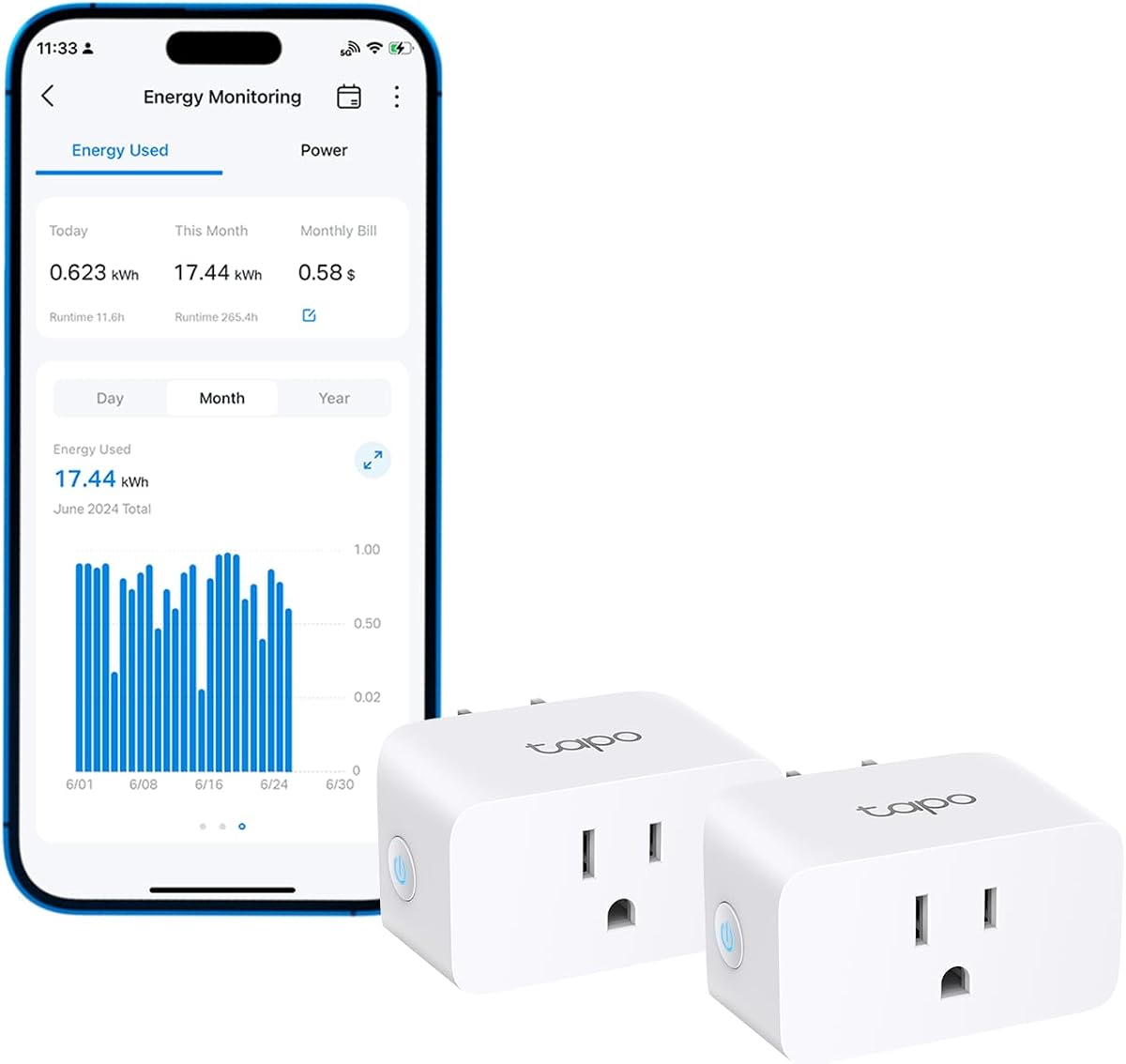
Tapo provides smart monitoring with Wi-Fi connectivity. You can track usage via intuitive charts and stats. Auto-shutoff prevents overcharging your devices or PCs.
We may earn a commission when you buy through this link, at no additional cost to you.
Voice commands allow remote control of power states. You can schedule high-load tasks to off-peak hours. The app provides clear billing estimates.
It only tracks individual plug loads not whole circuits. This limits deep PC component analysis. However, it is great for overall power management.
Buy this for smart home integration and ease. It suits modern users wanting remote control. The scheduling helps reduce PC idle energy waste.
Automate your PC to power down during expensive peak hours.
Turn off your workstation with a simple voice command for convenience.
We may earn a commission when you buy through this link, at no additional cost to you.
Choosing the right energy monitor depends on your tracking goals and setup complexity. Consider these factors to find the device that fits your PC and home needs best.
Accuracy is critical when monitoring high-performance PCs to ensure you see real usage. Look for devices with at least ±2% tolerance to trust your data. Lower tolerance means you can rely on the cost calculations.
Decide if you need remote access via Wi-Fi or prefer local readouts. Smart plugs let you track usage from your phone anywhere. Hardwired systems offer more detail but require more setup.
Determine if you need whole-home circuit data or single outlet tracking. Plug-in meters suit individual PCs and accessories. Panel monitors offer total system visibility and appliance breakdowns.
Clear display is essential for quick manual checks. Ensure the screen shows power watts and cost clearly. Backlight helps in dark server rooms or setups.
Check if the device stores data when unplugged or power fails. Some meters lose history without battery backup. Good retention ensures you don't lose tracking progress.
Safety certifications like UL or ETL are vital for electrical devices. Overload protection warns you when power spikes dangerously. This protects both the monitor and your equipment.
Some apps require monthly fees for advanced analytics. Look for devices with one-time purchase pricing. Local data storage avoids hidden recurring costs.
Panel monitors require electrical access which may need a professional. Plug-in meters work out of the box easily. Consider your technical skill when choosing.
Plug or install the device securely to ensure accurate readings. Loose connections can cause false data. Follow manufacturer guidelines for setup.
Yes most monitors track power down to a few watts. They detect low load states like sleep mode. This helps you see how much energy your PC wastes when not in use.
Yes they are designed to handle high loads safely. Ensure the watt rating matches your PC setup. Overload protection adds extra safety during intensive gaming sessions.
No basic plug-in meters work without smart systems. Advanced panel monitors often benefit from app integration. You can use standalone apps without full home automation.
They measure kilowatt-hours and multiply by your rate. Input your local cost per kWh in settings. This gives an estimate of your PC's electricity bill.
Yes if using a circuit monitor or power strip. Plug-in meters may only track the main outlet. Use a strip monitor to see total station usage.
Local data storage keeps history safe offline. Smart monitors may lose live updates but retain logs. Check if the device stores data locally for reliability.
Choosing the right monitor helps you save energy and optimize PC costs. Whether you need a simple plug or a whole-home system there is a fit.
Prioritize accuracy and safety for reliable long-term tracking. Consider your setup complexity and whether you need remote access features.
Prices fluctuate so verify current deals before purchase. Select the device that offers the best value for your needs.