
Arsvita CD Laser Lens Cleaner Disc Cleaning Set
4.2Editor score
Two brush clean process
Includes glasses cloth
Works with CD DVD players
This guide compares the top ten CD and DVD Player Cleaner options to help you restore playback quality and extend device life with reliable cleaning tools.
Keeping your optical disc players in top shape requires regular maintenance to prevent skipping and freezing issues. A quality cleaner ensures the laser lens remains free of dust and debris for optimal performance.
We evaluated ten leading cleaning kits based on compatibility, cleaning technology, and user feedback. Our analysis focuses on effectiveness across various disc formats and device types including game consoles.
Each selection highlights key features and real world performance metrics to guide your purchase decision. Remember that product availability and pricing can change so verify details before ordering online.
4.2Editor score

4.2Editor score
4.2Editor score
The following table provides a side-by-side overview of all ten selected cleaning solutions highlighting their primary specifications and compatibility details for easy reference.






The Arsvita CD Laser Lens Cleaner Disc Cleaning Set ranks as our top pick for its balanced performance and comprehensive kit contents. It holds a strong 4.2-star rating from users who appreciate its ability to restore playback functionality without complex procedures.
We may earn a commission when you buy through this link, at no additional cost to you.
Its special technology utilizes a 2-brush clean process designed to remove dirt and dust deposits that often cause audio and video dropouts. This method effectively targets the laser lens to extend the service life of your CD VCD or DVD player while improving sound and image quality at the same time.
While effective for most optical drives users should note it is not compatible with gaming systems like PlayStation or Xbox. Additionally some users may find that heavily soiled lenses require more than one cleaning cycle to achieve optimal results.
This kit is ideal for home office users or anyone maintaining standard optical disc players. If you experience freezing or skipping during playback this solution offers a reliable and cost effective way to troubleshoot the issue without replacing hardware.
Cleaning the laser lens directly addresses dropouts and distortions caused by accumulated debris on the optical surface.
The package includes a cleaner disc glasses cloth and user manual to ensure you have everything needed for effective cleaning.
We may earn a commission when you buy through this link, at no additional cost to you.
The Arsvita ARCD-04 offers excellent value with a 4.3-star rating and added accessories that enhance the cleaning experience. It stands out in the budget category by including disc cleaning fluid alongside the standard cleaning disc and cloth.
We may earn a commission when you buy through this link, at no additional cost to you.
Users report significant improvement in playback quality after using the 2-brush clean process which targets dirt and dust deposits effectively. The inclusion of after sales support and a 24-hour standby service adds peace of mind for purchasers concerned about product reliability.
The primary limitation is its incompatibility with major gaming consoles which restricts its use to dedicated media players. Furthermore the included fluid may be consumed quickly if used frequently requiring separate purchases for ongoing maintenance.
This option is perfect for users with standard home theater systems who want a complete kit without spending much. The additional fluid ensures you can clean discs as well as the lens making it a versatile choice for media enthusiasts.
Includes disc cleaning fluid and glasses cloth to provide a more thorough maintenance solution than basic cleaner discs.
The company offers 24-hour standby service to assist with any problems that may arise during product usage.
We may earn a commission when you buy through this link, at no additional cost to you.
Maxell DVD-LC DVD Lens Cleaner delivers professional-grade cleaning with ultra-fine synthetic fibers impregnated with copper for maximum demagnetization. Its 4.2-star rating reflects consistent performance across DVD Blu-Ray and computer drives without causing damage to sensitive components.
We may earn a commission when you buy through this link, at no additional cost to you.
The Thunderon brush system effectively removes scratches and dust that lead to skipping and freezing during playback. Maxell recommends cleaning after every 10 hours of use to maintain optimal quality and extend the durability of your player.
While highly effective for most drives it is not suitable for PS3 or PS4 systems which limits its universality for gamers. The recommendation to replace the product after 20 usages adds to the long-term cost though performance remains high within that period.
Choose this for high-end home theater setups or office computers where reliability is paramount. The ability to safely clean Blu-Ray players alongside standard DVDs makes it a versatile choice for modern media centers.
Ultra-fine synthetic fibers impregnated with copper ensure maximum cleaning and demagnetization of the laser lens.
Safe for use with Blu-Ray players all DVD players computers and laptops providing broad utility for various devices.
We may earn a commission when you buy through this link, at no additional cost to you.
The Arsvita ARCD-02 provides a solid cleaning solution with a 4.1-star rating and a focus on restoring playback clarity. It includes one disc cleaning fluid along with the standard cleaning disc and glasses cloth for a complete maintenance experience.
We may earn a commission when you buy through this link, at no additional cost to you.
Users appreciate the 2-brush clean process that removes dirt and dust deposits causing audio and video dropouts. The product claims to extend service life and improve sound quality which aligns with feedback from those who used it on home theater systems.
It is incompatible with major gaming consoles which restricts use to CD VCD and DVD players only. Additionally the single fluid bottle may not be enough for heavy users requiring separate purchases for ongoing maintenance.
This kit suits users who need a simple effective cleaning tool for standard disc players. The inclusion of fluid and cloth makes it a good value option for those looking to maintain their media library efficiently.
Includes cleaner disc glasses cloth and disc cleaning fluid to address both lens and disc surface cleanliness.
Cleaning the laser lens can extend the service life of your player by reducing wear from debris accumulation.
We may earn a commission when you buy through this link, at no additional cost to you.
Endust for Electronics Lens Cleaner is designed for office desktops school use and home offices with a strong 4.3-star rating. It safely cleans the lens of any device that is CD DVD or Blu-Ray compatible making it versatile for varied environments.
We may earn a commission when you buy through this link, at no additional cost to you.
The product removes dust and dirt from your disc player effectively preventing playback interruptions. Users note that you must turn device audio on for use instructions once the CD is inserted which ensures correct operation during the cleaning cycle.
One constraint is the requirement to keep audio active during use which might be inconvenient in quiet environments. Some users also find the price point higher than basic brush cleaners though the brand reputation and compatibility justify it.
This cleaner is ideal for schools offices or shared spaces where multiple devices need reliable maintenance. The assurance of safety across different device types makes it a trusted choice for IT managers and general users.
Perfect for office desktops and school use where reliability and ease of use are essential for shared equipment.
Safely cleans the lens of any device that is CD DVD or Blu-Ray compatible covering a broad range of devices.
We may earn a commission when you buy through this link, at no additional cost to you.
Nicer CD VCD DVD Player Kit NS-2 offers a straightforward cleaning experience with a 4.1-star rating and voice guidance to assist users. It includes cleaning liquid and a microfiber cloth for a complete kit that targets slow loading and skipping issues.
We may earn a commission when you buy through this link, at no additional cost to you.
The kit is designed to solve playback stuck and unclear picture problems by cleaning the laser lens on the device. It supports CD VCD and DVD equipment but excludes gaming consoles making it suitable for home entertainment systems.
The three-minute process is quick and easy but the lack of console support limits its utility for gamers. Users with lower ratings may find the performance less consistent than other brands but the included accessories add value.
Choose this for simple DVD CD player maintenance without complex setups. The voice guidance and after-sales service make it friendly for non-technical users who need a reliable cleaning solution.
Voice guidance and clear instructions make the cleaning process simple for non-technical users and beginners.
Includes a microfiber cloth that can be used to clean CD discs ensuring you can maintain discs too.
We may earn a commission when you buy through this link, at no additional cost to you.
The Nicer NS-1 kit focuses on speed with a one and a half minute process and a 4.0-star rating from users. It includes a microfiber cloth and offers left and right channel testing to verify audio performance after cleaning.
We may earn a commission when you buy through this link, at no additional cost to you.
This kit solves issues like playback stuck and slow loading by cleaning the dirty laser lens on CD VCD and DVD equipment. The operation is simple and the 6-month after-sales service period provides additional support for users.
It does not support gaming consoles which limits application to standard media players. The lower rating suggests some inconsistency in results compared to other products but the speed of use is a distinct advantage.
Use this for quick maintenance on home DVD players where time is a factor. The channel testing feature helps confirm that audio quality has improved after the cleaning process.
The whole process only takes 1.5 minutes making it one of the quickest cleaning options available for standard players.
Includes left and right channel testing to verify audio performance after cleaning your laser lens effectively.
We may earn a commission when you buy through this link, at no additional cost to you.
Maxell CD DVD Quick Wipes offer an excellent solution for disc surface maintenance with a strong 4.3-star rating from users. Each pack contains 20 individual soft non-abrasive wipes that restore discs to peak performance by removing dirt dust and fingerprints.
We may earn a commission when you buy through this link, at no additional cost to you.
These wipes help prevent skipping and ensure a smooth uninterrupted experience while enjoying your media. They are ideal for routine maintenance and help maintain the longevity and optimal function of your CDs and DVDs.
The main limitation is that these wipes clean discs not the internal laser lens which limits their utility for fixing playback errors. However for preserving disc condition and ensuring clean data surfaces they are highly effective.
Keep this in your media kit for regular disc cleaning to prevent skipping caused by surface smudges. It is a convenient and safe way to handle discs without causing damage or leaving residues.
These wipes help prevent skipping ensuring a smooth and uninterrupted experience while enjoying your media content.
The soft non-abrasive wipes offer a quick and safe way to clean your CDs and DVDs without causing damage.
We may earn a commission when you buy through this link, at no additional cost to you.
Allsop Ultra ProLens Cleaner features an eight brush carbon system designed to remove static build-up and prevent skipping during playback. It holds a 4.1-star rating and targets DVD CD drives and game players for reliable maintenance.
We may earn a commission when you buy through this link, at no additional cost to you.
The carbon system helps neutralize static electricity that can attract dust to the laser lens. This is a valuable feature for users in dry environments where static often contributes to drive issues.
Packaging may vary which could be a minor inconvenience for buyers expecting a specific box design. Availability might also be limited in some regions compared to larger brands making sourcing slightly more challenging.
This option is best for users who have experienced static-related skipping issues on their drives. The compact design makes it easy to store alongside your media collection for ready access when needed.
Eight brush carbon system removes static build-up preventing dust from being attracted to the laser lens.
The small profile ensures it fits easily in a storage drawer alongside your CD and DVD collection.
We may earn a commission when you buy through this link, at no additional cost to you.
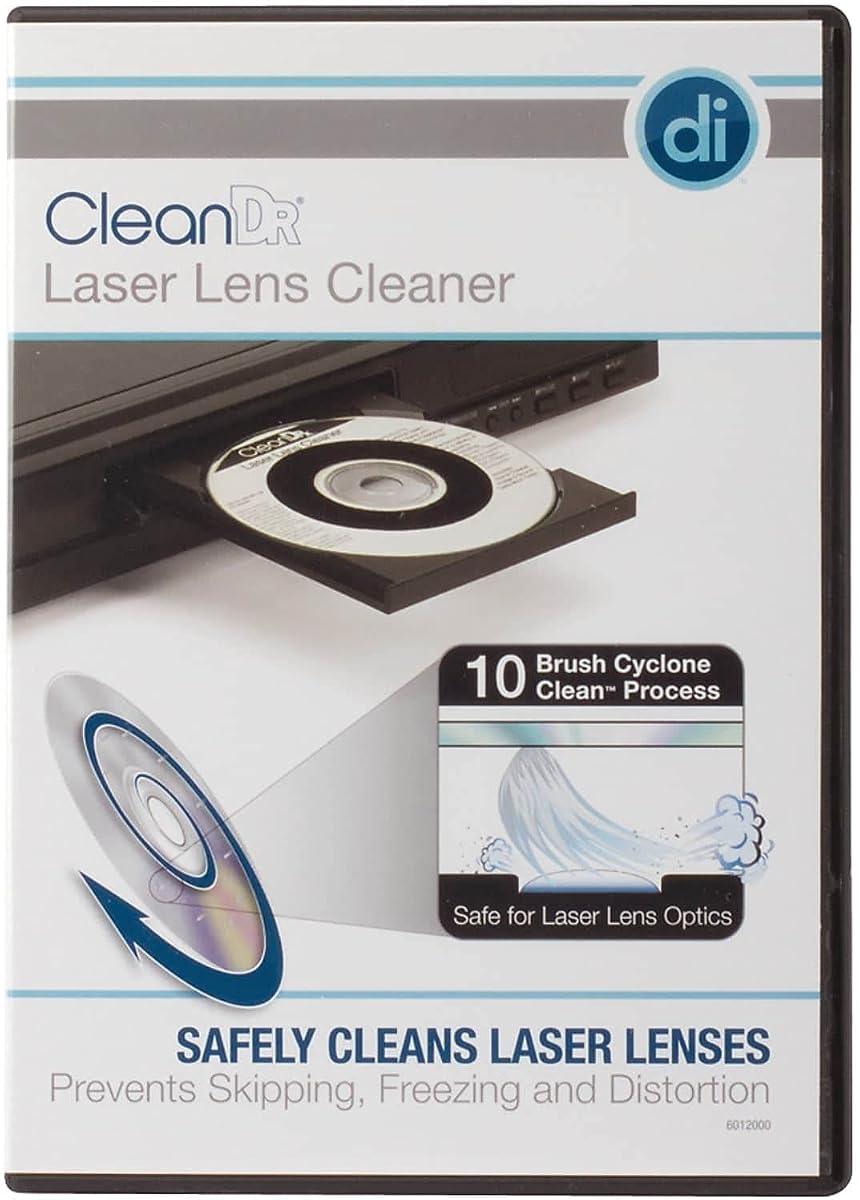
Digital Innovations CleanDr Laser Lens Cleaner boasts a unique 10-brush Cyclone Clean Process that removes dust dirt and debris from the laser lens effectively. With a 4.2-star rating it promises to extend the life of CD and DVD players while improving sound and image quality.
We may earn a commission when you buy through this link, at no additional cost to you.
The exclusive 10-brush cyclone process demagnetizes and removes dust ensuring optimal performance for compatible devices. It is safe for CD DVD players computers Xbox and PS1/2 game systems providing broad utility for mixed device households.
It is not intended for use with Blu-Ray players or WiiU which restricts its use in modern setups that include those formats. Users should verify device compatibility before purchase to avoid mismatch with their current hardware setup.
Choose this for legacy game systems or computer DVD drives that need robust cleaning. The demagnetizing feature offers a distinct advantage for maintaining consistent performance over time.
Unique 10-brush three-stage Cyclone Clean Process demagnetizes and removes dust and dirt from the laser lens.
Safe for CD DVD players computers Xbox and PS1/2 game systems covering a broad range of common hardware.
We may earn a commission when you buy through this link, at no additional cost to you.
Selecting the right cleaner requires understanding your specific device needs and the type of debris affecting performance. This section outlines key factors to consider before purchasing a lens cleaning kit.
Always verify that the cleaner supports your specific player type. Many kits work with CD DVD and Blu-Ray but exclude certain gaming consoles or multi-disc players. Check product labels for supported devices like Xbox PlayStation or PC drives to avoid incompatibility.
Ensure the kit matches your hardware to prevent wasted purchases and potential damage to unsupported systems.
Look for kits that use specialized brush systems such as carbon or microfiber brushes. Some cleaners include fluid to help dissolve stubborn grime while others rely on dry brushing. Advanced options may offer demagnetizing features to reduce static buildup on lenses.
Choose a technology that addresses your common issues like skipping freezing or static interference effectively.
A complete kit often includes more than just the cleaning disc. Check for accessories like microfiber cloths and user manuals. Some sets include extra cleaning fluid which is useful if you maintain multiple discs or devices regularly.
More components provide better value and allow for comprehensive maintenance beyond just lens cleaning.
Select cleaners that provide clear instructions or voice guidance for operation. Some kits require audio activation during use while others run automatically. A simple process reduces the risk of user error during the cleaning cycle.
Prioritize user-friendly designs to ensure consistent and safe application for all household members.
Consider how many times you can reuse the cleaning disc before replacement. Some products suggest replacement after specific hours of use to maintain effectiveness. A longer usable life offers better cost efficiency over time.
Opt for durable kits that can handle repeated maintenance without losing cleaning power quickly.
Check if the manufacturer offers after-sales support or warranties. Companies with responsive service can resolve issues or answer questions about usage. This adds a layer of security for your purchase.
Good support ensures you have help if the product does not work as expected on your device.
Review customer ratings and feedback to gauge real-world performance. Brands with high average ratings and positive comments on reliability are generally safer choices. User reviews often highlight specific use cases and limitations.
Choose trusted brands with a track record of delivering quality cleaning solutions for optical devices.
Balance cost with the features offered in the kit. Basic brushes may be affordable but might lack fluid or extra accessories. Higher-end options could provide longer life or better materials that justify the price.
Set a budget but ensure you do not sacrifice essential features needed for your specific devices.
Insert the cleaning disc into the player with the label facing up and play the track as directed. Follow any voice prompts or instructions to ensure the brushes make full contact with the laser lens during operation.
After cleaning eject the disc carefully and wipe it with a microfiber cloth to remove any residual dust or fluid. Store the disc in its case to prevent scratches or exposure to excess dust before the next use.
Regularly maintain your player by using a cleaner every few weeks depending on usage frequency. Combine lens cleaning with disc surface wiping to prevent recontamination and ensure consistent playback quality.
It is recommended to clean the lens every 10 hours of use or when you notice skipping and freezing issues. Regular maintenance prevents dust from accumulating and extends the life of your optical drive components.
Only specific models are compatible with gaming systems. Always check the product label for Xbox or PlayStation support before purchase to avoid damaging your console or voiding warranties.
If the disc does not resolve the problem the lens may be damaged or the laser weakened. Try cleaning discs again and if issues persist consult a professional technician for hardware inspection.
Yes many modern cleaners are designed to work with Blu-Ray drives as well as standard DVD players. Verify the product specifications to ensure it explicitly lists Blu-Ray compatibility before using.
Some cleaning discs require audio output to activate instructions or detect proper insertion. Keep the volume on during the process as instructed to ensure the cleaning cycle runs correctly.
No you should never apply water directly to the laser lens. Using water can cause damage and ruin the sensitive components inside your player. Always use a dedicated cleaning disc instead.
A cyclone cleaning process uses multiple brushes to remove debris from all angles of the lens. This advanced method ensures thorough cleaning and demagnetization for optimal performance after maintenance.
Most cleaning cycles take between one and three minutes to complete. Some kits include voice guidance to signal when the cleaning is done so you can safely eject the disc.
We reviewed ten top-rated cleaners highlighting the Arsvita Maxell and Nicer kits as standout choices for most users. Each offers unique benefits such as fluid inclusion demagnetizing brushes or quick cleaning cycles to suit different needs.
Prioritize compatibility and brush technology when selecting a kit to ensure it matches your specific player model. A reliable cleaner can resolve skipping and freezing issues without costly hardware replacements.
Remember to check current prices and availability as these details can change frequently online. Verify all specs before purchasing to ensure the kit meets your maintenance requirements.