
Stylus Pen for Touchscreen iPad,3-in-1 High Precision iPad Stylus
4.5Editor score
Three replaceable tips included
Transparent disc tip for precision
Universal capacitive touchscreen compatibility
This guide compares the top fine point stylus pens for 2026 to help you choose the best model for your tablet or smartphone needs.
Finding the right fine point stylus can transform your digital experience. Whether you are an artist needing precision or a student taking notes, the right tool ensures accuracy and comfort without damaging your screen.
We have carefully compared ten top-rated products based on performance and compatibility. Each model offers unique features designed to meet different user needs while maintaining high standards for everyday use across various devices.
Each pick highlights specific strengths like precision tip design or battery life. Keep in mind that prices fluctuate often so check the current listings before making your final decision to ensure you get the best value available today.
4.5Editor score

4.6Editor score

4.4Editor score
This comparison table provides a side-by-side view of all ten selected products highlighting their key specifications and unique features to help you make an informed choice quickly.



This 3-in-1 capacitive stylus offers exceptional value for users seeking a versatile tool without breaking the bank. It stands out by including multiple tip options that cater to different tasks like writing and gaming.
We may earn a commission when you buy through this link, at no additional cost to you.
The transparent disc tip allows precise visibility of the contact point which is crucial for detailed work. The included rubber tips provide comfortable scrolling options that prevent accidental touches on your screen.
While it lacks advanced active features like pressure sensitivity the design ensures smooth operation on most capacitive screens. Users should expect to replace tips occasionally due to normal wear during heavy daily usage.
Ideal for students and casual users this stylus delivers reliable performance at a minimal cost. It is a smart choice for anyone needing an extra pen for multiple devices or family members.
The clear disc design ensures you see exactly where your pen touches the screen improving accuracy significantly compared to standard rubber tips.
Designed to work with iPhones iPads and Android devices this stylus removes the need for purchasing separate tools for each of your gadgets.
We may earn a commission when you buy through this link, at no additional cost to you.
MEKO has refined the classic capacitive stylus with an upgraded design that balances precision and durability effectively. This model stands out as an editor choice due to its thoughtful inclusion of a protective cap and extra tips.
We may earn a commission when you buy through this link, at no additional cost to you.
The transparent disc tip provides exceptional visibility for accurate input while the rubber tips offer comfortable navigation for larger screens. The silicone material resists wear better than cheaper alternatives ensuring a longer product life.
Some users might find the passive nature limiting for professional art tasks but for general note taking it performs excellently. The included cap protects the sensitive disc tip when not in use preventing damage during storage.
This pen is perfect for daily productivity tasks and light creative work across multiple devices. Its comprehensive package makes it a top pick for anyone wanting reliability without complicated setup procedures.
High-quality silicone tips resist degradation over time ensuring consistent performance longer than many budget alternatives found in this category.
The included cap keeps the delicate disc tip safe from debris and damage extending the overall lifespan of your stylus significantly.
We may earn a commission when you buy through this link, at no additional cost to you.
This active stylus brings a closer experience to the standard Apple Pencil at a fraction of the cost. Its magnetic design ensures it stays securely attached to your device when not in active use.
We may earn a commission when you buy through this link, at no additional cost to you.
The one-touch switch allows for quick activation without complex pairing steps. Users can enjoy responsive writing and drawing without lag on supported iPad models making it ideal for digital note takers.
While the battery life is decent the need to charge it adds a maintenance step that passive pens do not require. Users should be aware of the specific iPad generations supported to ensure compatibility.
For users needing tilt or active features without the high price tag this model offers a compelling alternative. It is best suited for those who want an upgrade from basic capacitive pens.
The magnetic side attachment keeps your pen secure and easy to find reducing the chance of losing it in a bag or desk.
Unlike passive styluses this model supports active signal transmission for better accuracy on supported devices for a more natural writing feel.
We may earn a commission when you buy through this link, at no additional cost to you.
This active digital pen focuses on simplicity with a fast power-on mechanism that avoids the complexity of Bluetooth pairing. It delivers a fine point experience suitable for drawing and handwriting on many devices.
We may earn a commission when you buy through this link, at no additional cost to you.
The 1.5mm tip provides a balance between durability and precision allowing for smooth lines on digital canvases. Its universal design means it works across various brands without requiring specific app integrations.
The lack of pressure sensitivity limits its appeal for professional artists but it serves well for general sketching. Users may find the older Micro USB charging port less convenient than modern USB-C alternatives.
Best for students or office workers needing a reliable active pen for daily tasks this model offers steady performance. It is a solid mid-range option for those avoiding high-end brand names.
Powering on within one second ensures you can start writing immediately without waiting for connection setup or app initialization.
The specific tip diameter allows for detailed input making it suitable for tasks like signing documents or precise navigation on touch screens.
We may earn a commission when you buy through this link, at no additional cost to you.
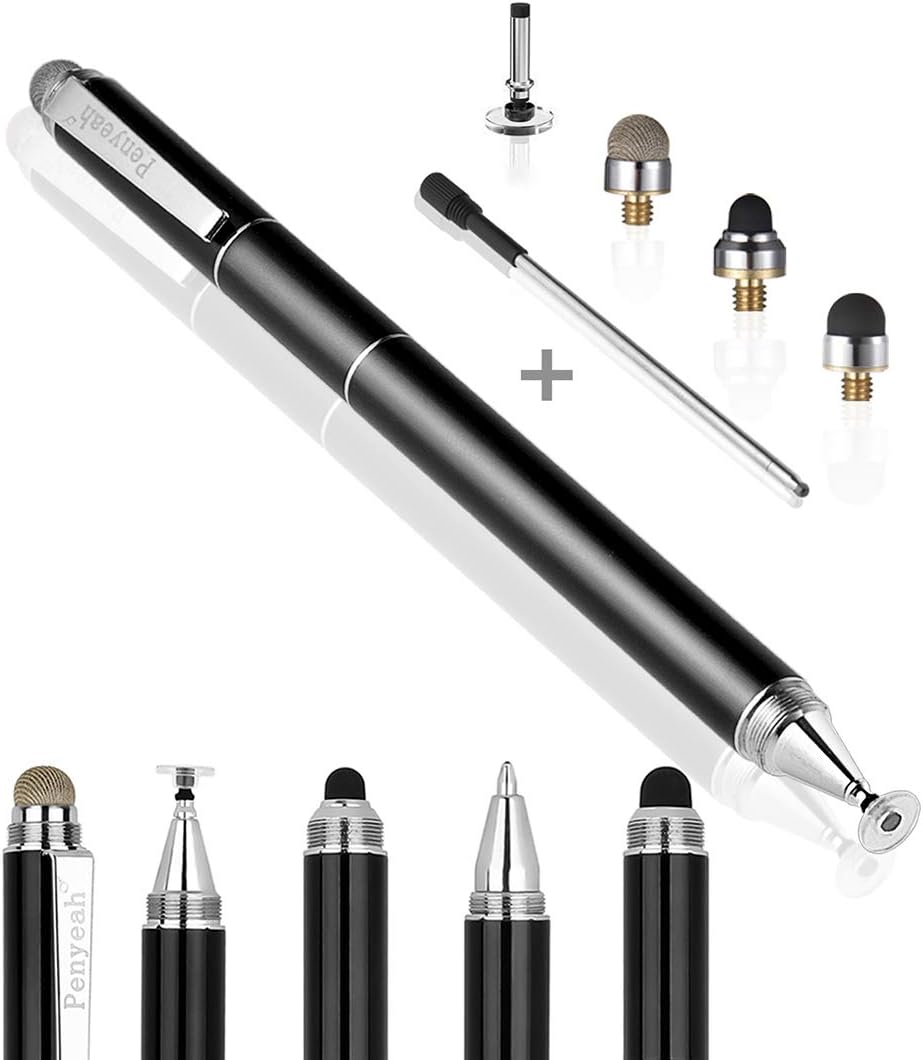
The Penyeah stylus stands out by combining digital touch capabilities with a traditional ballpoint pen in one sleek device. This dual functionality makes it incredibly useful for hybrid workflows involving both paper and screens.
We may earn a commission when you buy through this link, at no additional cost to you.
Its metal body feels premium and durable offering a satisfying weight and grip during long use sessions. The variety of tips including a disc tip and rubber options ensures it can handle diverse interaction types effectively.
While the digital side does not support palm rejection users can manage by adopting a light touch technique. The traditional pen side may eventually require a refill but this adds to the device's long term utility.
Ideal for professionals who switch between digital notes and physical writing this pen covers all bases. It is a stylish choice for those who value form and function in their daily carry accessories.
Having both a stylus and a real ink pen means you are always prepared for meetings or notes on any medium.
The high grade metal construction ensures durability and a professional look that appeals to business and creative users alike.
We may earn a commission when you buy through this link, at no additional cost to you.
Designed with artists and journalists in mind this stylus offers an ultra fine tip that captures details effectively. Its lightweight build reduces hand fatigue during extended drawing sessions making it comfortable for all-day use.
We may earn a commission when you buy through this link, at no additional cost to you.
The eight-hour battery life supports long work periods without interruption and the auto shutdown feature protects battery health. It works seamlessly with many iPad models providing a smooth alternative to expensive proprietary options.
Users must be careful with charging as fast chargers can damage the internal chip. Despite this caveat the pen delivers reliable performance for those prioritizing precision over advanced smart features.
This model is ideal for students and hobbyists looking for an affordable active pen. It offers strong value for its price point especially for users who need precision without the premium cost.
Weighing only 13.3 grams this pen is light enough to use for hours without causing strain on your hand or wrist.
The built-in battery supports up to eight hours of active use ensuring you can work through a full day without recharging.
We may earn a commission when you buy through this link, at no additional cost to you.
This six-pack bundle is the ultimate solution for households or offices needing multiple pens for different devices. It offers exceptional value by providing a reliable stylus for every user without the hassle of single purchases.
We may earn a commission when you buy through this link, at no additional cost to you.
The rubber tips are designed to glide smoothly without scratching screens and the built-in clips ensure easy transport. Because they require no battery they are always ready to use whenever you need them.
While the tips are standard rubber rather than ultra-fine disc types they perform well for general navigation and note taking. Users might need to replace them more often than premium models due to the soft material.
Best for teams or families this bundle ensures everyone has their own dedicated tool. It is a practical and cost effective choice for keeping your digital environment organized and productive.
Buying in a six pack reduces the cost per unit significantly making it an economical choice for shared usage environments.
The integrated pocket clip makes these pens easy to carry in your bag or shirt pocket so they are never lost.
We may earn a commission when you buy through this link, at no additional cost to you.
This four-pack set offers a premium feel with aluminum barrels and a generous supply of replacement tips. It is designed for users who want durability and precision without investing in high-end branded pens.
We may earn a commission when you buy through this link, at no additional cost to you.
The disc tips provide high sensitivity and accuracy while the rubber tips offer versatility for different tasks. The included extra tips ensure that the pens remain useful for a long time without needing new purchases.
While the design is solid the passive nature means it relies on screen capacitance rather than active signals. This is acceptable for most users but may limit compatibility with advanced stylus-only apps.
Perfect for students or shared offices this set balances quality and quantity well. It provides a reliable toolkit for digital interaction that is easy to maintain and distribute among multiple users.
The aluminum barrel gives these pens a substantial feel that mimics traditional writing instruments for a more natural grip.
Including twelve tips with four pens means you are covered for months of usage even with frequent replacements.
We may earn a commission when you buy through this link, at no additional cost to you.
This ten-pack offers an incredible value for classrooms or offices needing reliable tools for everyone. The alloy metal body ensures durability while the vibrant colors help users distinguish their pens easily.
We may earn a commission when you buy through this link, at no additional cost to you.
Each pen features dual rubber tips for both fine and broad tasks providing versatility without complexity. The inclusion of twenty replacement nibs ensures the set remains functional for a very long time.
While the tips are standard rubber and lack precision disc options they perform well for general navigation. The lack of setup or charging requirements makes them incredibly convenient for immediate use.
Ideal for educational settings this bulk pack is a smart investment. It provides a cost-effective solution for equipping students or staff with reliable digital tools for note-taking and browsing.
The metal construction withstands daily wear and tear better than plastic alternatives extending the life of each pen in the set.
The vibrant mixed colors allow each user to pick a specific color for their pen reducing confusion in shared environments.
We may earn a commission when you buy through this link, at no additional cost to you.
This set combines style with utility featuring a sleek aluminum body and dual tips for versatile interaction. It offers high sensitivity performance that rivals more expensive options while remaining extremely affordable.
We may earn a commission when you buy through this link, at no additional cost to you.
The smooth performance tips glide effortlessly across screens protecting your device from scratches and fingerprints. The included replaceable accessories ensure you can maintain performance over time without buying new pens.
While it lacks advanced features like palm rejection the high sensitivity allows for accurate drawing and writing. Users should expect regular tip changes if they use the pens heavily throughout the day.
Best for bulk needs this set is a reliable choice for families or offices. It ensures everyone has a high-quality tool for digital navigation without complicating the experience with batteries or apps.
The aluminum body looks modern and professional making it a great choice for business environments or style-conscious users.
Different tip sizes allow you to switch between precise writing and broader navigation tasks with a single pen easily.
We may earn a commission when you buy through this link, at no additional cost to you.
Choosing the right stylus requires balancing features with your specific usage needs. This guide outlines the critical factors to consider before purchasing.
Tip type determines how your pen interacts with the screen. Rubber tips are durable but less precise while disc tips offer better visibility and accuracy. Choosing the right material affects your workflow efficiency significantly.
Select disc tips for detailed tasks and rubber tips for general navigation to optimize your experience.
Decide whether you need an active pen that requires charging or a passive one that does not. Active pens offer better signal transmission but passive ones are simpler to use.
If you prefer simplicity choose a passive model to avoid charging interruptions during daily use.
Ensure the stylus works with your specific devices such as iPads or Android tablets. Some active pens only work on certain generations while universal passive ones work on all screens.
Verify device compatibility before buying to ensure seamless integration with your existing tech.
Look for pens with durable materials like metal or high-quality silicone tips. Cheaper plastic models may break or wear out quickly under daily stress.
Invest in a model with a sturdy build to ensure longevity and consistent performance over time.
A comfortable grip reduces hand fatigue during long writing sessions. Consider the weight and texture of the pen to ensure it feels natural in your hand.
Choose a pen with a comfortable weight and grip texture for extended use without strain.
Since tips wear out over time check if replacement parts are readily available. Pens with included spare tips offer better long-term value.
Prioritize bundles that include extra tips to avoid interruptions when your pen wears out.
Active styluses often offer palm rejection allowing you to rest your hand on the screen. Passive pens usually require you to hover your hand to avoid accidental touches.
If rest comfort is important choose an active stylus with palm rejection capabilities.
Compare the cost against the included features and longevity. Budget bundles often provide better value than single expensive pens when you need multiple units.
Evaluate the total cost including replacement tips to ensure you get the best value for your money.
Always start by cleaning your screen to remove dust or oils that might interfere with touch accuracy. This simple step ensures the stylus tracks your input smoothly without skipping.
For passive pens simply touch the screen with the tip to activate input. Ensure your hand does not rest on the display to avoid accidental touches unless using palm rejection features.
Regularly check your tips for wear and replace them when they become smooth or frayed. This maintenance ensures consistent performance and prevents potential scratches on your device screen.
Most fine point styluses work on any capacitive touchscreen including phones and tablets. However active pens may require specific operating system support so verify compatibility first.
Yes stylus pens with soft tips are safe and prevent scratches. Avoid using sharp objects or hard materials that can damage the screen surface.
Tips typically last months depending on usage frequency. Heavy users might need to replace them every few months to maintain accuracy.
Yes most styluses work fine with screen protectors. Ensure the protector is flat and smooth to maintain optimal sensitivity.
Passive styluses mimic a finger and need no power. Active styluses have electronics for better precision but require charging.
Use a soft damp cloth to clean the tip gently. Avoid harsh chemicals that might damage the material or reduce sensitivity.
We have reviewed ten top options ranging from budget bundles to premium active pens. Each pick offers unique benefits depending on whether you prioritize cost or precision.
Prioritize durability and comfort for daily use to ensure long-term satisfaction. Active pens suit creative tasks while passive ones excel for general navigation.
Always verify current prices and availability before purchasing since deals change regularly. This ensures you secure the best deal for your specific needs today.