
darkFlash V92 9.2" PC Case Screen
4.1Editor score
1920×462 resolution
USB-C or 9-pin
Free Station Space software
Slim aluminum body
Adding an LCD screen to your PC case transforms a standard build into a dynamic display hub. These panels let you monitor system stats, showcase custom art, or even use a secondary screen without sacrificing GPU ports. The right choice enhances both functionality and visual appeal.
We evaluated ten top models based on resolution, software support, mounting flexibility, and build quality. Each product offers unique strengths, from compact sensor panels to wide bar displays designed for specific cases. Our analysis highlights real-world usability and customization potential for every budget.
Each pick below shows key specs, pros, cons, and detailed usage notes to help you decide. Prices and availability fluctuate, so verify current details before purchasing. These screens range from budget-friendly options to premium units with advanced touch and ARGB features.
4.1Editor score

4.4Editor score

4.5Editor score
As an Amazon Associate we earn from qualifying purchases.
This side-by-side comparison outlines key specifications across all ten products. It helps you quickly identify differences in screen size, resolution, connection types, and unique features like touch support or case compatibility to streamline your selection process.




The Lian Li SM088X stands out as a top choice for enthusiasts seeking a versatile and polished LCD screen for PC case setups. With a 4.4-star rating, it delivers sharp visuals and a seamless integration experience. Its standout quality lies in the flexibility to function as an independent display or a dedicated system monitor.
We may earn a commission when you buy through this link, at no additional cost to you.
This model features an 8.8-inch screen with vivid colors and wide viewing angles, perfect for viewing hardware stats or custom animations. The L-Connect 3 software allows deep customization, including preset themes and user-uploaded media. You can adjust brightness and even switch temperature units between Celsius and Fahrenheit for clarity.
While the installation requires attention to screw types to avoid damage, the included guide ensures a safe setup. The need for specific mounting hardware might add a slight complexity compared to plug-and-play models. However, these trade-offs are acceptable given the superior build quality and extensive feature set.
Ideal for builders wanting a cohesive aesthetic with RGB sync, this screen complements Lian Li cases well but works universally. If you value flexibility and premium looks, the SM088X is a strong recommendation. It balances performance and style effectively for modern gaming workstations.
The L-Connect 3 suite offers intuitive controls for themes, media, and system data, enhancing the user experience without steep learning curves.
Multiple mounting brackets allow secure attachment to fan frames or case panels, ensuring optimal visibility from any angle in your setup.
We may earn a commission when you buy through this link, at no additional cost to you.
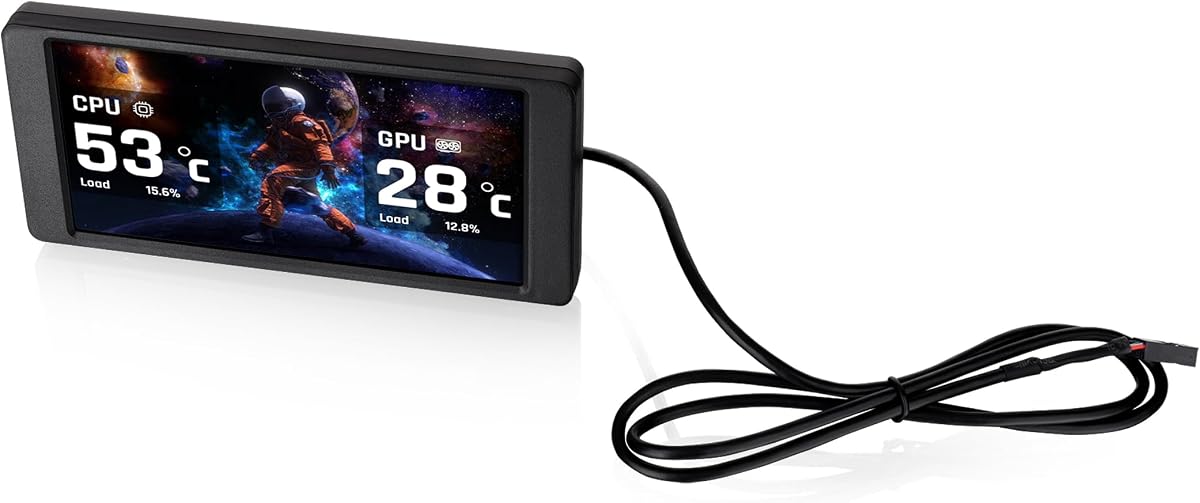
The darkFlash V92 offers exceptional value for budget-conscious builders wanting a dedicated PC case LCD screen. Rated 4.1 stars, it provides a large 9.2-inch display with an ultra-wide resolution ideal for data widgets. Its affordability does not compromise visual clarity, making it a top contender for entry-level builds.
We may earn a commission when you buy through this link, at no additional cost to you.
This panel uses an IPS sensor for bright, sharp images with wide viewing angles. The free Station Space software supports various widgets like weather and stats without needing paid tools. It connects via USB-C or a 9-pin motherboard header, freeing up GPU ports for other tasks.
However, the software only supports Windows 10 and 11, excluding macOS or Linux users. Additionally, you must check case clearance before purchase to ensure the slim body fits. These limitations are minor given the low cost and robust feature set for most desktop users.
For those seeking a cost-effective sensor panel with good resolution, the V92 is a smart choice. It balances price and performance well, delivering a clean look and reliable monitoring. It suits users prioritizing value without sacrificing essential display quality.
Station Space provides essential monitoring and theme capabilities without extra fees, simplifying the setup process for most users.
Support for both USB-C and internal headers ensures compatibility with a wide range of modern motherboards and setups.
We may earn a commission when you buy through this link, at no additional cost to you.
The WOWNOVA 8 Inch LCD screen earns a 4.5-star rating for its premium features and user-friendly design. It stands out with a desktop mode that allows it to function as an extended screen. This flexibility makes it highly versatile for multitasking while monitoring system stats simultaneously.
We may earn a commission when you buy through this link, at no additional cost to you.
Its setup process is streamlined with a single cable connection via USB-C or 9-pin header. The included software supports dynamic video themes and custom layouts, allowing creative control over the display content. Users can enjoy vivid visuals thanks to the bright IPS panel with excellent color reproduction.
While the model comes in white, which may not suit all case colors, the aesthetic impact is minimal compared to its functionality. The reliance on specific software for full features might be a slight hurdle, but it ensures stable performance. These trade-offs are acceptable for the added utility.
Best for users wanting a secondary display and sensor panel combo, the WOWNOVA delivers premium value. Its ease of use and extended functionality make it a standout choice. If you prioritize versatility and visual quality, this screen is highly recommended.
The ability to switch to desktop mode allows for true multitasking, turning the PC screen into a useful secondary workspace.
Support for custom dynamic videos and layouts lets you personalize the experience to match your unique style and preferences.
We may earn a commission when you buy through this link, at no additional cost to you.
The wisecoco 12.6 Inch LCD screen offers an expansive viewing area ideal for showcasing detailed system data or media. Rated 4.2 stars, it features a wide bar design with built-in speakers for audio output. This combination enhances the multimedia experience without needing external peripherals.
We may earn a commission when you buy through this link, at no additional cost to you.
Designed specifically for the Hyte Y60 case, it mounts perfectly using included hardware. The HDMI connection allows it to serve as a true secondary monitor, displaying any input source. Its high resolution ensures crisp text and clear visuals, making it easy to read stats from a distance.
While its compatibility is tailored to a specific case model, this design ensures a clean and professional fit. The requirement for an HDMI source may limit standalone use without a GPU port or capture card. However, for Y60 owners, these constraints are easily manageable and worth the seamless integration.
If you own a Hyte Y60 and want a large, integrated display with audio, this is the top choice. It transforms the build into a media center with ease. Its focus on size and integration makes it a unique option for specific setups.
Built-in speakers provide direct audio output, simplifying cable management and reducing the need for external speakers.
The design aligns perfectly with the Hyte Y60 panel, ensuring a factory-installed look without bulky modifications.
We may earn a commission when you buy through this link, at no additional cost to you.
The Hosyond 8.8 Inch Touchscreen brings interactive control to your PC case display. Rated 4.0 stars, it supports touch input for navigating menus or changing themes. This feature adds a layer of usability not found in standard sensor panels, appealing to users who prefer direct interaction.
We may earn a commission when you buy through this link, at no additional cost to you.
Its plug-and-play design via HDMI simplifies installation, with drivers available for most systems. It works well with AIDA64 for real-time monitoring and supports various OS options including Linux and Windows. The IPS panel provides decent color accuracy for viewing stats and custom graphics.
Driver installation might require a few extra steps compared to fully driverless models. Additionally, brightness levels are moderate compared to premium displays. These minor issues are acceptable given the touch functionality and broad compatibility. It balances interactivity with affordability effectively.
For users wanting a touch-enabled secondary display for a PC case, this model is ideal. It combines versatility with a simple setup process. If touch interaction is a priority, this screen delivers solid performance at a reasonable cost.
The capacitive touchscreen allows intuitive navigation, making it easy to adjust settings without needing a mouse.
Compatibility with Windows, Linux, and single-board computers ensures flexibility for diverse hardware configurations.
We may earn a commission when you buy through this link, at no additional cost to you.
The Thermalright Trofeo Vision LCD offers a sleek and compact solution for PC case displays. With a 4.3-star rating, it features a 9.16-inch screen with high resolution for clear text and graphics. Its slim profile ensures it fits into tight spaces without obstructing airflow or aesthetics.
We may earn a commission when you buy through this link, at no additional cost to you.
Setup is simplified with a USB-C connection that supports plug-and-play functionality. The TRCC software provides preset themes and tools for custom interfaces, allowing users to design unique layouts. It effectively tracks key hardware metrics like temps and fan speeds in real time.
The mounting bracket may be basic compared to more adjustable options, limiting placement versatility slightly. The software interface, while functional, might require some time to master fully. These limitations are minor given the overall quality and performance offered at this price point.
For those seeking a clean and efficient display option, the Trofeo Vision is a strong choice. It balances functionality with a modern look. If you value simplicity and style, this screen meets practical needs effectively.
USB-C connectivity ensures quick installation without complex cabling, making it accessible for users of all experience levels.
TRCC software empowers users to craft unique interfaces, enhancing the visual appeal of system monitoring.
We may earn a commission when you buy through this link, at no additional cost to you.
The Thermaltake 6.0 Inch LCD Screen Kit offers a compact display tailored for specific chassis models. Rated 3.8 stars, it provides a clean way to show off system stats without bulky hardware. Its small footprint makes it suitable for smaller builds where space is limited.
We may earn a commission when you buy through this link, at no additional cost to you.
This kit includes TTRGBPlus 3.0 support for seamless lighting control and real-time monitoring. Users can upload custom backgrounds in various formats to personalize the look. The connection via Type-C to 9-pin header ensures stable power and data transfer without needing extra USB ports.
Compatibility is limited to View 370 and View 390 series cases, restricting broader use. The resolution is lower compared to larger panels, which may affect text clarity. Despite these constraints, it remains a solid choice for owners of compatible Thermaltake models.
If you own a View series case and want an integrated display, this kit is convenient. It aligns well with the chassis design and offers practical monitoring features. Its focused compatibility ensures a polished and cohesive aesthetic for supported systems.
TTRGBPlus 3.0 ensures lighting and display data remain coordinated, creating a unified visual experience.
Support for various image formats allows easy personalization of backgrounds to match build themes.
We may earn a commission when you buy through this link, at no additional cost to you.
The GeeekPi 12.6 Inch IPS LCD Touch Screen brings high resolution and touch capability to PC builds. Rated 4.0 stars, it features a 10-point multi-touch system and dual speakers for audio. Its large size allows for detailed visuals and easy interaction with displayed content.
We may earn a commission when you buy through this link, at no additional cost to you.
Designed specifically for the Hyte Y60, it fits perfectly and simplifies installation with included hardware. The plug-and-play nature reduces setup time, supporting Windows and macOS systems. It functions well as a secondary monitor for media or system stats with vibrant color output.
MacOS users may need to adjust settings for touch features, which could be a minor hurdle. The specific case compatibility limits use outside the Y60 chassis. However, for Y60 owners, these factors are manageable given the rich feature set and seamless fit.
Ideal for Y60 owners seeking an interactive display with audio, this model delivers excellent performance. Its large screen and touch support provide unique versatility. If you want a premium experience with tactile input, this screen is a strong contender.
Up to 10-point touch enables smooth multi-finger gestures, enhancing usability and responsiveness.
Dual built-in speakers deliver clear sound, eliminating the need for external speakers in compact setups.
We may earn a commission when you buy through this link, at no additional cost to you.
The Thermalright TV 9.16 LCD offers an innovative magnetic installation system for PC displays. Rated 4.3 stars, it allows quick attachment and removal without screws. This feature is particularly useful for users who frequently access internal components for upgrades or maintenance.
We may earn a commission when you buy through this link, at no additional cost to you.
The 9.16-inch screen delivers sharp visuals with a high resolution IPS panel. TRCC software supports dynamic themes and real-time system monitoring. The USB-C power connection ensures stable operation while keeping cabling minimal and organized within the case.
Magnetic strength may vary depending on case material, requiring testing before permanent placement. Software configuration is necessary to enable monitoring features. These points are minor trade-offs for the convenience of a tool-free design. It offers practical flexibility for modders and enthusiasts.
For users valuing easy maintenance and quick swaps, this screen is highly practical. Its magnetic design simplifies case access while maintaining visual appeal. If you want hassle-free installation with solid performance, this model is well worth considering.
The magnetic suction design eliminates the need for screws, saving time during installation and removal.
High resolution IPS technology ensures vibrant colors and sharp text for clear viewing of stats and graphics.
We may earn a commission when you buy through this link, at no additional cost to you.
The Thermalrlght Trofeo Vision LCD 6.86-inch model provides an affordable compact display option for PC builds. Rated 3.4 stars, it uses magnetic mounting for flexible placement on coolers or case panels. Its smaller size makes it suitable for builds with limited space.
We may earn a commission when you buy through this link, at no additional cost to you.
TRCC software supports dynamic and static themes, allowing basic customization for personalization. The USB-C connection ensures stable power and data transfer without complex wiring. It serves well for showing essential stats like temperature and fan speed clearly.
The resolution is lower than larger models, which may limit text detail. Brightness is moderate and may not stand out in brightly lit rooms. These factors are acceptable given the low cost and ease of installation for basic monitoring needs.
For budget users wanting a simple and flexible display, this screen is functional. It offers essential monitoring features without breaking the bank. If you prioritize value and compact size, this model is a practical entry-level choice.
Priced competitively, it delivers essential monitoring and customization without expensive premium features.
Magnetic panel screen allows attachment to various surfaces, offering versatile installation options for different build styles.
We may earn a commission when you buy through this link, at no additional cost to you.
Selecting the right LCD screen for your PC case depends on specific needs and constraints. This guide outlines key factors to consider to ensure optimal functionality and aesthetic fit.
Choose a screen size that fits your case interior or panel space. Higher resolutions ensure crisp text and clear visuals for stats. Balance physical dimensions with pixel density for readability.
Opt for sizes between 6 to 12 inches based on available space and clarity preferences.
Identify available ports like USB-C, USB-A, or 9-pin headers. HDMI support allows use as a true secondary display. Ensure power compatibility with your system.
Verify connection options match your motherboard capabilities to avoid installation issues.
Check if the software works with your operating system. Some tools require Windows only. Ensure customization options meet your needs.
Review software requirements to confirm support for desired OS and features.
Consider whether mounting is fixed or adjustable. Magnetic or screw-based options affect stability and placement. Look for brackets that suit your case panels.
Choose mounting styles that provide secure attachment without obstructing components.
Ensure the screen fits your specific case model. Some are designed for specific chassis. Check clearance and panel dimensions.
Verify case specifications to ensure physical fit and aesthetic alignment.
Set a budget based on desired features like touch or ARGB. Higher prices often include better resolution and software. Balance cost with functionality.
Prioritize essential features to get the best value within your budget.
Low power consumption helps reduce overall system load. USB-powered screens are convenient. Check wattage requirements for safety.
Select energy-efficient units to maintain system stability and efficiency.
Touchscreens add interactive control for settings. Not all models support touch. Decide if input capability is necessary.
Consider touch support if you need direct interaction with the display interface.
Install the screen securely using provided brackets or magnetic mounts. Connect cables carefully to avoid damage. Power on and install necessary drivers or software for full functionality.
Customize display themes using the included software tools. Adjust brightness for comfortable viewing. Update software regularly to maintain stability and new features.
Clean the screen with a soft dry cloth to remove dust. Avoid harsh chemicals or water. Ensure vents remain clear to prevent overheating and maintain performance.
Most modern models use plug-and-play connections requiring no extra drivers. Some software for customization may need installation. Check product details for specific OS requirements.
Yes, if it supports HDMI or USB display input. Some models function independently for extended desktop use. Verify input compatibility for multitasking purposes.
Many screens are Windows-only due to software constraints. A few support macOS via generic drivers. Check compatibility lists before purchase.
Most consume under 5 watts via USB or motherboard headers. Low power requirements ensure minimal impact on system stability. Verify wattage for safety.
Many software tools support video uploads for dynamic themes. Ensure file formats match supported types. Customization adds visual appeal to builds.
Sizes range from compact to large panels. Measure interior space before buying to avoid fit issues. Compatibility varies by model and case.
Most connect via USB or headers without using GPU ports. Dedicated panels offload stats from GPU monitors. This preserves GPU resources for other tasks.
Check connections and power sources first. Reinstall software if data fails to display. Verify OS compatibility for proper function.
This guide reviewed ten top LCD screens for PC cases ranging from compact budget options to premium interactive displays. Each model offers unique features tailored to specific case types and user preferences.
Prioritize resolution, connection type, and case fit when making a decision. Software support and customization options also play a crucial role in long-term satisfaction.
Prices and availability fluctuate regularly. Always check current listings and compatibility details before purchasing to ensure the best value and fit for your build.