
TK Node Mini PC
4.5Editor score
AMD Ryzen R2314 Processor
Zorin OS Core Included
USA Assembled Support
This guide compares ten top Linux Mini Pcs for performance and efficiency to help you choose the ideal compact desktop for your specific computing needs.
Linux Mini Pcs offer powerful computing in a tiny footprint, perfect for developers and professionals seeking efficiency. These devices combine open-source flexibility with modern hardware to deliver reliable performance without the bulk of traditional towers.
We evaluated ten standout models based on processor power, memory capacity, storage options, and connectivity features. Each entry was assessed for its ability to run Linux distributions smoothly while supporting demanding workloads like virtualization and media streaming.
Every pick highlights key strengths, pros, and cons to guide your decision. Note that stock and pricing vary over time, so verify current availability before purchasing to ensure you get the best value for your budget and requirements.
4.5Editor score

4.8Editor score

4.0Editor score
The following table provides a side-by-side comparison of all ten featured models, highlighting their core specifications, display capabilities, and unique selling points for easy reference.


The ASUS NUC 14 Pro stands out as the top premium choice for Linux Mini Pcs with its powerful Intel Ultra 7 processor. It comes pre-installed with Linux Mint, ensuring a smooth experience for developers and creatives who need a secure open-source environment.
We may earn a commission when you buy through this link, at no additional cost to you.
This mini desktop delivers cutting-edge performance for AI researchers and professionals thanks to its 16 core processor and Intel Arc graphics. The 64GB DDR5 RAM ensures heavy workloads like virtualization run seamlessly without bottlenecks.
While the price is higher than entry-level models, the investment pays off in reliability and advanced features like Thunderbolt 4 and dual copper heat pipes. These elements ensure the system stays cool even during intense continuous operation.
Developers and power users seeking freedom and security should buy this model. Its scalability and advanced cooling make it ideal for coding, big data processing, and 24/7 server tasks without compromising on efficiency or performance.
The built-in AI acceleration allows for faster model training and inference tasks directly on the desktop without needing external servers.
Linux Mint provides a clutter-free, privacy-focused environment with powerful open-source tools pre-configured for programming and virtualization.
We may earn a commission when you buy through this link, at no additional cost to you.
The TK Node Mini PC is an excellent budget option that balances performance and reliability for everyday Linux users. Built and quality-checked in Texas, it offers a US-based limited warranty that provides peace of mind for long-term support.
We may earn a commission when you buy through this link, at no additional cost to you.
It features the Zorin OS Core which is an Ubuntu-based desktop perfect for transitioning from Windows. The AMD Ryzen R2314 processor handles continuous operations and virtualization tasks efficiently for home labs or small businesses.
Although the base configuration has 8GB of RAM, the dual SO-DIMM slots allow for easy expansion up to 64GB which makes it future-proof. The dual NVMe SSD slots also support up to 4TB total storage for extensive data needs.
Ideal for home offices and labs requiring reliable 24/7 performance, this mini PC fits in any desk space. Its US assembly and warranty make it a standout choice for those prioritizing support and security over raw power.
Being assembled in Texas ensures strict quality control and access to a responsive local support team for any technical issues.
Flexible memory and storage slots allow you to upgrade components as your needs grow without replacing the entire unit.
We may earn a commission when you buy through this link, at no additional cost to you.
The CyberGeek Mini PC delivers superior performance with the 11th Gen Intel i9-11900H processor making it a powerhouse for demanding tasks. It comes preloaded with Ubuntu Linux which ensures a robust and versatile computing experience right out of the box.
We may earn a commission when you buy through this link, at no additional cost to you.
With 8 cores and 16 threads this device handles multitasking and gaming effortlessly. The compact design is optimized with an advanced cooling system to maintain full frequency performance without overheating even under heavy loads.
While the cooling system is advanced the high performance does imply higher power consumption compared to lower tier options. However this trade-off is acceptable for users needing desktop-class power in a small form factor.
Developers and gaming enthusiasts looking for a compact workstation should choose this model. Its triple 4K display support and dual LAN ports make it perfect for multi-monitor setups and specialized network configurations.
The 8-core processor provides up to 50% more power than 6-core i7s for faster rendering and compilation times.
Support for three 4K displays simultaneously enables immersive visual workflows for design and video editing.
We may earn a commission when you buy through this link, at no additional cost to you.
The Beelink SER3 is a solid mid-range option known for excellent performance despite its older Ryzen 3 processor. It offers seamless multitasking and energy efficiency which are vital for long-term office use and creative work.
We may earn a commission when you buy through this link, at no additional cost to you.
With 16GB of DDR4 memory and a 500GB SSD this mini PC delivers enough power for complex design software and light gaming. The Radeon Vega 3 graphics handle 4K video playback smoothly without stuttering issues.
The main limitation is the older architecture which means it might struggle with very heavy modern workloads compared to newer models. However for everyday productivity and media streaming it remains a highly reliable choice.
Small office users needing stable dual display support should opt for this model. Its lifetime technical support and strong connectivity options like Gigabit Ethernet make it a dependable workstation for daily tasks.
The 3.5GHz max turbo frequency ensures quick response times for daily applications and efficient energy use.
A dedicated support team guarantees solutions to any issues ensuring long-term peace of mind for buyers.
We may earn a commission when you buy through this link, at no additional cost to you.
The Beelink S12 Pro features the Intel N100 processor which offers a significant performance boost over previous entry-level chips. It is perfect for office tasks NAS setups and light streaming due to its efficient 6W TDP design.
We may earn a commission when you buy through this link, at no additional cost to you.
Featuring 16GB RAM and dual HDMI ports it supports two 4K displays efficiently. The upgraded cooling system with a silent fan and heat sink ensures it runs quietly even under load without overheating.
While RAM expansion is limited to a single slot the 16GB capacity covers most light to medium workloads comfortably. The focus on low power and silence makes it ideal for quiet environments or 24/7 usage.
Home users and office workers needing a compact energy efficient desktop should buy this device. Its dual 4K support and silent operation make it a practical choice for media centers and desk setups.
The N100 processor improves multi-core performance by 25% over older models allowing smoother application handling.
WiFi 6 and BT5.2 ensure fast and stable wireless connections for all your peripheral needs.
We may earn a commission when you buy through this link, at no additional cost to you.
The KAMRUI Pinova P2 crushes rivals with its AMD Ryzen 7 3300U which is nearly 50% faster in single-core tasks. This efficiency-tuned powerhouse handles heavy multitasking and coding smoothly at just 15W TDP.
We may earn a commission when you buy through this link, at no additional cost to you.
Its integrated Radeon Graphics supports triple 4K displays at 60Hz without lag. This makes it a visual beast compared to older GPUs and allows for immersive multi-monitor work setups seamlessly.
RAM is LPDDR4X and soldered which limits future upgrades but ensures power efficiency and high speed. However expansion slots for storage are generous allowing up to 4TB of total drive capacity.
Professionals needing multiple high-resolution screens should choose this model. Its space-saving design and excellent cooling make it perfect for home offices or trading setups requiring reliable visual real estate.
The GPU pushes higher clock speeds to drive three 4K screens simultaneously for a seamless visual experience.
Fast USB-C and Gigabit LAN ensure flexible connections for peripherals and high-speed networks.
We may earn a commission when you buy through this link, at no additional cost to you.
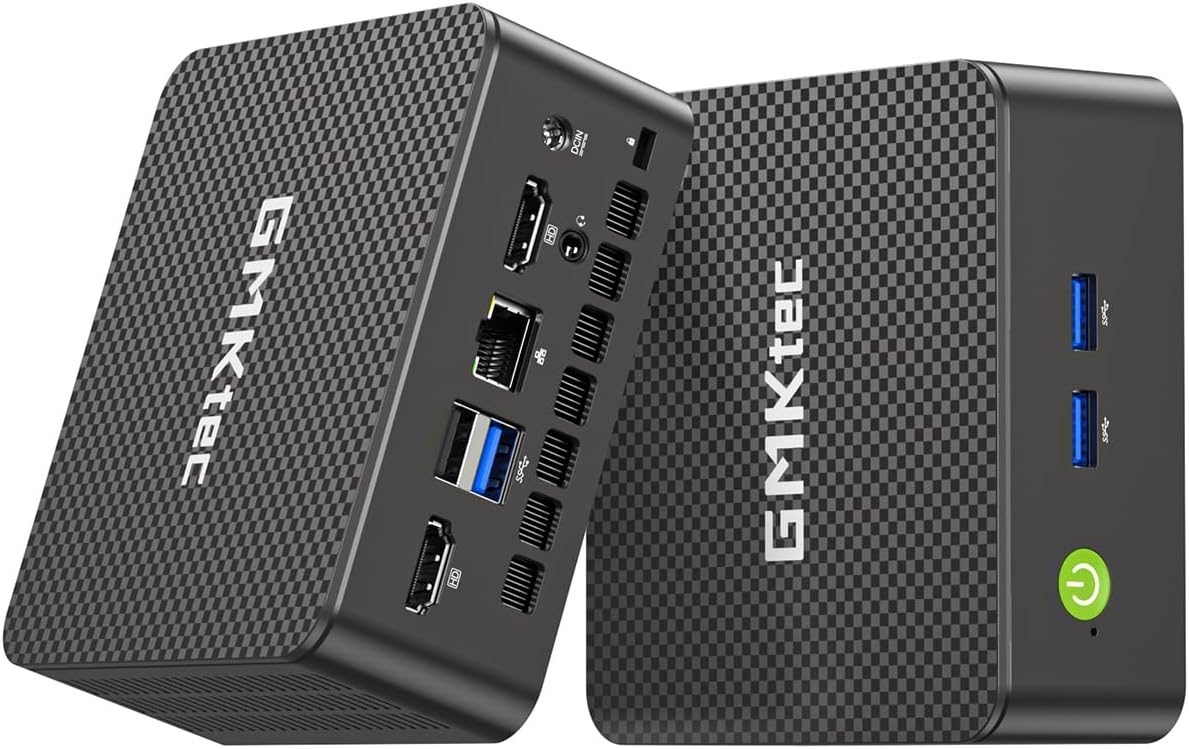
The GMKtec G11 is designed for continuous 24/7 operation in professional environments. Its AMD Ryzen Embedded R2514 processor beats older CPUs and offers impressive GPU performance for high-intensity tasks.
We may earn a commission when you buy through this link, at no additional cost to you.
With dual 2.5GbE Ethernet ports this mini PC transforms into a powerful networking hub or router. It supports triple 4K displays and WiFi 6E for faster speeds and less interference in crowded networks.
The dual-channel RAM ensures zero memory bottlenecks for the GPU delivering better frame rates and smoother video playback. This architecture choice makes it robust for CAD viewing and real-time data visualization.
Network enthusiasts and home lab users should buy this model. Its dual NIC ports and triple display support make it ideal for running virtual machines and managing secure network configurations.
Dual 2.5GbE ports allow you to create isolated networks for IoT and security cameras easily.
Multiple HDMI and USB-C outputs enable seamless multitasking for office work and trading.
We may earn a commission when you buy through this link, at no additional cost to you.
The BOSGAME E5 features a Ryzen 3 5300U processor optimized for daily workflows and stable processing. It excels at business software and network applications providing efficient performance for standard office tasks.
We may earn a commission when you buy through this link, at no additional cost to you.
Expansion is a key feature with dual SODIMM slots for RAM up to 64GB and dual M.2 slots for storage. This flexibility makes it a versatile choice for users planning to grow their system over time.
Its dual 2.5GbE LAN ports and triple 4K display support make it suitable for advanced network environments. The cooling system is optimized to keep noise levels whisper-quiet during operation.
IT enthusiasts and home server builders should buy this device. Its storage flexibility and professional networking features make it perfect for secure environments and high-speed NAS setups.
Dual RAM slots allow you to upgrade to 64GB for demanding virtualization and heavy multitasking needs.
Integrated graphics drive three 4K monitors simultaneously for side-by-side document editing and tracking.
We may earn a commission when you buy through this link, at no additional cost to you.
The BOSGAME E4 Air is a budget-friendly mini PC driven by the Ryzen 5 3500U which handles daily workloads effectively. It offers reliable power for 4K video streaming and general multitasking needs.
We may earn a commission when you buy through this link, at no additional cost to you.
Featuring triple 4K display support via HDMI DisplayPort and USB-C it provides great screen real estate for home theater or office setups. Dual RJ45 LAN ports ensure stable connections for file transfers.
Storage is limited to a 256GB SATA SSD which is slower than NVMe options. However for office documents and media storage the speed is adequate for basic computing tasks without major lag.
Students and home users needing a cheap multimedia center should opt for this model. Its 3-year customer service and low price make it a safe entry point into Linux mini PC computing.
Multiple display outputs allow immersive home theater setups and multi-window productivity for tasks.
Certifications and extended warranties ensure long-term peace of mind for everyday users.
We may earn a commission when you buy through this link, at no additional cost to you.
The GMKtec G3S offers a 12th Gen Intel N95 processor which delivers up to 36% performance improvement over previous models. It is perfect for routine tasks office work and home entertainment in a convenient size.
We may earn a commission when you buy through this link, at no additional cost to you.
Dual HDMI outputs support two 4K displays at 60Hz enabling efficient multitasking for work and streaming. The Intel UHD Graphics with AV1 decoding ensures smooth viewing of modern video content seamlessly.
While the RAM is fixed at 8GB it handles daily browsing and application use well enough. The compact design allows it to easily replace bulky traditional desktop towers for space-saving setups.
Casual users needing a compact home entertainment PC should buy this device. Its dual 4K support and reliable performance make it ideal for media streaming and office use without extra bulk.
This efficient 4-core chip improves overall speed while keeping power consumption low for quiet operation.
USB 3.2 and dual HDMI ports ensure versatile connectivity for all your peripherals and monitors.
We may earn a commission when you buy through this link, at no additional cost to you.
Choosing the right Linux Mini Pc requires balancing processing power, memory, and connectivity options to suit your specific workflow needs and budget constraints effectively.
The CPU determines how well the mini PC handles tasks like coding, virtualization, and media rendering. Look for modern AMD Ryzen or Intel Core processors for higher multi-core performance in demanding scenarios.
Prioritize newer generation CPUs with more cores and threads to ensure the system remains responsive and efficient under heavy loads.
RAM is critical for multitasking and running multiple applications simultaneously. Aim for at least 16GB of DDR4 or DDR5 RAM to handle modern workflows smoothly without slowdowns.
Check if the RAM is expandable by looking for SO-DIMM slots rather than soldered memory to allow for future upgrades.
Fast storage speeds significantly impact boot times and file access rates. NVMe SSDs are preferred over SATA SSDs for superior performance in most Linux environments and server tasks.
Ensure the unit supports multiple drive slots if you need to store large datasets or media libraries locally on the device.
Many professionals require multiple monitors for increased productivity. Verify the mini PC supports triple 4K output via HDMI, DisplayPort, and USB-C to meet your workspace needs.
Choose models with at least dual HDMI ports to ensure compatibility with various monitors and projectors easily.
Gigabit Ethernet and WiFi 6 or WiFi 6E are essential for stable high-speed network connections. Additional USB ports and Thunderbolt support allow for fast data transfers to external drives.
Consider models with dual LAN ports if you plan to use the device as a router or firewall appliance.
Pre-installed Linux distributions like Ubuntu or Zorin OS save setup time and ensure compatibility right out of the box. This is vital for users transitioning from Windows to open-source ecosystems.
Confirm that the hardware supports open-source drivers to avoid issues with graphics and networking components.
Silent and efficient cooling is crucial for 24/7 operation to prevent overheating during intensive workloads. Look for copper heat pipes and optimized airflow designs in compact chassis.
Passive or low-fan noise systems are ideal for home offices where quiet operation is a priority.
Reliable customer service ensures long-term peace of mind for your investment. Check for regional warranty options like US-based support for faster resolution of hardware issues.
Lifetime technical support is a valuable feature for troubleshooting software configuration and performance problems.
Place your Linux Mini Pc in a well-ventilated area to ensure proper airflow and prevent overheating. Use the included VESA mount to attach it securely behind a monitor for a clutter-free desk setup.
Update your operating system and drivers regularly to maintain security and performance. Utilize built-in package managers to keep your applications current and compatible with the latest Linux environments.
Manage storage by utilizing external drives or cloud services to extend capacity. Perform routine backups to prevent data loss and ensure your system remains responsive over time.
Yes, most modern Linux Mini Pcs come with Ubuntu, Zorin, or Mint pre-installed. However you can usually install other distros like Debian or Arch depending on hardware driver availability.
Entry-level models are better suited for light 1080p or 4K editing. High-performance options with Intel Ultra processors handle more demanding tasks like 3D rendering effectively.
Yes, with 16GB or more RAM these devices run virtual machines smoothly. Dual NIC models allow you to set up complex network virtualization for home labs or testing.
Yes, the compact footprint means fewer components to manage. Pre-installed systems offer familiar interfaces similar to Windows making the transition smoother for most users.
Models with SO-DIMM slots allow easy upgrades. Check the manual for compatible types and capacities. Soldered RAM models cannot be upgraded so choose based on your future needs.
Most rely on external speakers or headphones via the 3.5mm jack. For high-fidelity audio, ensure the model has USB-C audio or HDMI audio pass-through capabilities.
Our top picks highlight the ASUS NUC 14 Pro for power, the TK Node for reliability, and the CyberGeek for raw performance. Each offers distinct advantages depending on your specific workflow and budget constraints.
Prioritize RAM capacity and display support if you work with multiple monitors or heavy multitasking. Cooling and warranty options are equally important for long-term stability in professional environments.
Always verify current stock and warranty terms before purchasing. These recommendations serve as a guide but your specific needs and local availability should dictate the final choice.